Participating Frequently
April 20, 2023
Question

Crop a pasted-into shape

  • April 20, 2023
  • 3 replies
  • 915 views

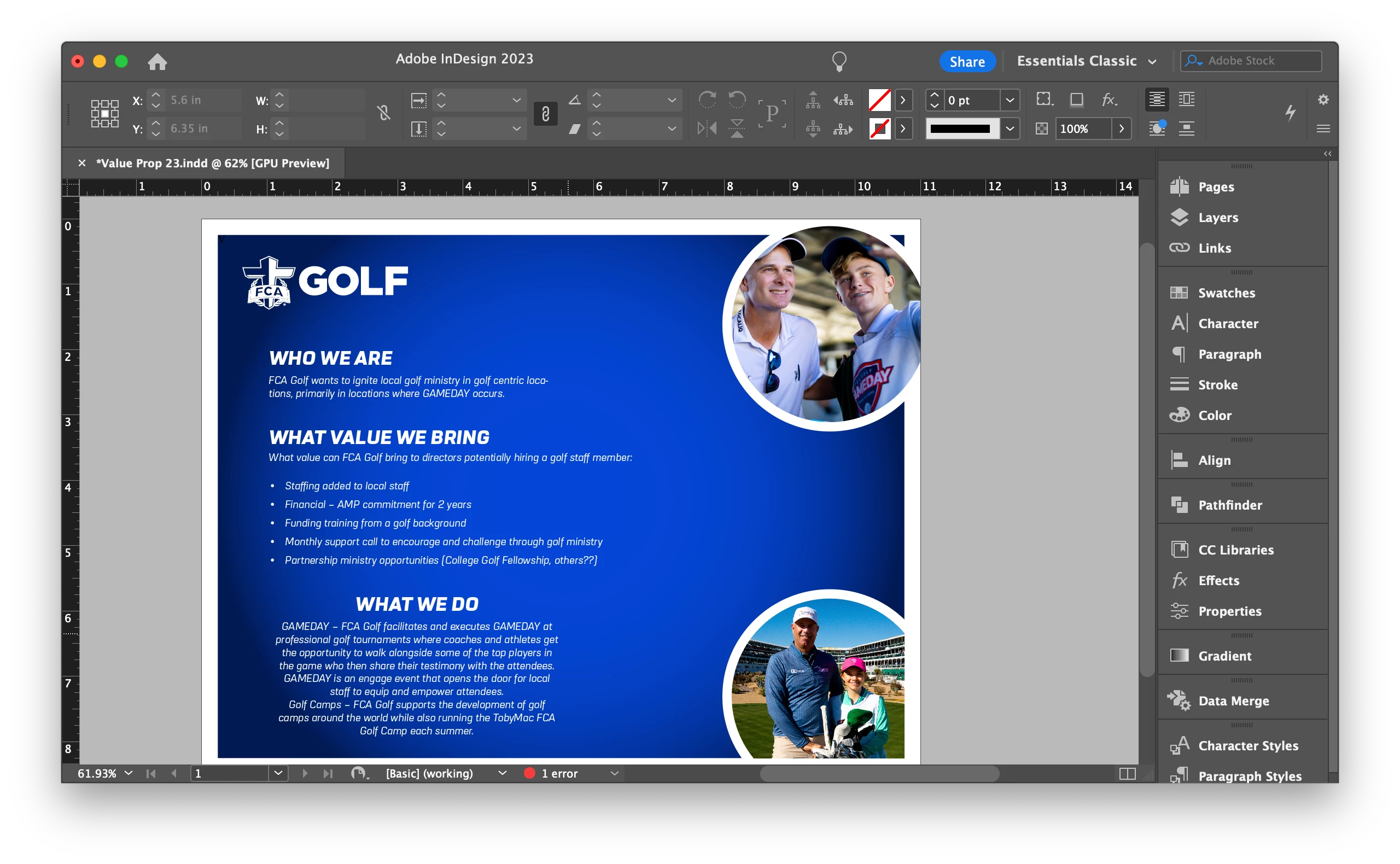
Hi. If I have an image, I can crop it easily in ID. But how can I crop a shape I have used "paste into" on with an image?


In my screenshot, the circle above I can't seem to crop the circle to the border. I did it in the bottom circle but have no idea how ha.


Thx so much.
This topic has been closed for replies.

3 replies

Peter Spier
Community Expert
Community Expert
April 25, 2023

Is it possible the white outer border is actually a separate object and the uncropped circle is above it in the stack?

John Mensinger
Community Expert
Community Expert
April 25, 2023

Some quick and dirty steps to get you there...

  1. Use the Direct-Select tool to select the circle-framed image.
  2.  Choose Edit > Cut
  3.  Draw out two rectangles as shown in red:
  4.  With the 2 rectangles still selected, choose Object > Pathfinder > Add
  5. With the combined rectangles selected, Shift+Click the circular frame to add it to the selection.
  6. Choose Object > Pathfinder > Subtract
  7.  Choose Edit > Paste Into...


Participating Frequently
April 27, 2023

TY! Got it to work!

Robert at ID-Tasker
Legend
April 20, 2023

Layers? 


Bottom circle is on a layer below the white frame / border - or it's on the same layer but under the frame. 


Participating Frequently
April 20, 2023

I used "paste into" for both.

Robert at ID-Tasker
Legend
April 20, 2023

Can you share your file - on priv? 

Or at least show us a screenshot not in preview mode - with all the edges visible.