Participant
September 14, 2017
Answered

Cross Referencing - Missing out the first part of a paragraph

  • September 14, 2017
  • 2 replies
  • 729 views

If anybody has any knowledge of this I'd really appreciate it.

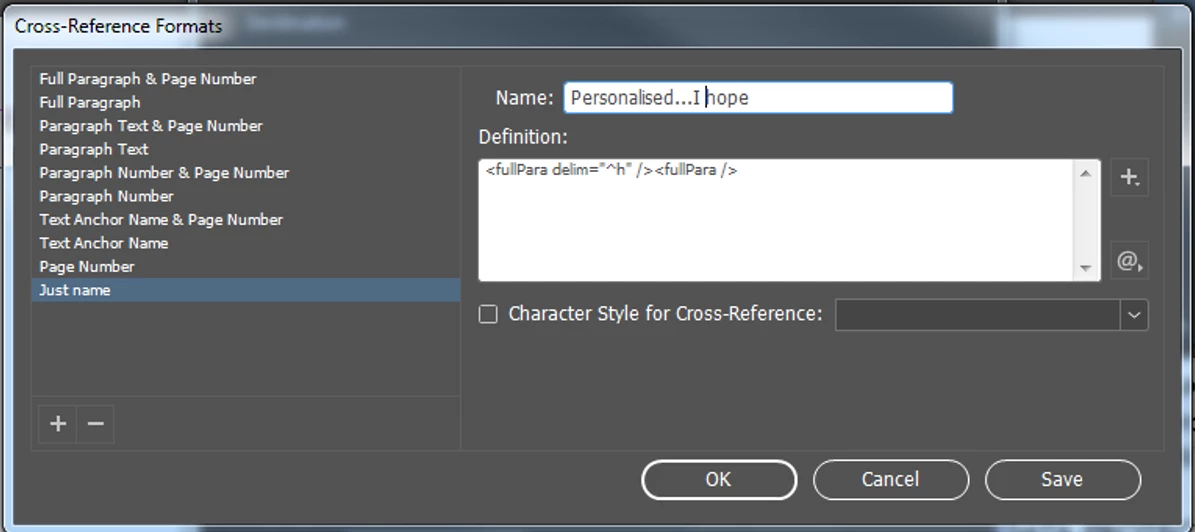
I've just finished a document on InDesign and now I'm cross referencing things from my contents page (I did it myself because I wanted paragraphs and not pages) but I'm having a nightmare cross referencing to paragraphs as all of my paragraphs are numbered references. (Pictures to show how it's laid out.)


So when I try to cross reference I end up with the full paragraph which is 1          Membership categories.

All I want on there is the actual title - Membership categories...Is there something I can type into the definition to be able to get me this? Or another way around it?

I'm tearing my hair out!

Thanks in advance!

This topic has been closed for replies.
Correct answer AnneMarie Concepcion

Are you using automatic numbered lists to do the numbers in front of the text? Or did you enter "1." and "1.1" etc. manually.

If you're using automatic numbered lists, then one of the Paragraph Text (<paraText>) types of x-ref formate will do the job. They ignore the numbering and just pick up the text. You can edit your custom Just Name format to replace "fullPara" with "paraText".

AM

2 replies

AnneMarie Concepcion
Community Expert
AnneMarie ConcepcionCommunity ExpertCorrect answer
Community Expert
September 14, 2017

Are you using automatic numbered lists to do the numbers in front of the text? Or did you enter "1." and "1.1" etc. manually.

If you're using automatic numbered lists, then one of the Paragraph Text (<paraText>) types of x-ref formate will do the job. They ignore the numbering and just pick up the text. You can edit your custom Just Name format to replace "fullPara" with "paraText".

AM

Participant
September 14, 2017

They were copied and pasted in so It was inputted as plain text.

So can I make the numbered lists do 1.1     1.1.1     1.2 etc?

I only didn't do it like that as I didn't think it would.

Barb Binder
Community Expert
Community Expert
September 14, 2017

Yes, you can backtrack and number the heads automatically.

Adobe InDesign: Numbering Chapters, Subheads, Tables & Figures - Rocky Mountain Training

~Barb at Rocky Mountain Training
vinny38
Legend
September 14, 2017

I'm really not sure I understand your problem, but isn't <paraText /> tag what you're looking for?

Participant
September 14, 2017

Sorry,

I worded it really badly.

When I put in ,paraText/> I'm still getting the number before the Title coming up (1     Membership Categories)

I'm trying to get it so that I just have the wording (Membership Categories)

Is there a way for me to get the last part of the paragraph? I managed to use the delim to just get the number but I want it the other way and lose the number.

Obi-wan Kenobi
Legend
September 14, 2017

Just that:

<paraText />^t<paraNum />

(^/)