
August 22, 2009
Question

cs4 in design page setup help cm, mm, inches change

  • August 22, 2009
  • 2 replies
  • 34645 views

hi all

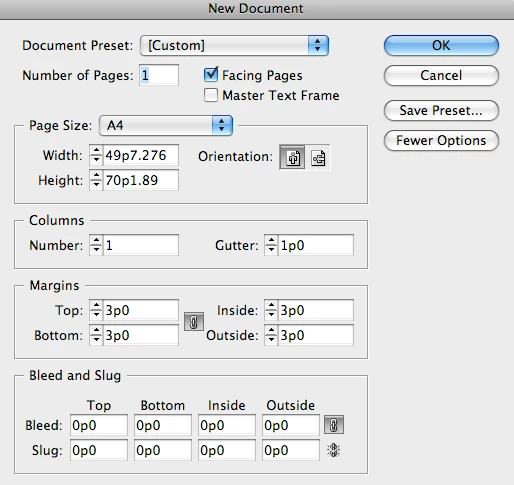
i dont know if i am being totally stupid but whaen i go to start up an new document in indesign cs4 i can sem to change my page dimension option to cm, inches or mm it comes up like  - 51p0 x 66p0 etc

can someone tell me how to change this so i can make my pages in mm, cm or inches?

thank you for your help

here is a a screen shot
    This topic has been closed for replies.

    2 replies

    Geert DD
    Participant
    August 22, 2009

    When working in a document, I found InDesign uses the units the rulers are currently set to. Since you can easily change the units (for vertical and horizontal independently) by right-clicking the rulers, this is a convenient way to switch between different units.

    Jongware
    Community Expert
    Community Expert
    August 22, 2009

    The keyboard shortcut Alt+Ctrl+Shift + U rotates through all units (on Windows; Mac users should probably press all modifier keys except Ctrl).

    BobLevine
    Community Expert
    Community Expert
    August 22, 2009

    With no files open, edit your preferences and change units to inches.

    That said, InDesign will convert units so if you type 11 in, even though the document uses picas, it will convert the inches to picas for you.

    Bob

    August 22, 2009

    ahhhh

    thank you

    Date: Sat, 22 Aug 2009 06:37:29 -0600

    From: forums@adobe.com

    To: pecchi17@hotmail.com

    Subject: cs4 in design page setup help cm, mm, inches change

    With no files open, edit your preferences and change units to inches.

    That said, InDesign will convert units so if you type 11 in, even though the document uses picas, it will convert the inches to picas for you.

    Bob

    >