CS5 JS-Apply Transparency Question
Hello,
I am having trouble applying transparency to some ovals I'm creating with a script. I've used script in the past to apply drop shadows but this seems a little different. I'm trying to apply Feathering and Glows and I just can't seem to figure this out. The current script I am running does some basic document preperation and the ovals are going to be used by the person who builds the page. If you could help me apply the inner glow, hopefully I will be able to figure out the feathering. Thanks for any help in advance.
The Inner Glow Presets:
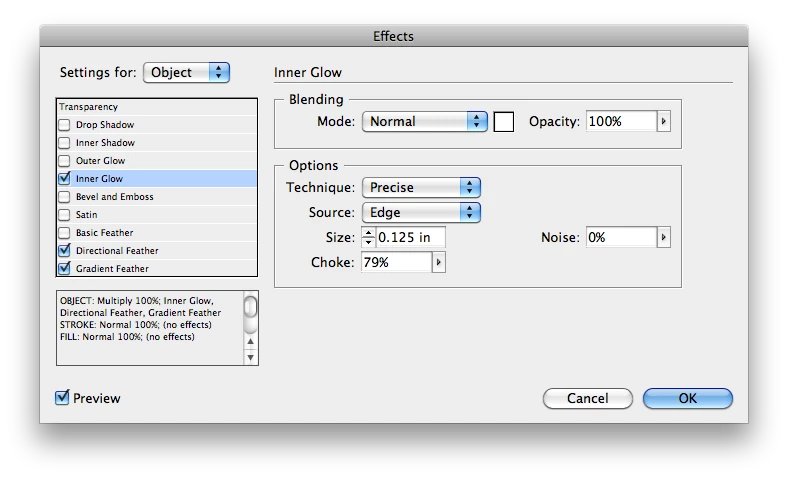
And the Script:
var myDoc = app.activeDocument;

//Set measurement units to inches
myDoc.viewPreferences.horizontalMeasurementUnits = MeasurementUnits.inches;
myDoc.viewPreferences.verticalMeasurementUnits = MeasurementUnits.inches;
myDoc.viewPreferences.rulerOrigin = RulerOrigin.pageOrigin;
//Zero out the document
myDoc.zeroPoint = [0,0]

//Unlock any of the locked layers     boolean
myDoc.layers.everyItem().locked=false

//Create layer and move it to the bottom, name New Layer, Set color to Charcoal
var myLayer = myDoc.layers.add();
myLayer = myLayer.move(LocationOptions.atEnd)
myLayer.name = "New Layer";
myLayer.layerColor = UIColors.CHARCOAL;

//Find swatches with values 0,0,0,100 and merge with Black swatch
var myColors = myDoc.colors;
var myBlack = myDoc.swatches.itemByName("Black");

for (i = myColors.length-1; i >= 0; i--) {
    var myColor = myColors;
    if (myColor.colorValue == "0,0,0,100" && myColor.name != "Black"){
        myColor.remove(myBlack);
    }
}


 // Add 25% Black swatch
    try{
myDoc.colors.item("25% Black").name;
}
catch (myError){
myDoc.colors.add({name:"25% Black", model:ColorModel.process,
colorValue:[0, 0, 0, 25]});
}

//What Pages should the ovals be put on-All Spreads
var myPage = myDoc.spreads.everyItem();


//Create the ovals and specify their size and location...
var myLeftOval = myPage.ovals.add({geometricBounds:[2, -3, 2.75, -.75], fillColor:myDoc.colors.item("25% Black"),strokeColor:myDoc.swatches.item("None"), itemLayer:myDoc.layers.item("New Layer")});

var myCenterOval = myPage.ovals.add({geometricBounds:[3, -3, 3.75, -.75], fillColor:myDoc.colors.item("25% Black"),strokeColor:myDoc.swatches.item("None"), itemLayer:myDoc.layers.item("New Layer")});

var myRightOval = myPage.ovals.add({geometricBounds:[4, -3, 4.75, -.75], fillColor:myDoc.colors.item("25% Black"),strokeColor:myDoc.swatches.item("None"), itemLayer:myDoc.layers.item("New Layer")});
Thanks again for any help with this, I am at a dead end.
Danny
 AdChoices