Inspiring
September 2, 2011
Answered

[CS5][JS] Using Import options when placing a picture

  • September 2, 2011
  • 1 reply
  • 672 views

Hi,

Does anyone know how to add import options when placing a picture?

I Would like to enable "Apply Photoshop Clippingpath".

Currently I'm using ...

myRectangle.place(myPicture);

Or is this an application setting?

Thanx

John
This topic has been closed for replies.
Correct answer Larry G. Schneider

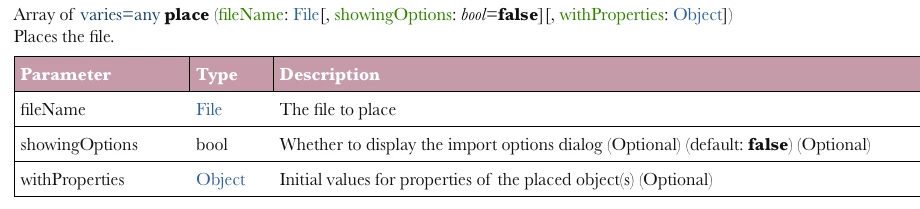
Seems as though you can call for properties of a placed file which can include the preferences of the ClippingPathSetting. This is from Jongware's excellent CS5 Object Model.

1 reply

Larry G. Schneider
Community Expert
Larry G. SchneiderCommunity ExpertCorrect answer
Community Expert
September 2, 2011

Seems as though you can call for properties of a placed file which can include the preferences of the ClippingPathSetting. This is from Jongware's excellent CS5 Object Model.

Inspiring
September 4, 2011

Hi,

Thanx for your feedback. It was very usefull.

Here is the code:

myRectangle.place(myPicture);

var myGraphic = myRectangle.allGraphics[0];

try{

       myGraphic.clippingPath.clippingType = ClippingPathType.PHOTOSHOP_PATH;

}catch(ex){

}

Thanx

John

Inspiring
September 6, 2011

Hi,


It seems that my previous solution results in crashing of Indesign.

Adding this to the beginning of the script instead of my previous solution does the trick:

                app.pdfPlacePreferences.pdfCrop = PDFCrop.CROP_ART;
                app.epsImportPreferences.epsFrames = true;

John