

dublove
Legend
September 19, 2025
Answered

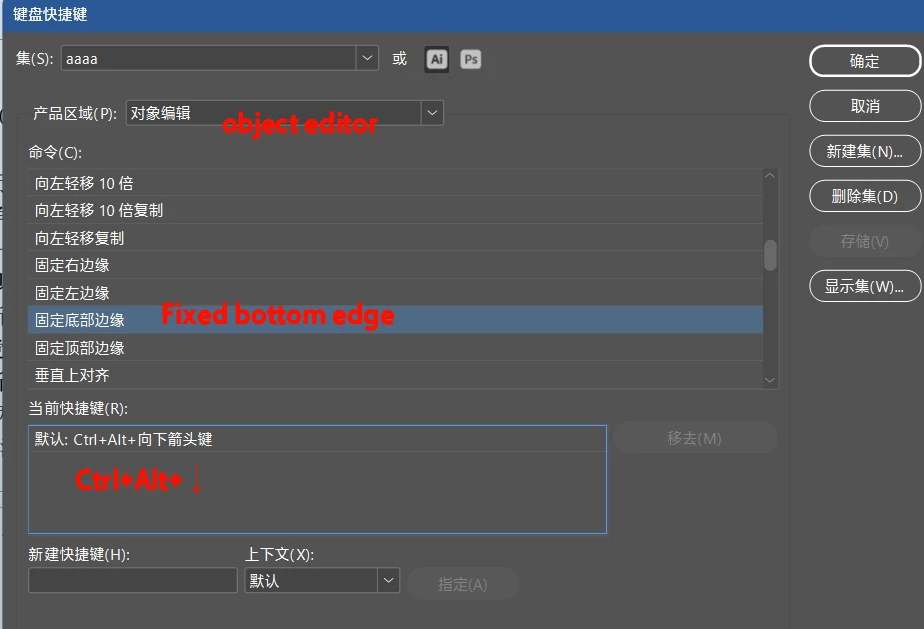
Ctrl+Alt+arrow keys: Does “Fixed to edge” mean aligning to the page margins? It doesn't respond.

  • September 19, 2025
  • 3 replies
  • 200 views

In Keyboard Shortcuts Settings > Object Editing:

Ctrl+Alt+arrow keys (↑↓←→): The system defaults to “Snap to Edge(Pin to edge?),” but pressing them yields no response.
How do I use this?
Correct answer Barb Binder

I'll add that it is highly unlikely that you (or most InDesign users) will work with the Alternate Layouts that rely on the pre-defined Liquid Layout rules, but you can read more about it here: https://helpx.adobe.com/indesign/using/alternate-layouts-liquid-layouts.html


~Barb 

3 replies

Barb Binder
Community Expert
Barb BinderCommunity ExpertCorrect answer
Community Expert
September 20, 2025

I'll add that it is highly unlikely that you (or most InDesign users) will work with the Alternate Layouts that rely on the pre-defined Liquid Layout rules, but you can read more about it here: https://helpx.adobe.com/indesign/using/alternate-layouts-liquid-layouts.html


~Barb 

~Barb at Rocky Mountain Training
dublove
dubloveAuthor
Legend
September 20, 2025

Thanks.
It's generally useless, so I won't bother researching it either.

Barb Binder
Community Expert
Community Expert
September 20, 2025

Hi @dublove:


This keyboard shortcut works in conjunction with the Page Tool when defining Liquid Layout Rules, and is the keyboard shortcut to pin a frame to the bottom margin of the page, so that when the paper size changes when you add an Alternate Layout, the frame will still be pinned to the newly-positioned bottom margin. 


~Barb

~Barb at Rocky Mountain Training
dublove
dubloveAuthor
Legend
September 20, 2025

Has no one researched this issue?