
Participant
January 25, 2023
Answered

Custom list help

  • January 25, 2023
  • 1 reply
  • 209 views

Hello all, I am trying to figure out how to make a custom list. I know you can make lists starting with letters, but I am looking to make my list go like this:

A-1.    additonal text where each line

           lines up like this.

A-2.    additonal text where each line

           lines up like this.

A-3.    additonal text where each line

           lines up like this.


Any help/advise would be greatly appreciated!! Thank you!


This topic has been closed for replies.
Correct answer Brad @ Roaring Mouse

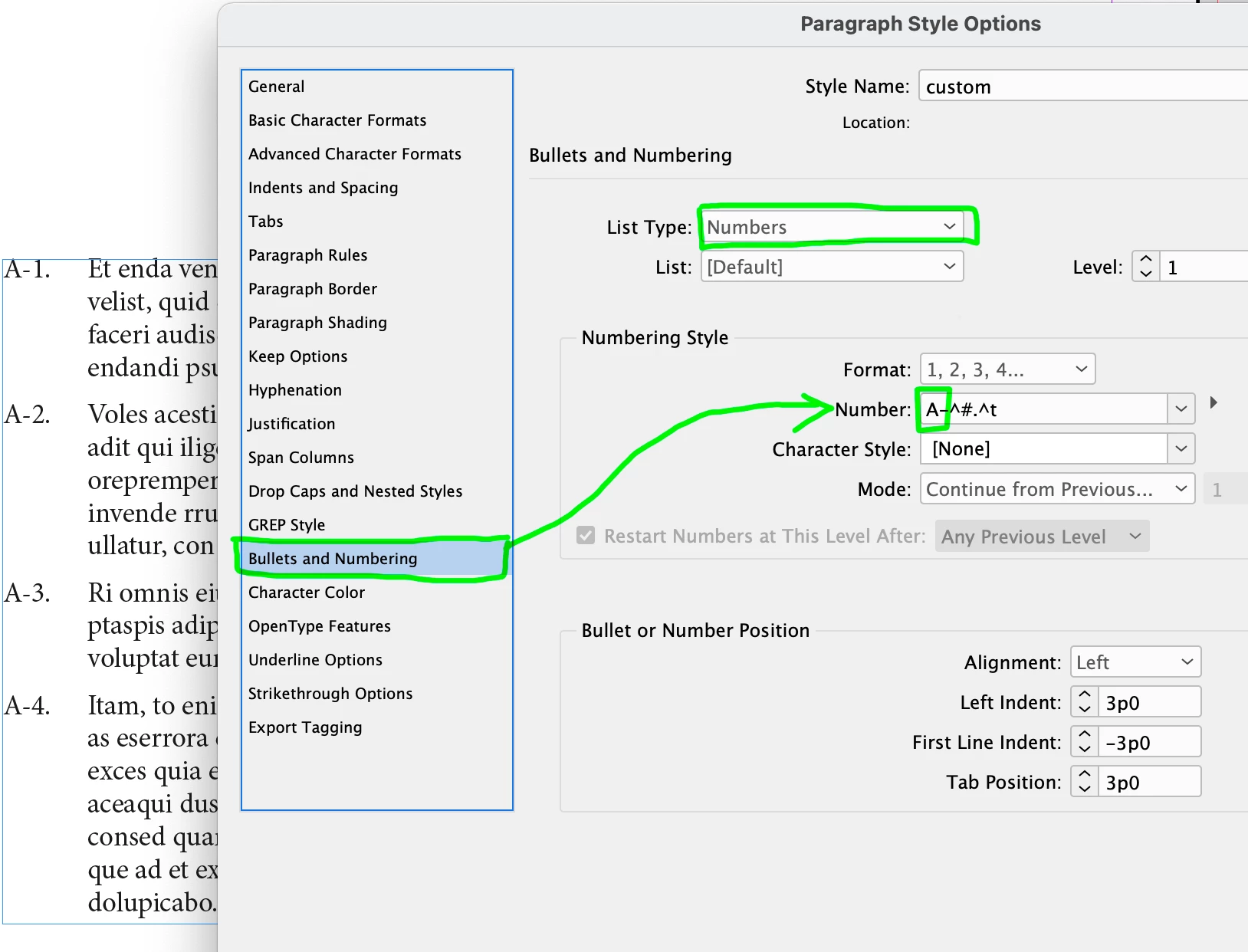
If you are talking about having the letter "A-" before every number in the list, yes, that's a simple configuration in your Paragraph Style when you set up a Numbered List. Just add the "A-" in front of the normal number configuration, like so:

 Then set up your indents accordingly

1 reply

Brad @ Roaring Mouse
Community Expert
Brad @ Roaring MouseCommunity ExpertCorrect answer
Community Expert
January 25, 2023

If you are talking about having the letter "A-" before every number in the list, yes, that's a simple configuration in your Paragraph Style when you set up a Numbered List. Just add the "A-" in front of the normal number configuration, like so:

 Then set up your indents accordingly