
Participant
January 13, 2026
Question

Custom page size panel - duplicates sizes

  • January 13, 2026
  • 4 replies
  • 188 views

Everytime i create a new document a new duplicate is appearing.

What can cause this issue in indesign (21.1) - Cache deleted, Preferences deleted. (no plugins installed).
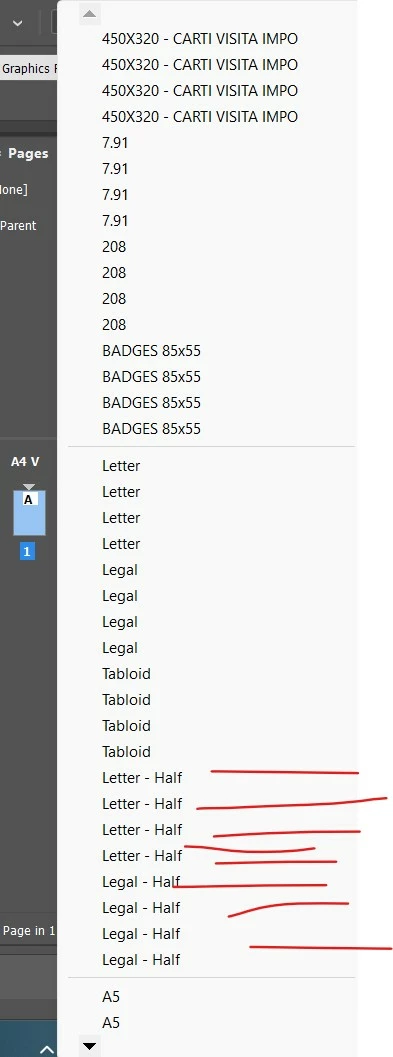
Screenshot 2026-01-13 153815.jpg

Can this be from a script or from a restricted folder (read/write)/access to folder restricted due to security?

Thank you.

4 replies

Mike Witherell
Community Expert
Community Expert
January 23, 2026

What I can't figure out so far, Gabriel, is what you are clicking on to get that flyout menu?

Mike Witherell
Participant
January 23, 2026

Dear Mike.

Pages panel/Edit page size

See below

Gabriel23717186abix_0-1769179995080.png


Peter Spier
Community Expert
Community Expert
January 13, 2026

at some time previously new page sizes were saved in a file named New Page Sizes.xml in your user profile. You might want to take a look and see if you have something similar.

Stefan Rakete
Inspiring
January 15, 2026

Pls note that Gabriel is using the "old" dialog for creating new documents not the CEP Version which was introduced in a later version of InDesign

Abhishek Rao
Community Manager
Community Manager
January 13, 2026

Hi @Gabriel23717186abix,


Thanks for reaching out. Could you please share the details the expert asked for, including the exact steps you are following and your OS version, so we can look into this properly. Just to confirm, you are seeing these duplicates in the New Document window under Page Size, right? In the meantime, please try renaming the CEP folder to CEP.old from C:\Program Files (x86)\Common Files\Adobe, then relaunch InDesign and test again. If the issue still persists, also rename the UXP folder to UXP.old from both C:\Program Files\Common Files\Adobe and C:\Program Files (x86)\Common Files\Adobe, restart InDesign, and check if the duplicate page sizes stop appearing.


Let me know how it goes.

Abhishek

January 23, 2026

Hi!

I'm facing the same problem. So far, 14 duplicates have been added for each dimension. No result even after renaming the CEP folder, didn't find the UXP folder. 
I'm using Windows 10 and InDesign V21.0.2 of Creative Cloud.

Thanks.

Maloy Chakraborty

Abhishek Rao
Community Manager
Community Manager
January 23, 2026

Hi @Studio Weaver36974659ps0w and @Gabriel23717186abix,


Thanks for sharing the detailed observations. I wanted to check in and ask if you could please update to the latest InDesign 2026 build. Version 21.2 has recently gone live as part of its phase 1 rollout, and if it is showing as available in your geography, please install it from the Creative Cloud Desktop app and test the behavior there. 

Also, I understand that preferences have already been cleared earlier. However, could you please try clearing them once more manually by following the steps shown in the video on this HelpX page and then test again: https://adobe.ly/3LQ7iaD

Please let us know how it goes after testing on 21.2 and whether manually resetting preferences makes any difference.


Looking forward to your update.

Abhishek

Mike Witherell
Community Expert
Community Expert
January 13, 2026

Hi Gabriel,

Can you describe and screenshot each step of what you are doing and also tell the OS version?

Mike Witherell
Participant
January 14, 2026

Dear Mike.
Step 1. Created new empty document and checked. (Screen1)

SC1.jpg

Step 2.

Created multiple empty documents and checked. (Screen2)

SC2.jpg

Step 3. Created one document, added a textframe and filed it with Placeholder text. Checked and it's already duplicated. (Screen 3)

SC3.jpg

After this for each new document i get a new duplicate in that menu up to 6 duplicates (did not tried to go further).

This is the same in InDesign 2026 and 2025 but not in 2024.


The duplicates in the menu are present even if InDesign is restarted. The only way to get them to disappear is to delete Cache files.


OS.

Edition Windows 11 Enterprise
Version 24H2
OS build 26100.7462

Processor AMD Ryzen 7 4700U with Radeon Graphics (2.00 GHz)
Installed RAM 16.0 GB (15.4 GB usable)
System type 64-bit operating system, x64-based processor

Gabriel23717186abix_0-1768380781797.png


@Abhishek Rao The duplicates are not present on the new document window.

Gabriel23717186abix_1-1768381235965.png

Unfortunately i can't rename or delete the mentioned folders due to not having admin rights (company policy).


@Peter Spier I checked the XML file and it's ok, nothing changed, no duplicates.


Thank you all for taking the time.