sofiepett-intility
Participating Frequently
April 12, 2019
Question

Customize style of Table of Contents

  • April 12, 2019
  • 2 replies
  • 481 views

Hi!

I have set up a custom TOC for my 100+ page document. I've added 2 levels. This is my current setup:
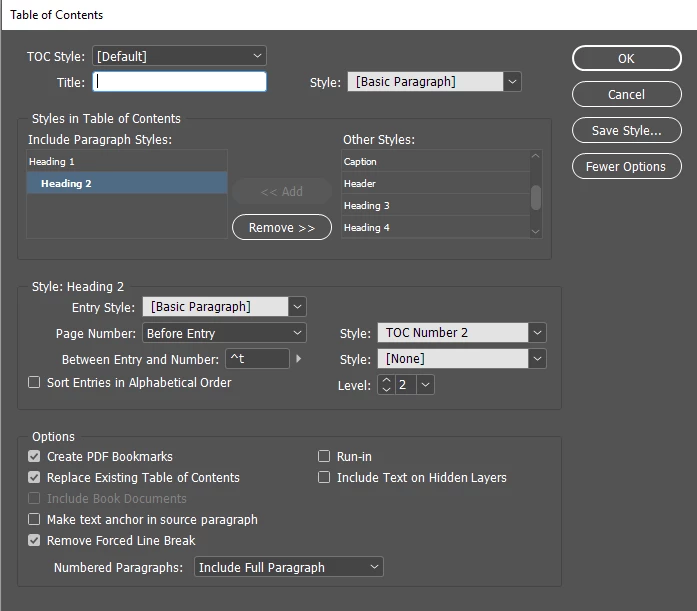
Which produces this result:

However; I would like to add some background and more styling to the entry paragraph. I would like something like this:

Here I've added a colored square behind the page number and made the entry text aligned.

I haven't figured out how to do this "the correct way" without having to do so manually. Is there any possibility to add something like a object style to the page number; or is there a other way? Any help would be greatly appreciated.

This topic has been closed for replies.

2 replies

sofiepett-intility
Participating Frequently
April 12, 2019

I have managed to fix the indenting of the breaking text.

Legend
April 12, 2019

Simple answer is "do it by hand". Several reasons:

  • Drop Caps is a paragraph style feature, but the numbers/bullets in a list are not part of the paragraph, so before anything else you'd have to flatten the numbering, which breaks the TOC.
  • Paragraph shading is not available via a character style, and you can only apply character styles to drop caps. You can fake shading the old way using a huge underline and offset, but it won't create a nice set of justified boxes.
  • Drop caps are strictly per-character and there's no grep pattern filter, so your lists would fall apart going between item 9 and 10.
FRIdNGE
April 12, 2019

Simple answer: "Just do it"!

[Para style advanced settings]

Best,

Michel, for FRIdNGE

sofiepett-intility
Participating Frequently
April 12, 2019

Hi Michel!

Could you please elaborate?