
Participating Frequently
June 17, 2020
Question

Cut and Paste Within InDesign Removes Formatting

  • June 17, 2020
  • 11 replies
  • 1395 views

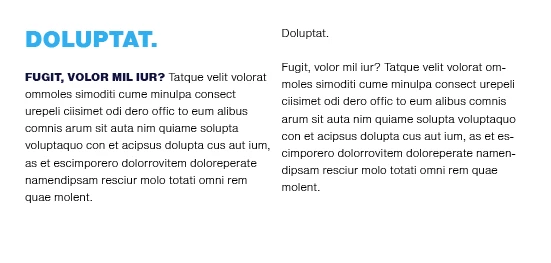
When I try to cut and paste a block of text within the same document in InDesign, it removes all of the styling. It doesn’t matter if I’m using style sheets or not. I also updated InDesign to the latest version today and it did not resolve the issue. See attached – when I select, copy and paste the left hand-column copy into the right column, all of the styling is lost.
This topic has been closed for replies.

11 replies

Derek Cross
Community Expert
Community Expert
June 17, 2020

Try Place instead.

kblvgoAuthor
Participating Frequently
June 17, 2020

Hi, I'm not actually trying to place the copy from another doc. It's just when I select the content (in this example, the whole block on the right) and paste in the left column, the stylings disappear (no bold, size shrinks down to the same size, etc.)