Participant
August 9, 2022
Answered

Dark green RGB turns blue when converted to CMYK

  • August 9, 2022
  • 3 replies
  • 2859 views

Hi!

I know the RGB to CMYK question is common and I am used to the CMYK being more desaturated then RGB counterpart (I understand the color sience behind it). But I have never experienced the color changing completely. 

(Every color except the RGB is in CoatedFogra39)

This is the original RGB (2, 50, 46)

 

Below you can see that the online convertion from RGB to CMYK made it dark blue (96, 0, 8, 80) while the bar below is the CMYK color that Adobe suggest in the color panel (92, 50, 65, 67). 

When I open the color settings for the Dark blue adobe suggests a web safe color (in CMYK mode photoshop) that looks closer to the original rgb (93, 51, 60, 65)

I didn't pick the original RGB color but I have to make it into a similar CMYK so for a brand book. Should I adjust the CMYK manually so that it works or do you guys have any suggestions on what I should do?

Maybe find a pantone first and then find a good CMYK from that? There is not enough budget for test prints unfortunately (just standard office print).

This topic has been closed for replies.
Correct answer rob day

Below you can see that the online convertion from RGB to CMYK made it dark blue (96, 0, 8, 80) while the bar below is the CMYK color that Adobe suggest in the color panel (92, 50, 65, 67).

 

Online web conversions are not accurate and should not be used—HTML coding is not capable of making color managed RGB to CMYK conversions.


When you build a 90|0|8|80 CMYK swatch in a document with Coated FOGRA39 assigned as the CMYK profile, InDesign is displaying the built color’s expected appearance when printed on an offset press profiled to FOGRA39.


When you make an RGB-to-CMYK conversion in an Adobe print app, the conversion is color managed—the resulting CMYK values depend on the source RGB profile assigned to your 2|50|46 RGB color, the CMYK destination profile you choose, and the Conversion Options you choose (Intent, and Black Point Compensation). If the RGB color is in the CMYK gamut, InDesign will attempt to preserve its appearance on the conversion, which is why the Photoshop values look closer to the original.


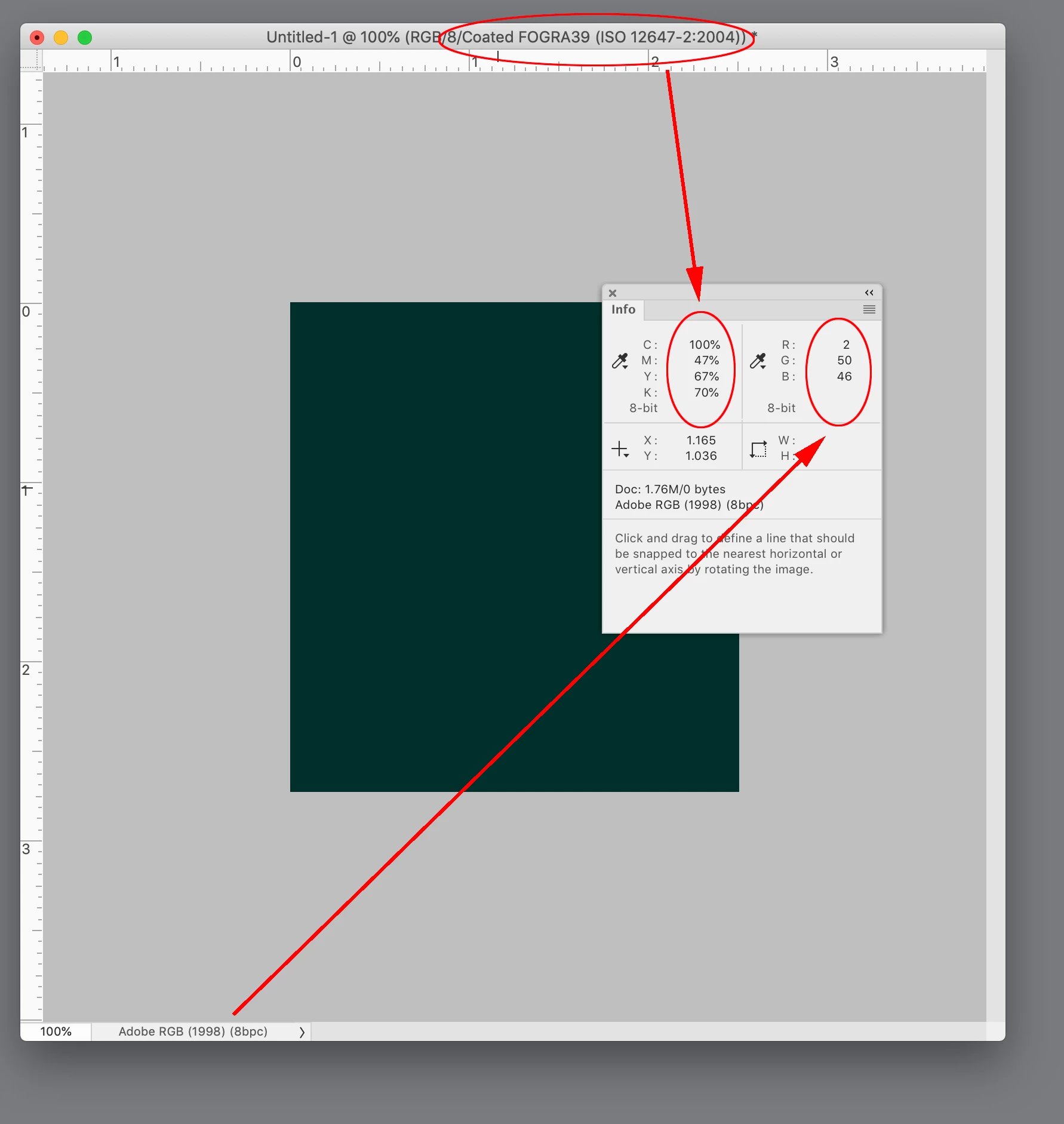
You can see how the source RGB color affects the conversion. Here 2|50|46 RGB has AdobeRGB assigned, which is a larger RGB space. The conversion to FOGRA 39 using Relative Colorimaetric as the Intent outputs as 100|47|67|70:


Maybe find a pantone first and then find a good CMYK from that?


For branding color this might help:

https://community.adobe.com/t5/indesign-discussions/branding-color-guide/td-p/10818696

3 replies

rob day
Community Expert
rob dayCommunity ExpertCorrect answer
Community Expert
August 9, 2022

Below you can see that the online convertion from RGB to CMYK made it dark blue (96, 0, 8, 80) while the bar below is the CMYK color that Adobe suggest in the color panel (92, 50, 65, 67).


Online web conversions are not accurate and should not be used—HTML coding is not capable of making color managed RGB to CMYK conversions.


When you build a 90|0|8|80 CMYK swatch in a document with Coated FOGRA39 assigned as the CMYK profile, InDesign is displaying the built color’s expected appearance when printed on an offset press profiled to FOGRA39.


When you make an RGB-to-CMYK conversion in an Adobe print app, the conversion is color managed—the resulting CMYK values depend on the source RGB profile assigned to your 2|50|46 RGB color, the CMYK destination profile you choose, and the Conversion Options you choose (Intent, and Black Point Compensation). If the RGB color is in the CMYK gamut, InDesign will attempt to preserve its appearance on the conversion, which is why the Photoshop values look closer to the original.


You can see how the source RGB color affects the conversion. Here 2|50|46 RGB has AdobeRGB assigned, which is a larger RGB space. The conversion to FOGRA 39 using Relative Colorimaetric as the Intent outputs as 100|47|67|70:


Maybe find a pantone first and then find a good CMYK from that?


For branding color this might help:

https://community.adobe.com/t5/indesign-discussions/branding-color-guide/td-p/10818696

rob day
Community Expert
Community Expert
August 9, 2022

Also, FWIW the InDesign and Photoshop Color Pickers’ values are  color managed, which explains why 90|0|8|80 entered into the Picker would not show an RGB value of 2|50|46. The Hex, RGB, HSB, and Lab values are color managed based on the document’s assigned color profiles (Edit>Assign Profiles...)


Here the Color Picker shows the RGB values for CMYK 90|0|8|80 as 0|56|75, which is the conversion from FOGRA39 to sRGB for that specific CMYK build. If I change the document profile assignments, I’ll get different conversion values.


Legend
August 9, 2022

I agree. All online converters are dangerous and useless - even Adobe's online service, which is disgraceful. 

Community Expert
August 9, 2022

Are your RGB colors (2, 50, 46) meant for sRGB?

Then I get a CMYK of (91.8, 50.23, 64.89, 67.23) with FOGRA 39 and with Adobe (ACE) color engine and priority set to relative color metric. InDesign 2022 version 17.3.0 on Windows 10.


From my German InDesign:


What do you mean by "online conversion" ?


Regards,
Uwe Laubender
( Adobe Community Professional )

Derek Cross
Community Expert
Community Expert
August 9, 2022

I can't see any colours in the sample in your post. It's usually recommended to keep images in InDesign in RGB color mode. Certain colours, such as bright green and bright orange can't be reproduced in CMYK.

There are some colour management experts who volunteer on this forum who, no doubt, will be able to help with your particular issue.

Participant
August 9, 2022

Thank you for your answer! You can't see the pictures or should I add any other information to make it clearer? I'm sticking with RGB in the inDesign document but I need to type in the CMYK codes for the brand book. 


Orginal RGB with the CMYK that Adobe suggests


After the online CMYK convertion


Derek Cross
Community Expert
Community Expert
August 9, 2022

You can mix RGB and CMYK in InDesign documents.