
rob day
Community Expert
Community Expert
September 21, 2025
Answered

Dash Plus Sixth Space GREP

  • September 21, 2025
  • 3 replies
  • 338 views

Can anyone help me with a GREP for making dashes consistent? I want all dashes to be sixth space, Em dash, sixth space:
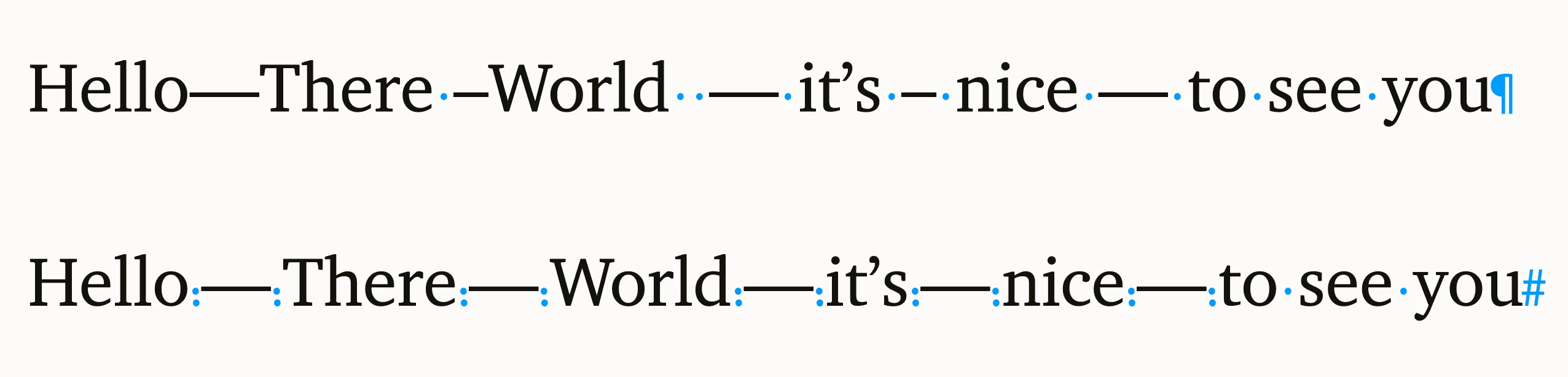

 

Correct answer FRIdNGE

Suppose it will find 2005-2025 (year ranges) or minus numbers -1 -10 etc. 


Might not be an issue. Maybe it can be tweaked further.


\h*[~=~_]+\h*


(^/)  The Jedi

3 replies

Anantha Prabu G
Legend
September 22, 2025

.

Design smarter, faster, and bolder with InDesign scripting.
Community Expert
September 22, 2025

You might try


\p{Pd}

or

\p{Dash_Punctuation}


Should catch any kind of hyphen or dash.

Community Expert
September 22, 2025

Further GREP

Find

\s*\p{Pd}+\s*

 Replace

~%~_~%
Community Expert
September 22, 2025

Suppose it will find 2005-2025 (year ranges) or minus numbers -1 -10 etc. 


Might not be an issue. Maybe it can be tweaked further.

tonks_the_auror
Community Expert
Community Expert
September 22, 2025

I think I can help.

Step 1: In your document, select the em-dash (or whatever it is you want to change). Open the Find/Change window, make sure GREP is selected, and paste what you copied into the "Find what:" field.

Step 2: Type the 6th space, Em dash, 6th space in your document, then select this and paste it into the "Change to:" field

Example: FInd/Change em-dash will look like this:

You can save GREP queries, so you can save one for each combination of dashes and spaces that you want to change.


I hope this helps. I'm not a GREP expert, but this does work.