Participant
July 8, 2019
Question

Data merge

  • July 8, 2019
  • 1 reply
  • 301 views

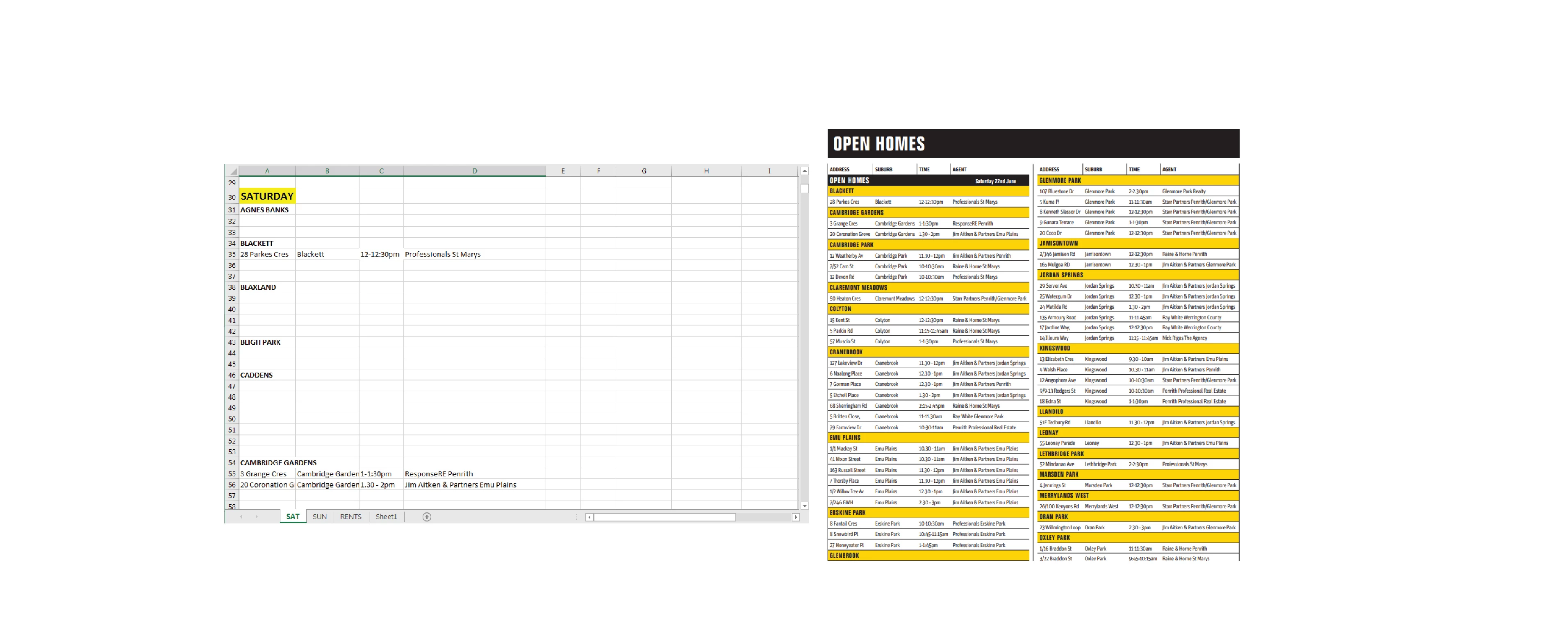
Trying to see if there's an easier way to do this... We're currently copying and pasting the data from an Excel document into a table in InDesign for a weekly property guide. If there are no properties for that suburb for that week, the cells are left blank in Excel. We're having to delete all the blanks to get the true number of rows, divide that number by the number of columns we've set up to get them as even as possible. Then we can only copy one suburb, paste into a yellow cell, then copy the listed properties for that suburb and paste them into the white cells, then repeat. Is there a way to make this process faster with data merge or any other solution? Right now it's taking about an hour to copy and paste 3 pages of this data each week.
This topic has been closed for replies.

1 reply

Colin Flashman
Community Expert
Community Expert
July 11, 2019

I would personally treat this more as an Excel problem rather than a Data Merge problem.

To remove all blank rows in the Excel file, highlight column A in your excel file and then look for the find and select button in Excel, click on the dropdown and select go to special..., and then select blanks. This will highlight all blank cells in the A column in the Excel file. From here, look for the delete button, click the dropdown next to it and click Delete Sheet Rows. This will leave only the fields with type in them. The suburbs without inspections will still require deletion.

BACK IN INDESIGN...

Convert the table to text and if the table isn't using table styles or cell styles, consider using them as it will make maintaining formatting a lot easier. To line up the tables, in the text frame option, click the balance columns button.

To keep the heading with the heading cell, go to the cell options and click the keep with next row button.

It would be great if that last feature was in the cell style options but it is not. If I can find (or write) a script that will apply that feature to particular cell styles, I will add to this post.

If the answer wasn't in my post, perhaps it might be on my blog at colecandoo!
Colin Flashman
Community Expert
Community Expert
July 11, 2019

OK, so there is a script that will look for a paragraph style, highlight the cell it is in, and then go to that cell's properties and make the cell keep with the next row. It can be found in the following thread:  Set InDesign table "Keep with next row" via a script

That said, I couldn't believe the "keep with next row" wasn't an option in Cell Styles... so if you think it should be there, please kindly tell the InDesign team here: Add a keep option in cell styles – Adobe InDesign Feedback

If the answer wasn't in my post, perhaps it might be on my blog at colecandoo!