
Inspiring
February 23, 2025
Answered

Data Merge: CSV Random Order Issue

  • February 23, 2025
  • 6 replies
  • 847 views

Why would the CSV file used in Data Merge when auto-importing images from a folder be ordered randomly?

I have a folder of images named: SEP 01.psd, SEP 02.psd, SEP 03.psd, etc. but the resulting CSV after running the script looks like this:
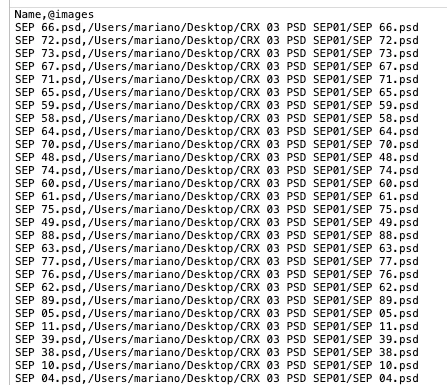
 

I know I can re-order the CSV file but I want to know why is this happening because I've used this script extensively in the past with no problems. I've tried all 3 formats of the ImageCatalog script included in InDesign, plus a custom version I always use, and they all yield the same unordered results.

Correct answer Mariano–

Thanks to Robert at ID-Tasker mentioning NTFS and file creation order, I've found the source of the problem: it's a file naming and disk format combination issue, not an InDesign or script-related problem


Robert's comment made me take a closer look into disk formats and the files themselves, as everything else seemed right. So I've discovered that even though the files are numbered sequentially in ascending order, they come up arranged by modification date on the resulting CSV. I copied the files from the external PC-formatted drive they originally reside into a new folder on my Mac, renamed all files sequentially again –making sure they are ordered by name and not by creation or modification date– and they are being imported correctly in numbered sequence now.


6 replies

Legend
February 26, 2025

APFS changed the order of files delivered by the operating system.

Sort the result if you depend on a specific order.


https://developer.apple.com/library/archive/documentation/FileManagement/Conceptual/APFS_Guide/FAQ/FAQ.html

  • Calling readdir(2) on a directory in APFS returns filenames in hash order, whereas HFS+ returns filenames in lexicographical order.


Mariano–AuthorCorrect answer
Inspiring
February 25, 2025

Thanks to Robert at ID-Tasker mentioning NTFS and file creation order, I've found the source of the problem: it's a file naming and disk format combination issue, not an InDesign or script-related problem


Robert's comment made me take a closer look into disk formats and the files themselves, as everything else seemed right. So I've discovered that even though the files are numbered sequentially in ascending order, they come up arranged by modification date on the resulting CSV. I copied the files from the external PC-formatted drive they originally reside into a new folder on my Mac, renamed all files sequentially again –making sure they are ordered by name and not by creation or modification date– and they are being imported correctly in numbered sequence now.


Robert at ID-Tasker
Legend
February 25, 2025

@Mariano– 


Always happy to help 🙂


But this could be corrected in the script - by forcing sort order, either when files as accessed - in ImageCatalog script - or the whole list can be sorted before being saved as CSV file.


m1b
Community Expert
Community Expert
February 26, 2025

Robert is right, this is something that should be fixed in the code. Something like this:


var files = myFolder.getFiles();

files.sort(function(a, b) {
    return a.name.toLowerCase().localeCompare(b.name.toLowerCase());
});
m1b
Community Expert
Community Expert
February 25, 2025

Hi @Mariano– can you post the script that generates the CSV file? I suspect it would be easy to fix it.

- Mark

Inspiring
February 24, 2025

Thank you for your replies. The script I'm referring to is called ImageCatalog, it's included in the Mac version of InDesign and it comes in AppleScript, JavaScript and UXPScript formats.


I've just tried a similar script from Ozalto linked above by Colin (Folder2CSV) and the non-sequential order still persists. Since all formats are failing, I'm going to look into the image files themselves. Perhaps there's a file related property generating this error.

Robert at ID-Tasker
Legend
February 24, 2025

@Mariano–


ImageCatalog just place files - it doesn't create a CSV file? 


Inspiring
February 24, 2025

That's true, the CSV is created by a custom script akin to the one offered by Ozalto. But when using ImageCatalog the images are being placed in the same wrong order as they appear on the CSV file.

Colin Flashman
Community Expert
Community Expert
February 24, 2025

Guess you're using a mac. What version of the OS is running? Guessing you've run this script before with the list in the correct order - do you recall when the last time the script ran correctly?

I don't think the script is creating the list randomly, but just in a different order (possibly date made or file size, I can't tell from here).

When I have a look at the imagecatalog.jsx script in a text editor, I can see that line 59 is the mac file filter. It is literally building an array (a list of stuff) but there isn't an instruction as to how to sort that stuff, so the script may be using whatever sort order is currently active in your finder.

Perhaps try an alternative script, such as the two image folder to data merge scripts from Ozalto's website http://www.ozalto.com/en/solutions-en/downloads/

If the answer wasn't in my post, perhaps it might be on my blog at colecandoo!
Robert at ID-Tasker
Legend
February 24, 2025

How do you produce this CSV file? What is "this script"? 


brian_p_dts
Community Expert
Community Expert
February 24, 2025

Think they are talking about the image catalog script. 

Robert at ID-Tasker
Legend
February 24, 2025
quote

Think they are talking about the image catalog script. 


By @brian_p_dts


I just checked - just in case 😉 - but I don't see anywere in the ImageCatalog script option to export CSV file?