


Participant
November 17, 2011
Answered

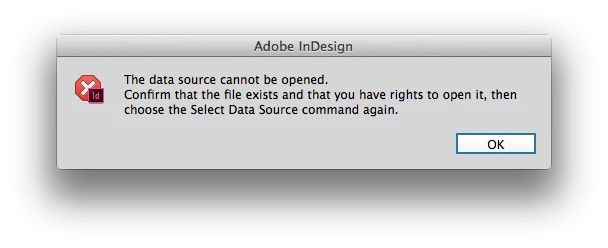
Data Merge error message

  • November 17, 2011
  • 3 replies
  • 40219 views

I keep receiving this message when selecting Data Source in InDesign: "The data source cannot be opened. Confirm that the file exists and that you have rights to open it, then choose the Select Data Source command again." I saved my excel file as a .csv file. What else needs to be done or isn't being done right?

Correct answer Colin Flashman

The answer was in the first reply to the post on this thread - this message (i've attached it below)

Can occur when the txt/csv file being opened is currently open somewhere else. Typically this is when it is still open in software such as Microsoft Excel. Close the software that may have that file open and try importing the data again.

3 replies

Participant
September 1, 2024

Just close the file-Excel file that you need to import the data from, before importing the data, and it will work.

Participant
October 2, 2024

I'm still having a similar issue. Even when Excel is not open anymore I get the same error. Any other fixes?

Community Manager
October 2, 2024

Hi, Sorry for the trouble. Please try the steps suggested in this link and share the outcome.


^VS

Participant
October 1, 2015

I am also getting this exact same problem, were you able to find a way to fix it?

Colin Flashman
Community Expert
Colin FlashmanCommunity ExpertCorrect answer
Community Expert
October 3, 2015

The answer was in the first reply to the post on this thread - this message (i've attached it below)

Can occur when the txt/csv file being opened is currently open somewhere else. Typically this is when it is still open in software such as Microsoft Excel. Close the software that may have that file open and try importing the data again.

If the answer wasn't in my post, perhaps it might be on my blog at colecandoo!
Participant
February 15, 2016

So the error message should simple say "confirm the document is not open in another application" instead of this message. Typical Adobe -- no one is paying attention to details.

Peter Spier
Community Expert
Community Expert
November 17, 2011

make sure you've also closed it in Excel.

KPintaAuthor
Participant
November 17, 2011
Please download the attached file to view this post
Peter Spier
Community Expert
Community Expert
November 17, 2011

The text file would be more useful, but that looks OK...