3 replies

Participant
November 2, 2025

How can i fit it


Colin Flashman
Community Expert
Community Expert
May 28, 2025

I've written a data merge troubleshooting guide for CreativePro that can be found here:

https://creativepro.com/troubleshooting-data-merge-errors/

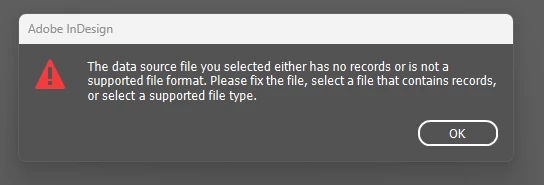
For this specific error, usually is for one of two reasons:

  • When attempting to import an Excel file as a data source rather than the CSV or TXT file that needs to be exported first. It often happens because the suffix of the file may be TXT or CSV, but during the saving process was still saved as an Excel file – with the file extension being changed manually instead of using the format dropdown in the save dialog box.
  • When attempting to import a text file that is either completely blank; or has text on the first line only.
If the answer wasn't in my post, perhaps it might be on my blog at colecandoo!
Abhishek Rao
Community Manager
Community Manager
May 28, 2025

Hi @Touchpagorn32476307o7a7,


Thanks for sharing the details! That error usually happens when InDesign can't properly read the CSV data source, either because the file is empty, the format isn't quite right, or sometimes if it's still open in another program. Since you've confirmed it’s not open elsewhere,please try the below steps:

Make sure your CSV file is correctly formatted with a header row containing the column names and at least one data record below it. Also, check that the file is saved with UTF 8 encoding.

Try opening the CSV in a plain text editor like Notepad or TextEdit to confirm there are actual records and no hidden formatting or special characters causing issues. If possible, export a fresh copy of the CSV from your spreadsheet app as a standard CSV.

Then, close InDesign completely and reopen it before linking the data source again.

If the issue still continues, please share your InDesign version, operating system, and a screenshot of your data merge panel. Also, try importing the CSV into a new InDesign document or recreate the CSV file to see if that helps. 


Looking forward to your update!

Abhishek