
Participant
November 24, 2022
Answered

Data Merge greek texts UTF-8 and UTF-16

  • November 24, 2022
  • 3 replies
  • 605 views

Hello,


I have an excel with greek and swedish texts like this

TitleGR

TitleSE

Κουκουβάγια σε βράχο με ανοιχτά φτερά και πρόσωπο αριστερά 6εκ

Uggla på en sten med öppna vingar och ansikte vänster 6cm ruta 60

Κουκουβάγια σε βράχο με πρόσωπο πίσω αριστερά 6εκ

Uggla på en sten med ansikte bak vänster 6cm box 60


I tried to make csv UTF-8 and UTF-16.

If i make it to utf-8 all the texts on csv are perfect if i save with utf-16 all the texts change to symbols.

So, i tried to use the csv utf-8 on indesign but the greek texts are coming up like shapes.


Can anyone help me ?

Thanks a lot

Stefanos
This topic has been closed for replies.
Correct answer Joel Cherney

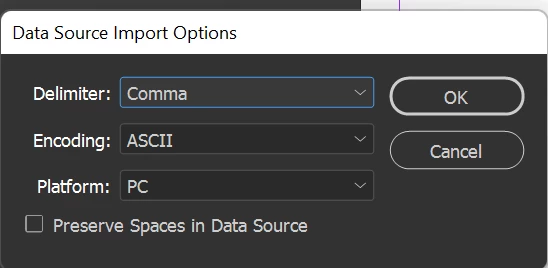
When you first select your csv, make sure you check the "Import options" box in your Select Data Source dialog. Then you'll see this window:

InDesign won't pick Unicode (or ASCII, or Shift_JIS, those being the three encodings supported by Data Merge) based on the encoding of your file, you have to do it manually. Note that you can also change the delimiter from Comma to Tab or Semicolon, which might be useful depending on how you're generating your .csv or .txt or etc. 

3 replies

Joel Cherney
Community Expert
Joel CherneyCommunity ExpertCorrect answer
Community Expert
November 26, 2022

When you first select your csv, make sure you check the "Import options" box in your Select Data Source dialog. Then you'll see this window:

InDesign won't pick Unicode (or ASCII, or Shift_JIS, those being the three encodings supported by Data Merge) based on the encoding of your file, you have to do it manually. Note that you can also change the delimiter from Comma to Tab or Semicolon, which might be useful depending on how you're generating your .csv or .txt or etc. 

Community Expert
November 26, 2022

Based on my experiences in the past, saving the file with UTF-16 BE encoding does the trick. So you can try that as well. Let us know what works.

Another issue could be a missing glyph in the font that you are using, check that as well.

-Manan

-Manan
Community Expert
November 26, 2022

Save as unicode text instead.

.txt file will be fine for datamerge.