Participant
August 9, 2023
Question

DATA MERGE INDESIGN-EXCEL

  • August 9, 2023
  • 2 replies
  • 350 views

"Hello friends, I'm having trouble using the data merge feature in InDesign. Is there anyone who can help me with this issue?" 

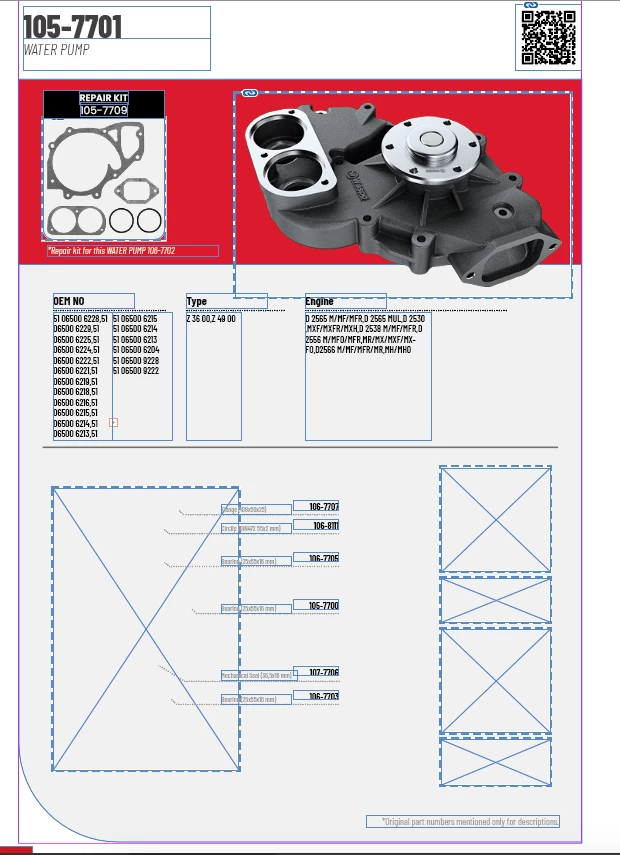
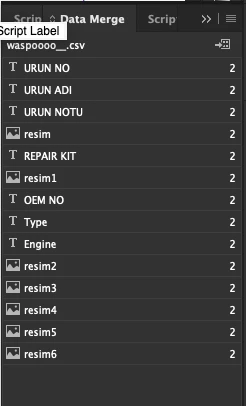
I saved the table I prepared in Excel as a .csv file, but only 2 out of 5 images are being included along with all the text. Moreover, even though the headers are labeled as '@image, they appear in the Data Merge panel but cannot be linked to the project files. What might be the issue? Can you please help me?

This topic has been closed for replies.

2 replies

BobLevine
Community Expert
Community Expert
August 10, 2023

Add the full path to image and try again.

Peter Spier
Community Expert
Community Expert
August 10, 2023

adding the full path can't hurt, certainly, but should only be necessary if the images are not in the same folder as the document. We have no idea, at the moment, what the image locations are but since two were found I'm going to guess they are not scattered across multiple folders.

BobLevine
Community Expert
Community Expert
August 10, 2023

I think we've reached the "waiting for the OP" stage of things.

Peter Spier
Community Expert
Community Expert
August 9, 2023

Every column needs a unique header name -- all your columns for images appear to be using the same name.

Fix that and see if it solves your problem. If not, come back and we'll see what else might be causing problems.

Also, please post a screen capture of your template page showing the data merge placeholders.

BobLevine
Community Expert
Community Expert
August 10, 2023

Image columns, I believe, have to be named "@IMAGE" and then InDesign will interpret multiple fields. You can see it in the screen shot as it adds 1, 2, 3, etc to the field names.


As I said in my reply to the OP, I think the issue is in the lack of a path to the images.

Peter Spier
Community Expert
Community Expert
August 10, 2023

I haven't done a data merge project with images since 2008, and that had only one image field, but it was not named @IMAGE, but rather @FileNamePath, so for the moment I'm sticking with having unique names for each field.