Participating Frequently
May 23, 2018
Answered

Data Merge Issue - Data won't "stick" after merge

  • May 23, 2018
  • 2 replies
  • 1347 views

I am using InDesign CS6 on a Macintosh running High Sierra. I am using a Master Document that worked previously, with multiple records on a page, but with a new  data file that was created in Excel and saved as a .csv file.

When I do the merge function, if I have checked the preview box, all the records show up in a new document. But, when I close the merge dialog box the records all disappear and I'm left with a single page document with just the field names. This is happening with two different documents using the same .csv file. There are no error messages. I vaguely remember having this problem in the past, but can't remember a solution.
This topic has been closed for replies.
Correct answer SJRiegel

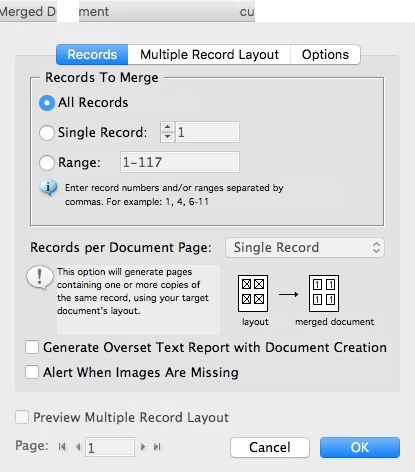
It's in the first tab. Where it says "Records per Document Page" it is greyed out with "Single Record" showing. It won't let me change that to Multiple Records.


How many pages does your template have? The option for Multiple Records will be unavailable if the document has more than one page.

2 replies

Legend
May 23, 2018

When you check the Preview box, you are seeing what the new document would look like. To make that document, you have to choose Create Merged Document. You template file will remain, and another file will be created with your merged data.

Participating Frequently
May 23, 2018

I am still missing something here ... when I choose "create merged document" a window comes up ... if I click on OK it creates the new document, but it is blank, looks exactly like my template. If I have chosen "see preview" I can see that all the data is there, but as soon as I click on "OK" all the data disappears. There is no option to save anything while I am viewing the preview with all the data.

Legend
May 23, 2018

Maybe this is related to the long-standing bugs in the Data Merge multiple-record preview. (Previewing in the template can introduce permanent errors into the merge). 

Try creating a new blank document. Paste your fields in, add your database, and create the merged document without using preview first.

manal shanableh
Legend
May 23, 2018

thats right!

when you make the data merge, the merged document will be on different and new document, you can save the single page with the csv file as a template. save the new merged document as new file.

Participating Frequently
May 23, 2018

Wile the document is in Preview mode, the save functions are greyed out. When I leave Preview mode the data disappears and that new document is blank, there is nothing to save.