Known Participant
December 12, 2016
Answered

Data merge multi-record layout with 2 sided document

  • December 12, 2016
  • 3 replies
  • 9065 views

Hello & some help please,

A little background to help: I have a 2 sided 4x6 postcard with bleed that is being driven by a text file that contains variable data. I can lay it out as a 4x6 2 sided document, set up the data merge fields and preview it and see the data base changes as I cycle through the records and create a new document with all the files needed. However, I want to place them 8 up on a 13x19 sheet size, which means that page 2 has to have the back side of the card in the opposite position (no facing pages). I can set up one record to give me what I want on the 13x19 sheet and get he multi-record functionality to put 8 per page on the sheet the way I want ONLY when I do not set up the back side (page 2), when I do that the mult-record option is disabled.

The problem is complicated by the fact that the finished document needs to be printed in mail sort order which means I will also need some help obtaining a script that will arrange the records correctly so the finished printed document can be produced in cut and stack order. Before I get to this step I need to be able to accomplish the task listed in the first paragraph.

Any help would be appreciated.

Respectfully
This topic has been closed for replies.
Correct answer Jeffrey_Smith

Keep in mind, with Indesign Data Merge, you have one or the other: a multiple record merge that steps and repeats - but only one sided. Or a single record merge - 2 sided.

There is a workaround. But requires resorting your data file to accommodate the cut and stack imposition.

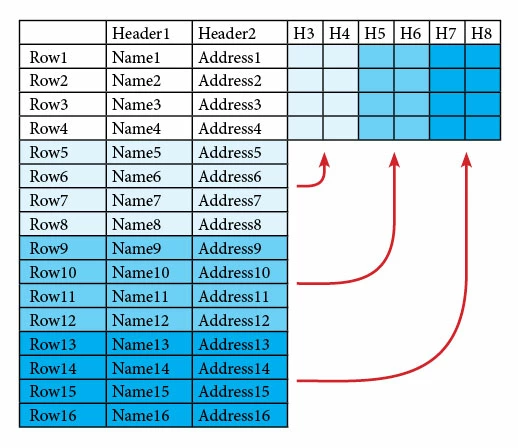
Here is an example for 16 postcards/records for a 4 up cut and stack imposition:

First Step: Reformat Data:

The data file is sliced into quarters and transposed with multiple records in one row representing 4 records.

Data file will look like the following:

Header1Header2Header3Header4Header5Header6Header7Header8
Row 1Name1Address1Name5Address5Name9Address9Name13Address13
Row 2Name2Address2Name6Address6Name10Address10Name14Address14
Row 3Name3Address3Name7Address7Name11Address11Name15Address15
Row 4Name4Address4Name8Address8Name12Address12Name16Address16

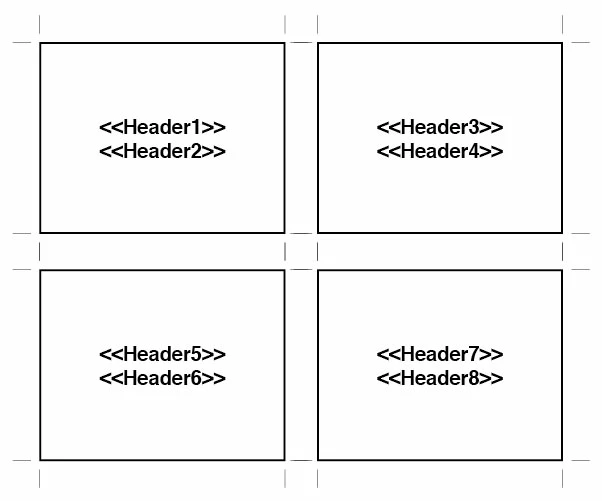
2nd Step: build merge template with all the placeholders positioned like the following:

This method would use single record data merge, with 2 pages (front and back) for the master merge doc.

3 replies

joet082964
Inspiring
December 14, 2016

If your final intent is mailing and you have a decent amount of records to produce, most modern print and mailing houses can handle this quite easily for you.

Community Expert
December 13, 2016

Data Merge and Cut & Stack Imposition are 2 separate functions that require 2 separate applications to perform. Indesign can certainly perform a single record merge that can create 2 sides for all postcards. Cut & Stack imposition can be accomplished with a dedicated imposition application, PDF plugin, or integrated within the DFE of a digital printer. Are you preparing file to print yourself, and if so, what kind of equipment are you using?

Known Participant
December 13, 2016

Thanks for the response.

While I agree that these are separate steps in most print production facilities I have found that by doing the work up front enables me to have more flexibility sourcing the job for printing and get more favorable pricing. I've been doing it up to now with VDP software. Thought that if the capability could be replicated with Data Merge I could save some money on specialized software.

So my question stands: Is what I'm trying to accomplish possible?

Jeffrey_SmithCommunity ExpertCorrect answer
Community Expert
December 13, 2016

Keep in mind, with Indesign Data Merge, you have one or the other: a multiple record merge that steps and repeats - but only one sided. Or a single record merge - 2 sided.

There is a workaround. But requires resorting your data file to accommodate the cut and stack imposition.

Here is an example for 16 postcards/records for a 4 up cut and stack imposition:

First Step: Reformat Data:

The data file is sliced into quarters and transposed with multiple records in one row representing 4 records.

Data file will look like the following:

Header1Header2Header3Header4Header5Header6Header7Header8
Row 1Name1Address1Name5Address5Name9Address9Name13Address13
Row 2Name2Address2Name6Address6Name10Address10Name14Address14
Row 3Name3Address3Name7Address7Name11Address11Name15Address15
Row 4Name4Address4Name8Address8Name12Address12Name16Address16

2nd Step: build merge template with all the placeholders positioned like the following:

This method would use single record data merge, with 2 pages (front and back) for the master merge doc.

Mike Witherell
Community Expert
Community Expert
December 13, 2016

Don't turn on facing pages, of course. Consider setting up two different merge documents and shuffling the PDF pages together in Acrobat? How many unique records are you producing?

Mike Witherell
Known Participant
December 13, 2016

Facing pages are turned off, thank you and there are apx 7500 records in the database.