
Christine Holzmann
Known Participant
October 29, 2018
Answered

Data Merge Multiple Records nightmare... pls help!!!

  • October 29, 2018
  • 1 reply
  • 1432 views

Hi all,

I am having a NIGHTMARE trying to get this data merge with multiple records to work Everything LOOKS right when I preview the data placement before merging but once I create the merge then everything gets SO messed up

Basically, I have a 3.5" x 4" block with 2 data fields (will be a folded card once printed, with each side being 3.5" x 2") that I am working with...

once the data merge is completed, the plan is for there to be two rows & three columns of these on a page. This fits perfectly on a letter size page, with a 0.24" margin all around.

This is what I am starting off with before the data merge:

2. This is how the preview looks with the multiple records....PERFECT!! This is the preview of the data merge before hitting "OK" to do the actual merge.

3. BUT then this is what happens I have NO idea why...
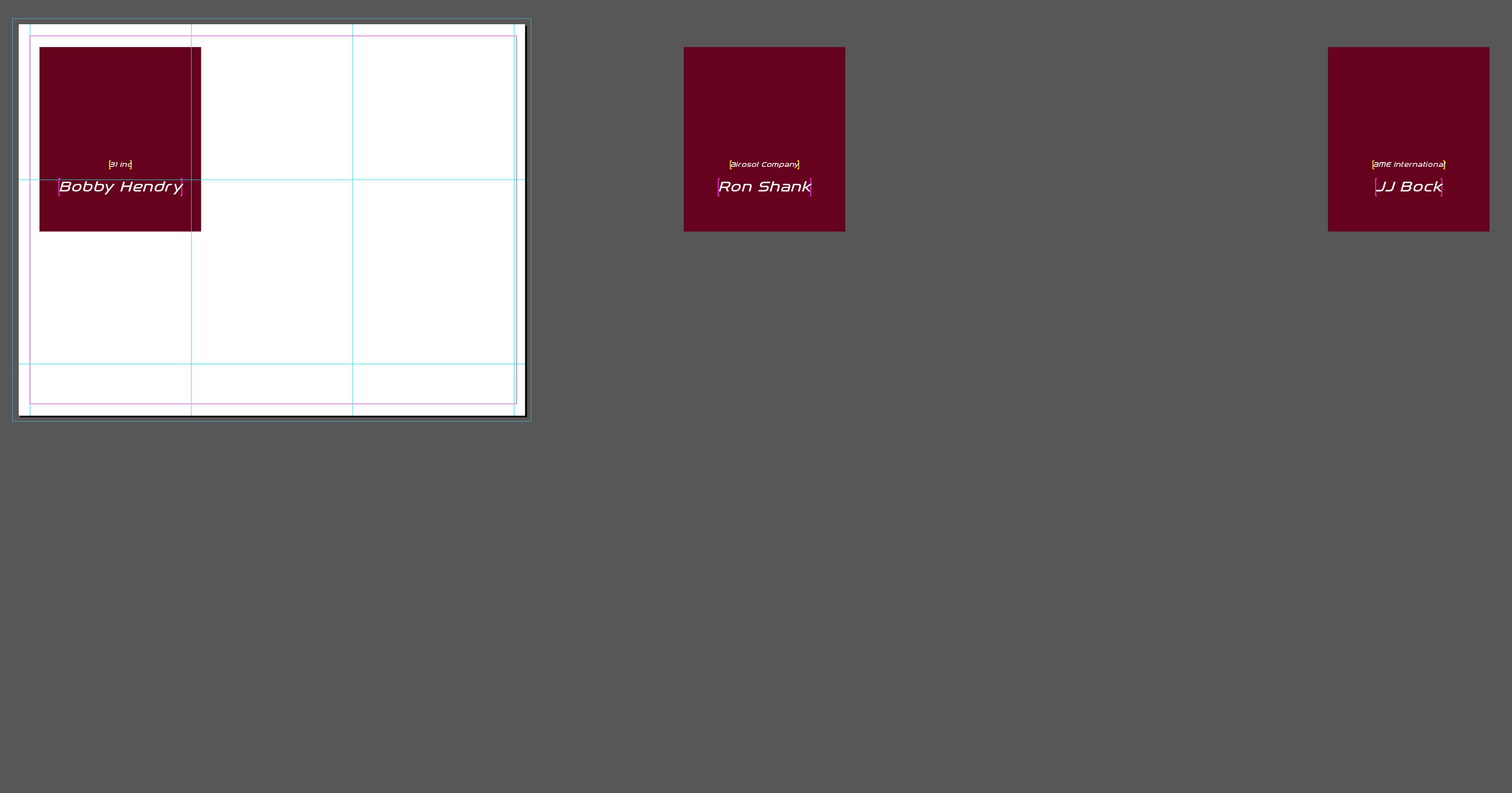
The way they are spaced out in the document is quite bizarre

If you want to take a look at the documents to see if you can help me to work it out... here is link to the Dropbox folder with both the InDesign (IDML) doc and the delimited text file for the data. https://www.dropbox.com/sh/m5eq8wri13d03hm/AACQ-QxVzMibsXdWOpDftwc5a?dl=0

    This topic has been closed for replies.
    Correct answer Jeffrey_Smith

    I had no problem with the file you sent.

    I suspect that your problem stems from a long-standing data merge preview bug. 

    Once you have previewed a multiple item per page merge, it is often permanently corrupted. 

    The only fix is to copy your template to a new document and create the merge without previewing the multiple layout.

    That's what I did with the files you linked, and it worked correctly.


    Same here, the master document most likely became corrupt from the data merge preview.

    Create a new master merge document, and here are a few suggestions:

    - Use a single master page, not a facing page spread master

    - Place all content (variable and static) on the master page

    - Place master content in upper left corner and use Data Merge Margins to offset

    - Beware of unused hidden layers, this can cause unexpected merge results

    1 reply

    Mike Witherell
    Community Expert
    Community Expert
    October 29, 2018

    Try making your database file comma-delimited instead of tab-delimited.

    Mike Witherell
    Christine Holzmann
    Known Participant
    October 29, 2018

    Mike,

    If I save it as comma-delimited choosing this file format:

    Then I get this message in InDesign:

    If I choose to save it as comma separated values choosing this file format:

    Then I am able to use that as a source file for the data BUT then get the EXACT same bizarre layout result as I did initially with the tab-delimited data file

    Legend
    October 29, 2018

    I had no problem with the file you sent.

    I suspect that your problem stems from a long-standing data merge preview bug. 

    Once you have previewed a multiple item per page merge, it is often permanently corrupted. 

    The only fix is to copy your template to a new document and create the merge without previewing the multiple layout.

    That's what I did with the files you linked, and it worked correctly.