
Participating Frequently
January 11, 2021
Question

Data Merge Scripting

  • January 11, 2021
  • 1 reply
  • 517 views

Hi everyone


I am trying to come up with a solution for a time consuming process we have. 


The original post here: https://community.adobe.com/t5/indesign/streamline-printing-process/m-p/11735514?page=1#M409925


Had a suggestion to re-post under scripting.
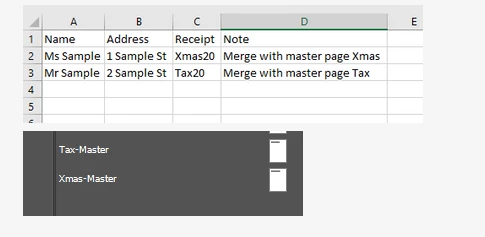


In the image above you can see a snippet of a .csv file containing data merge data and the InDesign file I am connected to

From this file I want to print a series of tax receipts to be posted out

However depending on the person who will receive the receipt, they only need to receive a certain page from the InDesign file.

e.g.
Record 1 - column C contains 'Xmas20' this person should only receive page 1 of the InDesign file or 'Xmas-Master'
Record 2 - column C contains 'Tax20' this person should only receive page 2 of the InDesign file or 'Tax-Master'

For further details, the real data contains 1000s of records and there are dozens of different pages

Any suggestions on how I could accomplish this?

This topic has been closed for replies.

1 reply

jctremblay
Community Expert
Community Expert
January 11, 2021

If the content of the Masters don’t include specific datafield, you can create the master as separated PDF and merge it when executing the Datamerge. 

Place the Masters PDF into a single folder where you will also save your .CSV use by InDesign Datamerge. That way you don't have to write the entire path to you file on your HD.


Participating Frequently
January 14, 2021

Hi Jean


I will keep this solution in mind there are datafields involved however. So this would be a back up solution


I was hoping that indesign could handle something like


If <<Receipt>> is "Xmas20" then Xmas (refering to either master or a layer in the file)


Thanks

Participating Frequently
January 15, 2021

Hello @tobyb71827903 ,

Basic scripts will only look at data after it has been merged on to a page. The current and most basic scripting will only handle a work flow like; Merge doc > Run script > Change master pages.


However if you want it to do more than this, it is most likely you would have to replace the merge tool with something else. This is totally possible but also a lot more work than the basic script above. Hopefullythis gives you a better direction on what to look for and how to develop it.


A quick question and suggestion:

  1. How many different receipts are there? If its only a small number it might be better off just splitting the data (A python script could do this easy) and then just merging those documents?