
e.w39724237
Participating Frequently
December 1, 2016
Question

data merge - text overflowing other fields

  • December 1, 2016
  • 4 replies
  • 2195 views

Hello,

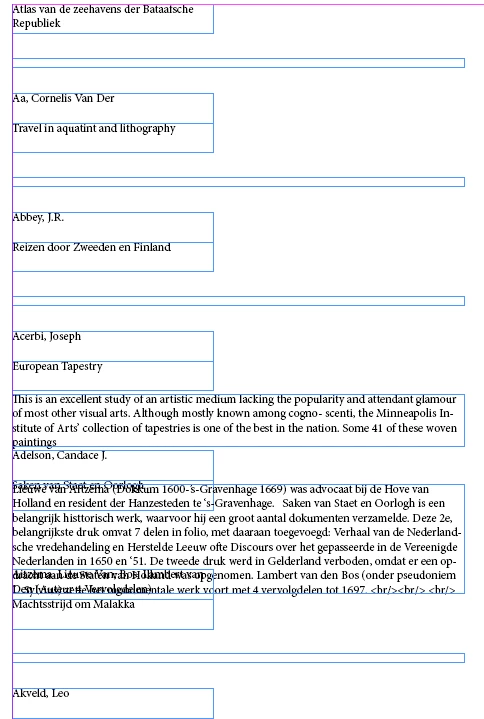
I am trying to merge data containing text-strings of variable length (multiple records per page). Therefore I created a textfield in InDesign and set it to "auto-resize" (height). However it either doesn't work or I misunderstand the concept, as the textareas are still overflowing the fields below it instead of pushing them down > see image.

What can I do to fix this?

Thanks & regards
This topic has been closed for replies.

4 replies

Community Expert
December 4, 2016

Here a very long thread about a similar problem, I think.
Maybe you can take something from there:

Multiple record data merge into paragraph styles-applies the wrong style

LinaD36 Nov 22, 2013

https://forums.adobe.com/thread/1341730

Regards,
Uwe

Community Expert
December 1, 2016

What you are trying to accomplish will not happen with a multiple record data merge. Even though some things are working, like the auto fill text frame, and the step and repeat function of multiple record.

Here is a workaround you can try. It requires multiple steps and a plugin. First you would do a single record data merge. Then using the Auto Stitch plugin, you would thread all records into one continuous text thread.

e.w39724237
Participating Frequently
December 1, 2016

Yes, the trouble starts with merging multiple records-per-page. Single records are ok. I will look into that Auto Stitch plugin you mentioned.

My goal is to produce (and maintain) a catalogue with descriptions of books.If you / or anyone knows of a plugin that was tailored for such task I would be very grateful to hear about it. I found "Easycatalog", but it's rather pricey..

Community Expert
December 1, 2016

A single record data merge creates separate non-threaded text frames on as many pages as there are records. To reiterate, the Auto Stitch plugin will combine many separate text threads into one continuous text thread. This is helpful to combine the multiple records, but in no shape a data management system. Another suggestion would be an XML workflow.

Community Expert
December 1, 2016

Why do you think, the text frames should push other ones down?


You could get what you want, but you have to use text wrap on the text frames and start with a distinct order of stacked text frames. And with text frame insets.

Regards,
Uwe

e.w39724237
Participating Frequently
December 1, 2016

Thank you Uwe,

They have to push them down because I merge multiple records per page, and the text of the first record 'overflows' (overlaps) the next 'record' etc. I use text wrap and the stacking of layers seems correct. Still records are overlapping...

Community Expert
December 1, 2016

e.w39724237 wrote:

Thank you Uwe,

They have to push them down because I merge multiple records per page, and the text of the first record 'overflows' (overlaps) the next 'record' etc. I use text wrap and the stacking of layers seems correct. Still records are overlapping...

From your screenshot I cannot see that the stacking order of text frames is ok.
Maybe, maybe not. At least text wrap is not working. And one important thing: Every text frame's top edge should be in line with every other's text frame you like to wrap. Just as I did in my answer # 2.

To get your issues straight:
Could you show us a sample how the result should look like?
Just position the text frames manually. I'm not sure about the structure of what you like to achieve.

Regards,
Uwe

vinny38
Legend
December 1, 2016

Hi,

you don't need to create a text frame for each field.

Create only one frame and merge all fields into it.

regards

e.w39724237
Participating Frequently
December 1, 2016

Thanks vinny38, I did not know that. However it still results in the same behaviour:  the text of consecutive records keep overlapping one another...

vinny38
Legend
December 1, 2016

Hi again.

Well I don't see how text can overlap when in an unique text frame

Can you tell us more about how you proceed with data merge? Do you use Excel? What format do you use (csv, txt?) Do you have hard returns ?

Please provide screenshots as well...

Here's a very basic example of data merge usage... no overlapping whatsoever...