



Jacek Mijal
Participant
January 25, 2019
Answered

Data merge with comma - problem after upgrading to CC 2019

  • January 25, 2019
  • 5 replies
  • 3261 views

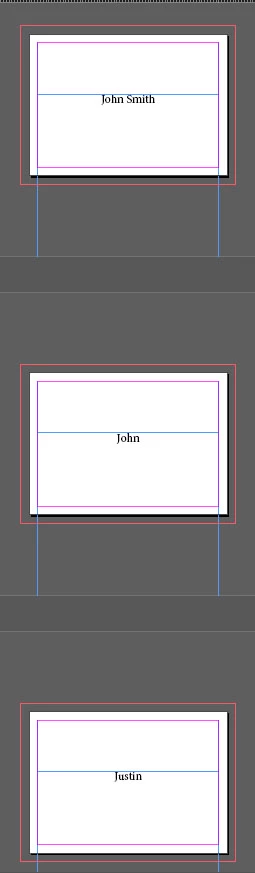
I'm making a lot of personalisation to invitations. Few days ago I updated Indesign to 2019 version and it started a big problem with data merge. I'm creating data in excel and it was saved as a tab-delimited txt file. When I do the data merge on pages with comma it only shows part of text before comma... I tried saving with quotation marks and it didn't change anything.

How can I solve this problem?

for example:
data looks like this:
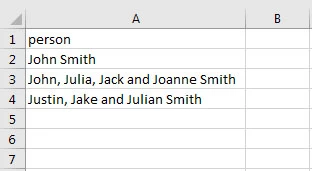
saved to tab-delimited txt file and after data mege I go file like this:
Correct answer Jacek Mijal

Problem is solved by Open Office - saving data as .csv and selected "quote all text cells" (and whithout changing character set - it "crashed" polish signs).

5 replies

Participant
January 11, 2023

In MS Excel, it worked with this option, UTF-16 Unicode Text (.txt).


I realized that in the line that contains comma, he puts quotes.


Jacek Mijal
Jacek MijalAuthorCorrect answer
Participant
January 29, 2019

Problem is solved by Open Office - saving data as .csv and selected "quote all text cells" (and whithout changing character set - it "crashed" polish signs).

Srishti_Bali
Legend
January 28, 2019

Hi Sebastian,

I would like to know if the suggestions shared above worked for you, or the issue still persists.

Kindly update the discussion if you need further assistance with it.

Thanks,

Srishti

Community Expert
January 25, 2019

Here is a workaround suggestion to try: Create a second column of data in your excel file and export new .txt file. Select the Data Source, but you don't need to assign the 2nd column header.

nagyi43295538
Participant
September 19, 2024

Thank you! That's worked for me!

Community Expert
January 25, 2019

If the quotation marks does not solve the issue then maybe you could change the delimiter to a tab and then try. You can change the delimiter by choosing import options when adding data source.

-Manan

-Manan
Community Expert
January 25, 2019

I tried on InDesign 14.0.1 on Windows and comma with quotation marks worked just fine for me both for comma delimited and tab delimited csv. Seems there is some issue with you csv file. Can you share that across also can you confirm the version of your InDesign is the latest or not.

-Manan

-Manan