Participating Frequently
September 25, 2020
Answered

DataMerge with special characters and QR code

  • September 25, 2020
  • 9 replies
  • 5203 views

Hi there, 


I use DataMerge to make business-cards with czech special characters (š, ř, č...) including QR codes for the vcards. To import these characters right, I use UTF-16 encoding for the data source. But when scanning the QR code with my iphone, it just says „No usable data found“. Is there any solution to this?


Thanks for any suggestions!

Ingo
This topic has been closed for replies.
Correct answer Laubender

Hi Ingo,

me again. Inspected the result of data merge with your data source.


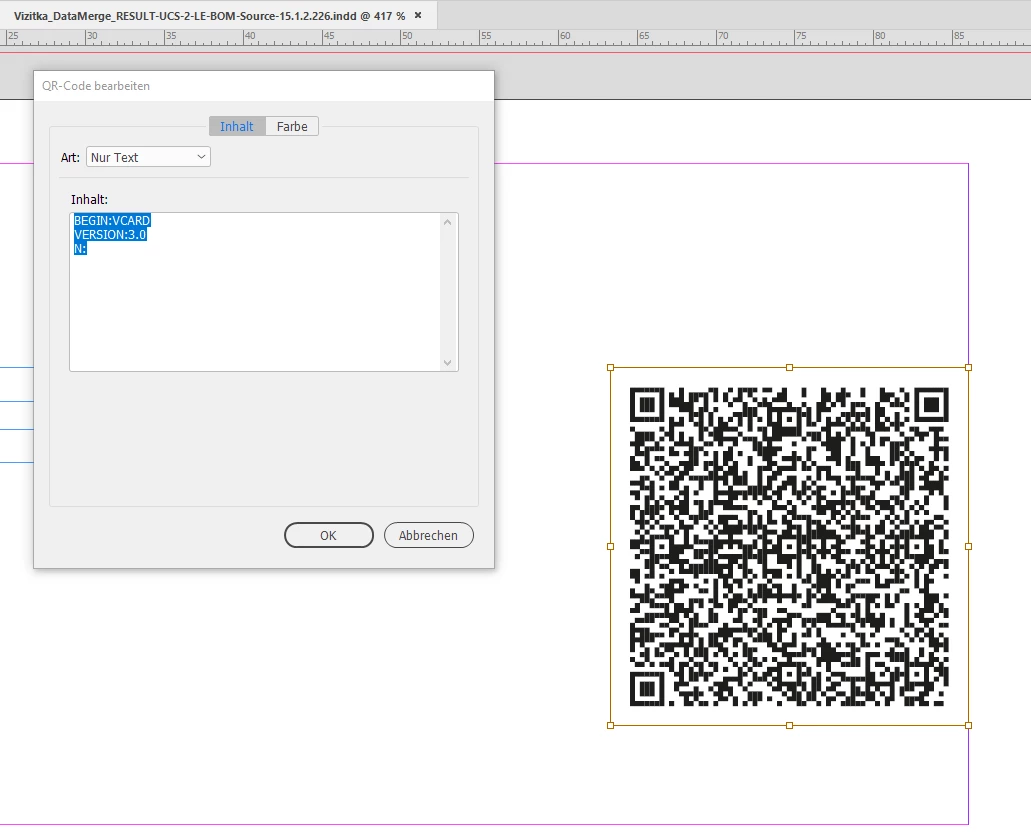
As I can see now from the Text field of the result code a lot of data is missing:


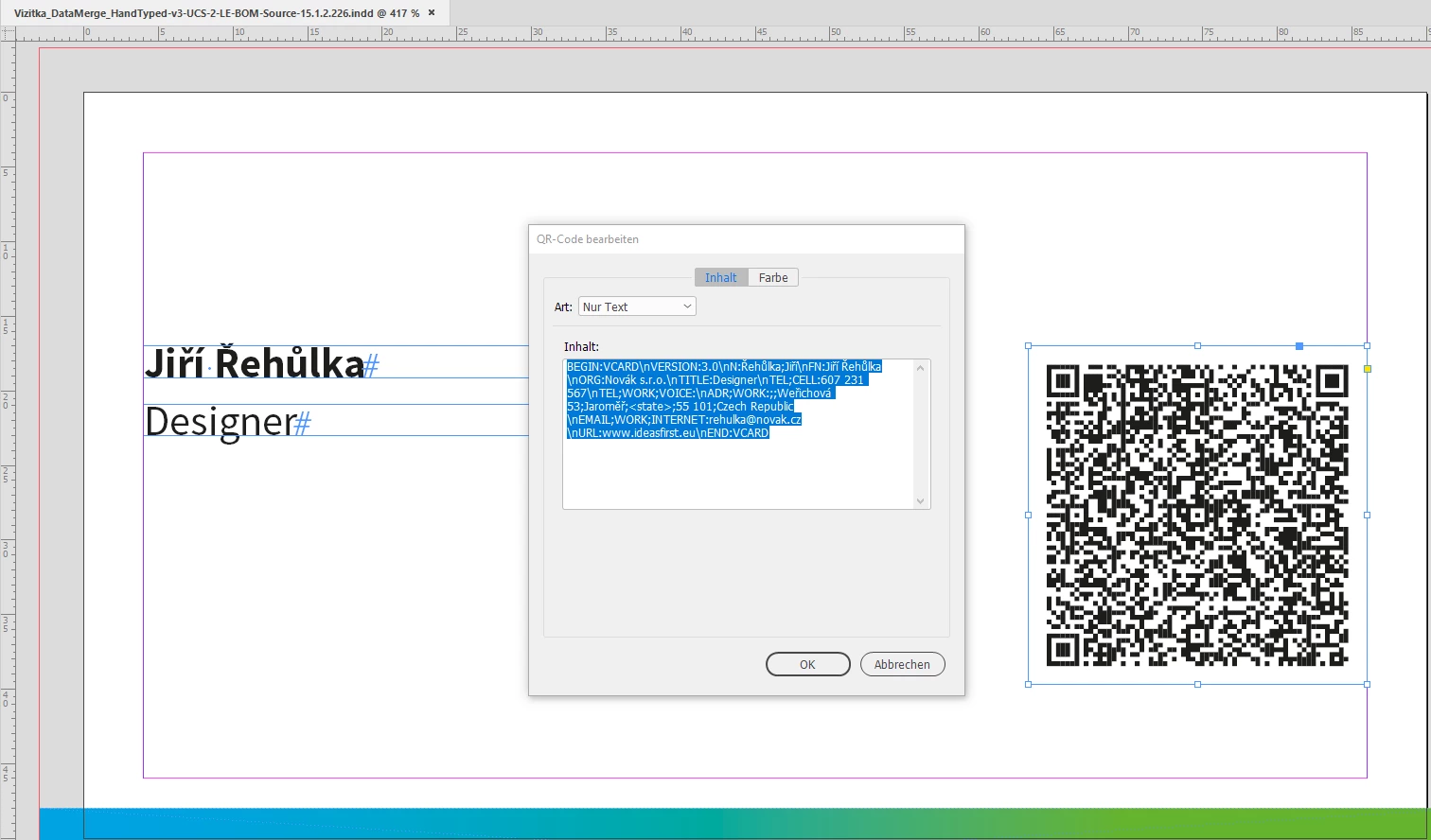
If I copy/paste the code from your text file ( without the quotes ) I get a different QR Code that should work:


Now, what could be the solution to your problem?

[1] Scripting the merge where the functionality of data merge is not used.

[2] Finding a way to insert the right text for the QR Code. Currently I cannot tell if that will work, if I made an error, if you made an error in the data source, if InDesign has a bug with that.


Regards,
Uwe Laubender

( ACP )

9 replies

Community Expert
October 6, 2020

Hi Ingo,

with the following screenshot I tried to illustrate the issue:


I also tested to script adding a QR Code with character Ř (LATIN CAPITAL R WITH CARON).

That worked as expected: All the QR Code's text was visible in the Text field of InDesign's QR Code user interface. So I really think, there is a severe bug with InDesign's data merge of QR Codes and some "special characters" ( that are not special at all if you are Czech-born. ). Especially with Ř (LATIN CAPITAL R WITH CARON)


Regards,
Uwe Laubender

( ACP )

Participant
February 4, 2022

Hello,

I have the same problem with special characters if I generate the QR-Code with data merge (InDesign 2022). Is there any automated solution available to generate a QR-code with InDesigns auto merge with this special characters? Or is Uwes Script-Adding available?


Thank you,
KR ismael

Participating Frequently
February 4, 2022

Hi Ismael, 

I did not find a solution within InDesign but ended up with https://qrcode.studio. Once in a while my client activates a monthly subscription and generates all necessary QR codes via Bulk Import from XLS, CSV... The exported QR codes then are placed into the InDesign template of the business cards. It's already sometime ago, so I do not remember, but I think that's done with DataMerge, so it's not that much work. As my client has an own Adobe CC account, he does the business cards on his own now 🙂 

Hope that helps

Ingo

Community Expert
October 2, 2020

Hi Ingo,

in the end a datamerged QR code is nothing but a QR code done manually.

So it is fully editable after the merge.


Regards,
Uwe Laubender

( ACP )

LaubenderCommunity ExpertCorrect answer
Community Expert
October 1, 2020

Hi Ingo,

me again. Inspected the result of data merge with your data source.


As I can see now from the Text field of the result code a lot of data is missing:


If I copy/paste the code from your text file ( without the quotes ) I get a different QR Code that should work:


Now, what could be the solution to your problem?

[1] Scripting the merge where the functionality of data merge is not used.

[2] Finding a way to insert the right text for the QR Code. Currently I cannot tell if that will work, if I made an error, if you made an error in the data source, if InDesign has a bug with that.


Regards,
Uwe Laubender

( ACP )

Participating Frequently
October 2, 2020

Hi Uwe, 

I really appreciate what you tried and will need some time to work me through that (and to understand 🙂 Up to now it didn't come up to my mind, that the generated QR code from DataMerge is editable as plain text in InDesign. So perhaps there might be a work-around without DataMerge, that will be at least a little bit more efficient than entering all data manually. I will let you know.

Community Expert
October 1, 2020

Hi Ingo,

thank you for the new files. At first glance I cannot see a problem in your data source file.


I'm on Windows 10 and opened the QR_datamerge_TEST.txt file with my Notepad++ application.

Notepad++ suggests the encoding of the file is UCS-2 LE BOM. That is compatible with UTF-16.


Also did a datamerge with the one entry of your data source document. For that I built a new template document.

And I converted the encoding of your text file to UCS-2 BE BOM. The result was exactly the same as with UCS-2 LE BOM.

A conversion to UTF-8 did not work, the merged results were garbled.

A conversion to UTF-8-BOM did not work, because InDesign did not accept that encoding as the right one for a data merge source.


All templates and results of my tests can be downloaded from my Dropbox account:

https://www.dropbox.com/s/flarrun3cxa87po/Vizitka_DataMerge-201001-1.zip?dl=1

I embedded the data source file in the template.


Regarding the QR code I get exactly the same result as you.

So working on Windows 10 with data merge makes no difference.

And also a conversion of the data source to UCS-2 BE BOM makes no difference.


What actually made a difference:

If I copy/paste the text from the source text file, QR_datamerge_TEST.txt , to the text entry field of the QR Code feature in InDesign. You can download the result here:

https://www.dropbox.com/s/95mrqvfwkzeac66/Vizitka_DataMerge_HandTyped-UCS-2-LE-BOM-Source-15.1.2.226.indd?dl=1

I have no idea if this will work on any device with a QR Code reader.


Away from all that:

Is there a special requirement on your side to compose your template with the data merge placeholders on a master page?

The result in that case are XML tagged texts and frames. Also the QR Code container frame is XML tagged.


Regards,
Uwe Laubender

( ACP )

Community Expert
October 1, 2020

Did a mistake with the "hand typed" VCard entries. Copy/pasted both of the enclosing " characters from the source to the entry field of option Text.


And I am not sure if entry VERSION3.0 is the right one.

I saw an example of a VCard that had VERSION2.1 as entry:

http://imagesmithblog.com/2014/07/18/qr-codes-indesign-cc-2014-data-merge/


Regards,
Uwe Laubender

( ACP )

Community Expert
September 30, 2020

Hi Ingo,

can you provide the data source file as well?


In your InDesign document's Links panel "QR_datamerge_QUELLE_UTF8.csv" is showing up as data source.

I guess, this is not the right one; you said you need a UTF16 encoded text file.


Just one line of text in the data source should work for additional tests.

Your Excel file gives no hint what's going wrong, I think.


Hm. That said:

Perhaps the issue is that Excel or your saved data source is using two glyphs to compose the special characters when one glyph for the special characters is needed to work as QR code?


Regards,
Uwe Laubender

( ACP )

Participating Frequently
September 30, 2020

Hi Uwe, 

you are right, that's not the right data source (just the last one of several tries). Now I updated the ZIP including the INDD, XLSX and UTF-16 TXT as data source. 

Thanks so much for having a look at it

Ingo


Inspiring
September 29, 2020

Hi there,

i got it to work with MyDataMerge - its a tool that controls InDesigns data merge and extends its functionality a lot.

I know that it uses InDesigns QR-Code functions to create and merge QR-Codes (but i think its more a scripting interface kind of thing)


The uploaded file (indd) is a proof of concept.

https://www.dropbox.com/s/rb2gm0yfbkqfo0a/%C5%99eh%C5%AFlka%20ji%C5%99%C3%AD.indd.zip?dl=0


I can read the QR-Code without issues with the built in QR-Code Scanner of my Galaxy S10 (Android).


In addition to standard QR-Codes:

  • You can color front and background color easily to get colored QR-Codes
  • You can customize filenames based on database (see uploaded example).


I just removed the other placeholders to speed up things. It's a mac only tool and has a free forever version to use with small amount of placeholders. But its a solution (we use regularly).

Participating Frequently
September 30, 2020

Thanks for the tip,

the result on the iphone isn't much encouraging : ( see the attached screenshot. But I will surely have a look at the tool.

Jens Trost
Inspiring
September 30, 2020

My guess would be that MyDataMerge creates the QR code via scripting (which is in fact pretty easy). The issue is with InDesign's data merge.


I just tested the QR code from comDesignSHi on Android as well, it does work... my collegue tested it on an iPhone 8 with iOS 13 – also all fine.

Jens Trost
Inspiring
September 28, 2020

Hi Ingo,

so I just tried creating a QR code via InDesign using your mentioned characters (š, ř, č), reading it via Android using 3 different readers – works fine.

You could try creating your QR codes via InDesign, see (apparently there is a mistake on Adobe's help site, so I link this)
https://indesignsecrets.com/data-merge-qr-codes-explained.php

Participating Frequently
September 28, 2020

That's what I already do, Jens,

of course there's nothing wrong with adding a QR code in InDesign (Object > Generate QR code), the special characters work. But that's just as inefficient as using an online-generator manually for every QR code. Therefore I want to use DataMerge and include the QR codes right away. But the codes via DataMerge won't display the czech characters (Android) respectively the QR code is not recognized at all (iPhone). Feel free to download the XLSX and INDD from my CC-account and give it a try, maybe I do not see the forest for the trees...


Jens Trost
Inspiring
September 29, 2020

Ah I'm sorry, I misunderstood – I thought you were still using an online QR generator.

So I did try different options with your data and played around here and there, I couldn't get it to work either:
my best guess is you found a bug within the data merge function…

Since the QR code generator itself does support those character (because it does work if you create a QR code manually) the issue must be with data merge...
If nobody else has some insight or solution I would post this @ InDesign Uservoice 
 

Colin Flashman
Community Expert
Community Expert
September 26, 2020

Have you tried decoding the QR code with any online readers or any other apps besides the one that is used? They don't always use the same framework.

If the answer wasn't in my post, perhaps it might be on my blog at colecandoo!
Participating Frequently
September 26, 2020

Hi Colin, 

I tried three online readers, all recognize the QR code as vcard, but none displays the czech characters right. Still waiting for response from some android users...


Participating Frequently
September 26, 2020

So I shorty summarize:

Imported UTF-16 TXT to DataMerge. Czech special characters themselves display well on the business-cards. The QR-codes nevertheless do not show the special characters in online readers and android phones. iPhone even worse does not recognize the vcard at all.

manal shanableh
Legend
September 26, 2020

Are you inserting the Qr code in the source file as an image?? 

Try to convert the xls sheet to UTF-8 comma delmated (.CSV)

i had some issues when using .txt data source


Participating Frequently
September 26, 2020

Thanks for your reply, manal_shanableh,

nothing else than an UTF-16 encoded .txt will import the czech special characters correctly to DataMerge. So UTF-8 is not really the point for me I guess.