Participating Frequently
Jan 12, 2023 9:08 PM UTC
Question

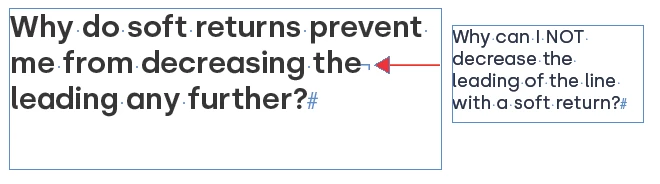
Decreasing leading on text with a soft return- why can I not do it?


This topic is closed to new replies. Start a new post to keep the conversation going.

15 replies

rob day
Community Expert
Community Expert
Jan 13, 2023 9:07 PM UTC

Hi @JR86 , Check your Type>Apply Leading to Entire Paragraphs Preference, which @Peter Spier suggested in his first reply. With it unchecked any character or insertion point can have its own leading—the insertion point with the largest leading sets the leading for the line:


Translate
Barb Binder
Community Expert
Community Expert
Jan 13, 2023 12:41 AM UTC

Hi @JR86:


Soft returns simply start a new line within a paragraph, they don't impact the leading. 


~Barb

Translate
~Barb at Rocky Mountain Training
JR86Author
Participating Frequently
Jan 13, 2023 5:59 PM UTC

Okay, when I highlight as you have they will all move BUT when I select the only the line with the soft return it will not decrease.

Translate
James Gifford—NitroPress
Legend
Jan 13, 2023 6:10 PM UTC

I've struggled to figure out the actual question here since I first read it. I think you might be confusing leading — which is the old term for "spacing between lines of text" and (usually) means "within a paragraph" in modern use — and spacing above/below, which is a different setting that applies only to the top and/or bottom of a paragraph.


With a soft return — something that should be used very little, if at all in modern typeset documents — leading, line spacing, will work on all the lines of that paragraph. However, spacing above or below will not, since a soft return is not an actual paragraph break.


Does that change the way you see what you're looking at?
 

Translate
Peter Spier
Community Expert
Community Expert
Jan 12, 2023 9:16 PM UTC

In your prefs Type section is Apply leading to entire paragraph checked?

Translate
