Participant
April 23, 2019
Answered

Deformation / Distorsion when creating PDF

  • April 23, 2019
  • 2 replies
  • 1203 views

Hello,

this is the issue:

When exporting an Indesign File to PDF, graphics get distorted.

This is how it's supposed to be (and how it's shown when viewed in Indesign):

And that's how it looks like in the PDF (I've printed the PDF and it's not just on screen, it is also distorted when printed on paper):

Please notice the distortion happening with the letter "i" (2 times).

The graphic was created in Illustrator as Text, then converted the text to paths and the result was placed in the CC Library from which it was imported to Indesign.

Any hints on how to solve this?

Cheers,

Tom
This topic has been closed for replies.
Correct answer John Mensinger

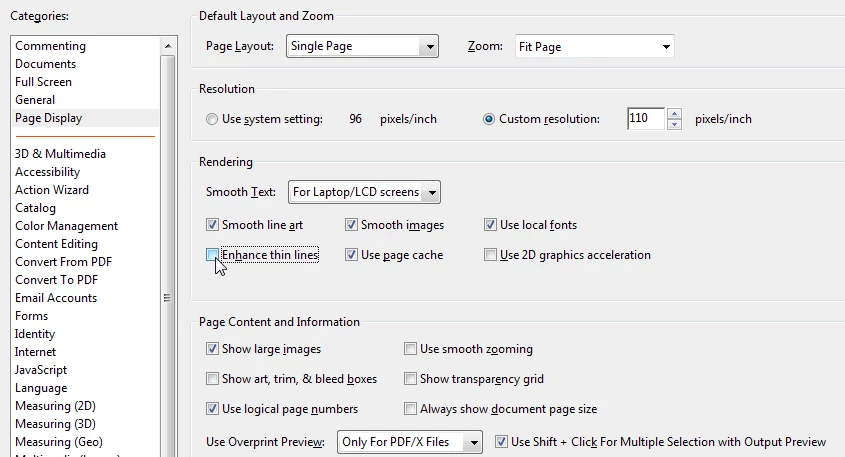
Certain strains of sans-serif face are susceptible to this in Acrobat due to the default Enhance Thin Lines feature.

In Acrobat DC: Edit > Preferences > Page Display > [un-tick] Enhance Thin Lines

2 replies

Participant
April 23, 2019

John, Derek, thank you for your help I've learned something about PDF's today! :-)

Derek Cross
Community Expert
Community Expert
April 23, 2019

Which version of InDesign and OS?

How did you produce the PDF and which kind?

Which application did you view the PDF on?

Do you Place a native AI file into your InDesign?

(I couldn't see the links, post a screen shot)

Participant
April 23, 2019

Hello Derek and thank you for taking the time to have a look at my problem.

InDesign 14.0.2 x64

Windows 10

I did "File -> Adobe PDF Presets -> [High Quality Print]". Did not change anything in the Dialog Box and click "Export".

I viewed the PDF using Adobe Acrobat Pro DC 2019.010.20100

I used the Adobe CC Libraries for bringing the graphic from Illustrator to InDesign.

Here's the Screenshot once again:

Cheers,

Tom

John Mensinger
Community Expert
John MensingerCommunity ExpertCorrect answer
Community Expert
April 23, 2019

Certain strains of sans-serif face are susceptible to this in Acrobat due to the default Enhance Thin Lines feature.

In Acrobat DC: Edit > Preferences > Page Display > [un-tick] Enhance Thin Lines