Inspiring
February 5, 2024
Answered

Delete all the vertical lines in a file with multiple tables (Script)

  • February 5, 2024
  • 1 reply
  • 709 views

Please, need a help with this script as we have hundred of tables.

And make a total substitution.

Thanks

This topic has been closed for replies.
Correct answer Joel Cherney

That looks extremely easy to make with Table Styles. Have you used the Table Styles or Cell Styles panels at all? 


... if the answer is "no" then all of your cells have No Style and your tables have Basic Table style applied. If you make a Cell Style with your horizontal borders only, and then a Table Style that specified your new Cell Style in the "Body" dropdown.
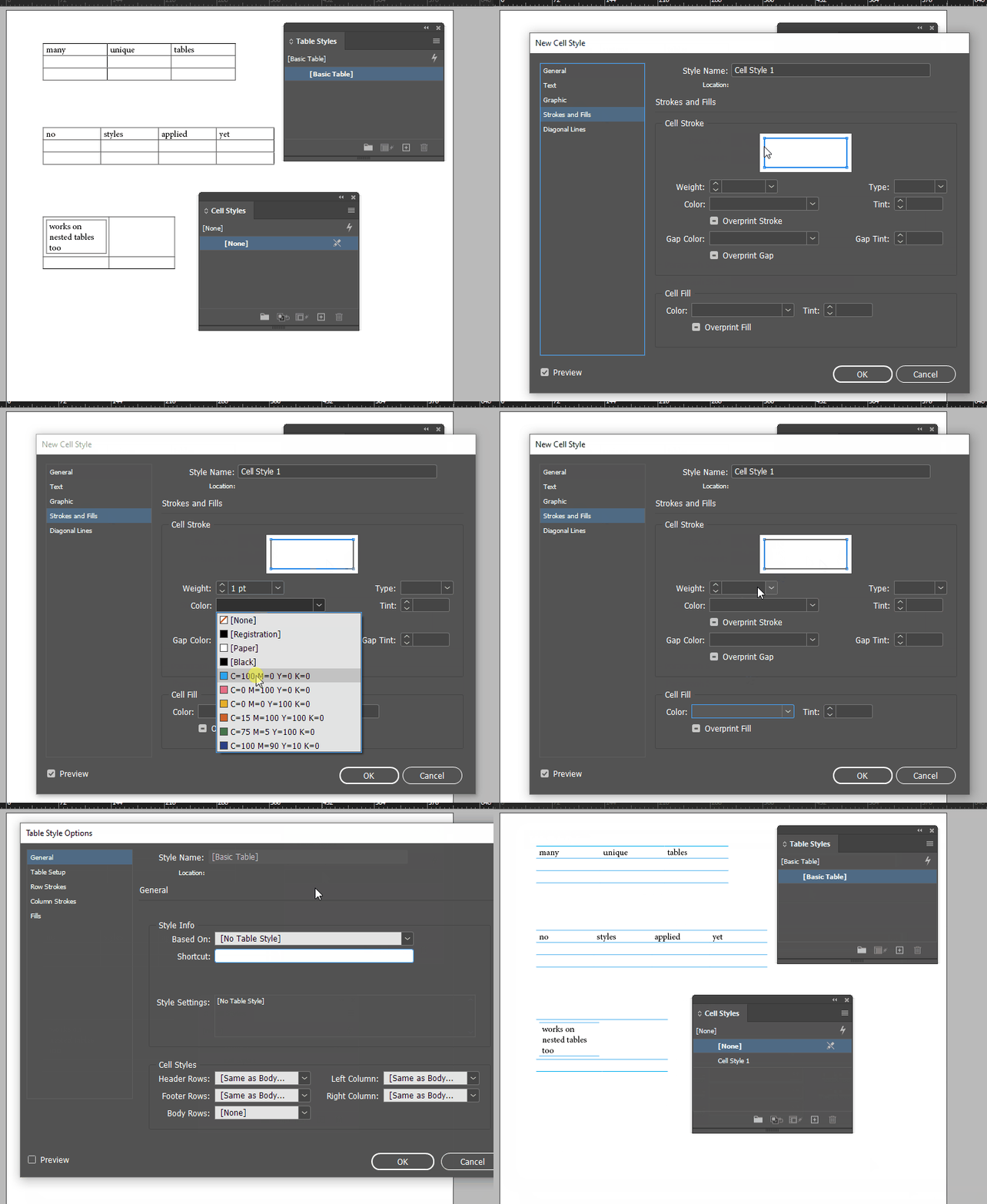


... if you do have some Table Styles in use, you might have to "Apply Table Style, Clear Overrides." 


It's possible to do this by directly applying Cell Styles, but it takes more clicks


It's possible to do this with scripting, by either automating the cell-border stuff, or by automating the application of table and cell styles with JS, but to be frank, I rarely encounter people using Table Styles at all, so when they say "Augh, how am I to do this to all of my hundreds of tables?" my typical response is "Well, all of your tables all share the Basic Table style, right? Because you haven't opened that panel since you were first learning ID, right?" and the answer has been 100% "You're right, Joel, I know where that panel is and I have never used it for anything." 


(One day I will encounter another user of Table Styles - I mean, one that's not already a regular poster here - but I'm not holding my breath.)


1 reply

Inspiring
February 5, 2024

Well, I mean deleting just the vertical ones to obtain something like this:

 Thanks.

Joel Cherney
Community Expert
Joel CherneyCommunity ExpertCorrect answer
Community Expert
February 5, 2024

That looks extremely easy to make with Table Styles. Have you used the Table Styles or Cell Styles panels at all? 


... if the answer is "no" then all of your cells have No Style and your tables have Basic Table style applied. If you make a Cell Style with your horizontal borders only, and then a Table Style that specified your new Cell Style in the "Body" dropdown.


... if you do have some Table Styles in use, you might have to "Apply Table Style, Clear Overrides." 


It's possible to do this by directly applying Cell Styles, but it takes more clicks


It's possible to do this with scripting, by either automating the cell-border stuff, or by automating the application of table and cell styles with JS, but to be frank, I rarely encounter people using Table Styles at all, so when they say "Augh, how am I to do this to all of my hundreds of tables?" my typical response is "Well, all of your tables all share the Basic Table style, right? Because you haven't opened that panel since you were first learning ID, right?" and the answer has been 100% "You're right, Joel, I know where that panel is and I have never used it for anything." 


(One day I will encounter another user of Table Styles - I mean, one that's not already a regular poster here - but I'm not holding my breath.)


Inspiring
February 6, 2024

No. This was not a correct answer.

And I am worried if someone has impersonated me on this forum because I did NOT mark the answer as correct.

1. Mr Chenney's answer is a solution but it is not correct for this case. I was looking for a script to chain it to others and do various formatting operations. What he proposes requires making adjustments to the menus that are not appropriate for what is required, which is to automate a process. Ergo,

2. There is a great free script by Eugenyus Budantsev that solves the request perfectly but it requires filling menus and therefore cannot be chained.

Ergo, a solution is not always a correct answer!