
Inspiring
August 22, 2015
Answered

Delete unused master spreads

  • August 22, 2015
  • 2 replies
  • 3712 views

Hi,

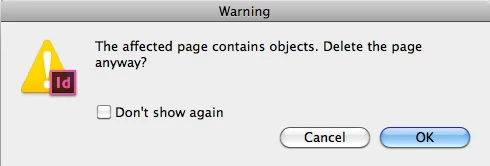
   I need to delete unused master spreads from document. If there is any unused master spreads then its removed.  But when there is no unused master spreads, its pop up the below alert. Its removing pages. I'm using the below code.

  Whats my in the below code.
function removeUnusedMaster()

{

    app.selection=1851876449;

    if(app.menuActions.itemByID(6145).checked == true)

    {   

        try{           

            app.menuActions.itemByID(6151).invoke();

            app.menuActions.itemByID(6150).invoke();           

        }catch(e){        // Remove all spread except 1st one, when all spreads are unused except none.               

            app.activeDocument.masterSpreads[1].select()

            app.activeDocument.masterSpreads[app.activeDocument.masterSpreads.length-1].select(SelectionOptions.addTo);

            app.menuActions.itemByID(6176).invoke();           

        }

    }else

    {

        //try{           

            app.menuActions.itemByID(6145).invoke();

            app.menuActions.itemByID(6151).invoke();

            app.menuActions.itemByID(6150).invoke();           

        //}catch(e){}

    }

}

Thanks in advance,

Sudha K

This topic has been closed for replies.
Correct answer Peter Kahrel

The alert that you see pops up not when there are no unused master spreads, but when you try to delete a master that's applied to another master or a page/spread. You can't use menuActions for this I don't think because you need to be able to tell whether a master is applied. With menuActions the test is to check whether that alert pops up, but you can't script that.

But it's not too hard to check whether masters are used: create a list of masters applied to the document's pages, another list of masters applied to the document's masters (i.i. a list of masters based on other masters), then remove the masters that don't occur in either list.

(function(){


  var pages;

  var masters;

  var i;

  var appliedToPages = {};

  var appliedToMasters = {};


  // Get the names of the masters applied to document pages

  pages = app.documents[0].pages.everyItem().getElements();

  for (i = pages.length-1; i >= 0; i--) {

    if (pages.appliedMaster !== null) {

      appliedToPages[pages.appliedMaster.name] = true;

    }

  }

  // Get the names of masters applied to masters (i.e. masters based on other masters)

  masters = app.documents[0].masterSpreads.everyItem().getElements();

  for (i = masters.length-1; i > 0; i--) {

    if (masters.appliedMaster !== null) {

      appliedToMasters[masters.appliedMaster.name] = true;

    }

  }

  // Delete masters that are not applied to any document pages or other masters

  for (i = masters.length-1; i > 0; i--) {

    if (!appliedToPages[masters.name] && !appliedToMasters[masters.name]) {

     // $.writeln (masters.name);

      masters.remove();

    }

  }

}());

Peter

2 replies

Mike Witherell
Community Expert
Community Expert
January 9, 2023

Hi gang,

Which of the 4 scripts on this thread is the most reliable version of script to remove master pages/spreads? I see 4 versions here?

Mike Witherell
Robert at ID-Tasker
Legend
January 9, 2023

What if you just copy normal pages to a new document? 😉 it should copy ONLY used Masters... but it will also strip all unused *Styles and colors - so may not be exactly what you are looking for... 


Peter Kahrel
Community Expert
Peter KahrelCommunity ExpertCorrect answer
Community Expert
August 22, 2015

The alert that you see pops up not when there are no unused master spreads, but when you try to delete a master that's applied to another master or a page/spread. You can't use menuActions for this I don't think because you need to be able to tell whether a master is applied. With menuActions the test is to check whether that alert pops up, but you can't script that.

But it's not too hard to check whether masters are used: create a list of masters applied to the document's pages, another list of masters applied to the document's masters (i.i. a list of masters based on other masters), then remove the masters that don't occur in either list.

(function(){


  var pages;

  var masters;

  var i;

  var appliedToPages = {};

  var appliedToMasters = {};


  // Get the names of the masters applied to document pages

  pages = app.documents[0].pages.everyItem().getElements();

  for (i = pages.length-1; i >= 0; i--) {

    if (pages.appliedMaster !== null) {

      appliedToPages[pages.appliedMaster.name] = true;

    }

  }

  // Get the names of masters applied to masters (i.e. masters based on other masters)

  masters = app.documents[0].masterSpreads.everyItem().getElements();

  for (i = masters.length-1; i > 0; i--) {

    if (masters.appliedMaster !== null) {

      appliedToMasters[masters.appliedMaster.name] = true;

    }

  }

  // Delete masters that are not applied to any document pages or other masters

  for (i = masters.length-1; i > 0; i--) {

    if (!appliedToPages[masters.name] && !appliedToMasters[masters.name]) {

     // $.writeln (masters.name);

      masters.remove();

    }

  }

}());

Peter

Sudha_KAuthor
Inspiring
August 27, 2015

Hi,

     Thank you... Its working fine... Sorry for the late reply...


Thanks,

Sudha K