
Participating Frequently
December 10, 2022
Answered

Deleted Type 1 font keeps appearing in Indesign (conflicting its Open Type replacement)

  • December 10, 2022
  • 5 replies
  • 2027 views

Hi There,

I hope someone can help me with the following:


I’m facing an issue with an older Type 1 font — Trump Mediaeval — that remains active/present in Indesign after deleting it from my computer.

I deleted the Type 1 font in an attempt to solve the initial issue I’m having: after installing the Open Type font ‘Trump Mediaeval LT’ to replace the Type 1 the Open Type properties aren’t working properly (‘Open Type properties are not applicable’).


It means I cannot select text and make them it into small caps or old style numerals, by ANY of the ways to do this in Indesign.


To be clear: the font has those properties as I can see them and pick them individually from the glyph panel. Clearly this isn’t the way to work around the issue (manually setting character after character would take me back to Gutherbergs age). 


Assuming it might be a conflict with the older Trump Mediaeval font, I trashed every file of it. But the font keeps appearing in the Indesign font library. Even after clearing Indesign preferences; uninstalling and installing Indesign and trying to clear font caches: it keeps returning.


Anyone who has had the same problems or know how I can clear Indesign from this ghost?


Thanks,

Connie
 

This topic has been closed for replies.
Correct answer Brad @ Roaring Mouse

"shows up in this typeface selecting list in Illustrator, but not in Photoshop"

This is expected as Photoshop had already removed support for Type 1 fonts, so even if they are installed, they won't show in PS.

Despite your efforts to search your computer for the old Type 1 fonts, it may be hiding somehwre that you cannot search.

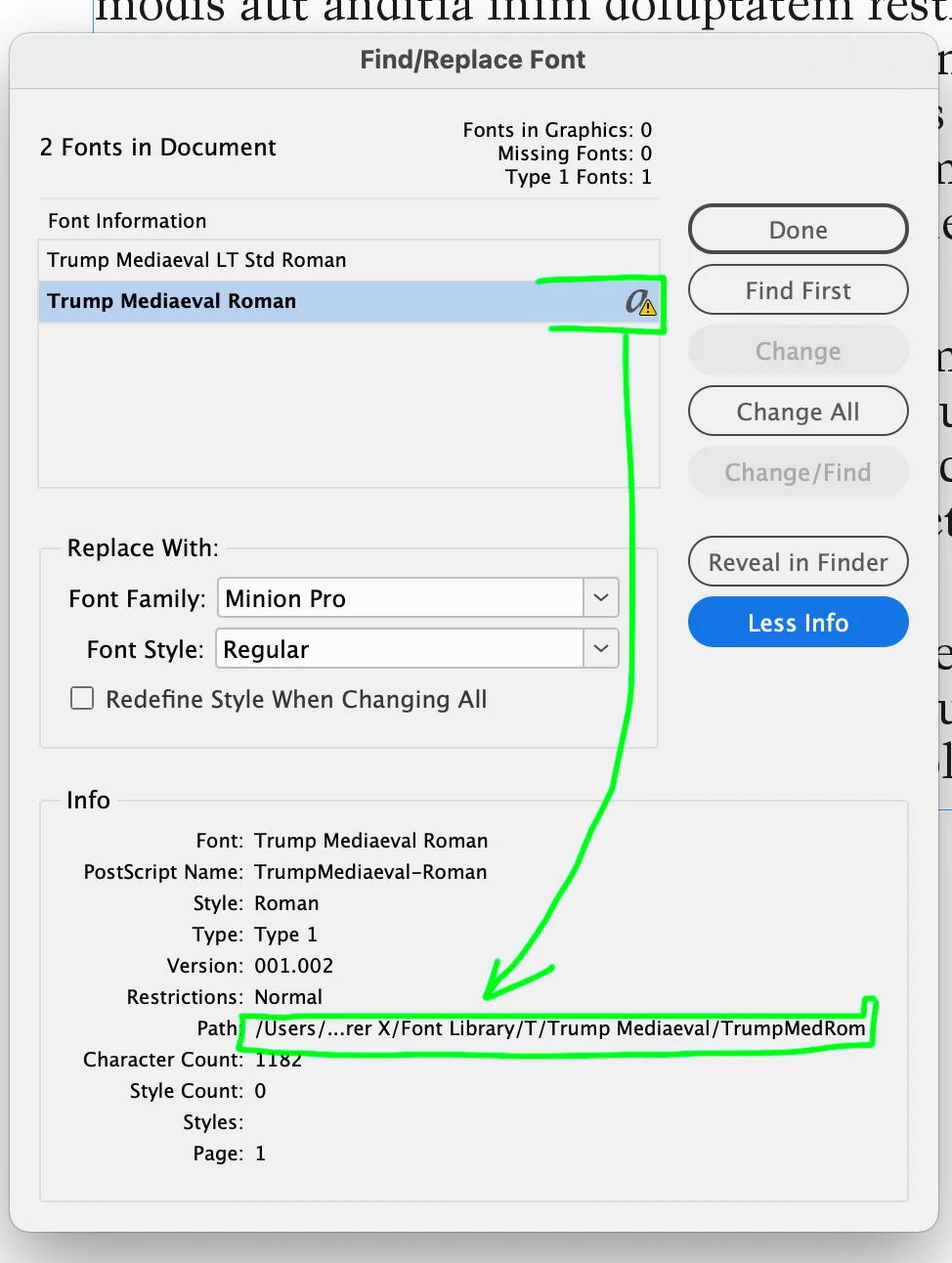
Try this: Apply the Type 1 version to any text, then go to the Find/Change Font dialog and you should see the path to the font's location in the More Info section.


5 replies

Participant
January 5, 2023

Hello,


My client with many users is experiencing this new issue with the recent Adobe CC update for related apps. They receive this error when trying to print something from InDesign, photoshop, illustrator, etc "error in the screenshot below". May I know how can we fix this error since the type 1 font is not supported anymore?


Kevin Stohlmeyer
Community Expert
Community Expert
January 5, 2023

@graphited67884243 please create a new post going forward as this is a separate issue from the OP.

Here is the information on Type 1 end of support. The error will continue to pop up as long as your documents have Type 1 fonts.

https://helpx.adobe.com/fonts/kb/postscript-type-1-fonts-end-of-support.html

Mike Witherell
Community Expert
Community Expert
December 22, 2022

BTW, we don't have a simple situation where the text is fighting with an applied paragraph style and also an applied character style and maybe also local overrides manually applied ... right?

Mike Witherell
Participating Frequently
December 23, 2022

No we don’t; The screenshots are taken from a new try out document without any style..

Kevin Stohlmeyer
Community Expert
Community Expert
December 12, 2022

Hi Connie,


What OS are you running?

How did you uninstall/remove the Type1 version of the font?

Second, when you open InDesign without a document open, what is your default font when you choose your Type tool?

Do you have any styles (Paragraph or Character) that could have this font attached?

Participating Frequently
December 12, 2022

Hi kevin,


I’m running Os Catalina 10.15.7.

I simply searched for the font (command F) and deleted every file containing its name. might not be the best way but don’t know how else to do it. 

Default font is Minion.

Styles are cleared. 

davecourtemanche
Inspiring
December 12, 2022

If you're not using a font manager (Suitcase, etc.) open Font Book and make sure it's removed there. Also, opening an indesign file from a collected folder that has the font in it will automatically load the font. I second the running of Onyx to clear font caches. 

Steve Werner
Community Expert
Community Expert
December 12, 2022

What often helps is to view the fonts which are in your document in the Find/Replace Font dialog box.


Choose Type > Find/Replace Font. It shows all the fonts in your document which warnings when a font is missing.


But you can get more information if you see a problem font by selecting it, then turn on the More Info button on the right. It shows how many characters are in the font, what styles it appears in, version number and more diagnostic information.


Participating Frequently
December 12, 2022

Thank you Steve,


Yes I checked it using the find replace font. My document is clear (there is no missing font). I actually don’t miss that font – I want to be replaced by the new version, as I think it is conflicting it somehow and the reason why the small capitals are not selectable/applicable.

Peter Spier
Community Expert
Community Expert
December 12, 2022

While it may not be missing, does the Type1 version show up in the Find/Replace Font dialog?

If it does you should select it and replace it withthe TrueType version and be sure to check the box to redefine styles as well.

Mike Witherell
Community Expert
Community Expert
December 12, 2022

I don't know what an "InDesign Type Library" is; but could it be that your mystery font is simply being declared in a paragraph style or a character style? Editing those styles would make it gone for good. Also, if you have a placed .AI or .PSD file that is calling for the old mystery font, it might be worth exploring the linked graphics and updating one of those graphics.

Mike Witherell
Participating Frequently
December 12, 2022

Thank you for thinking with me. 

I meant typeface library in Indesign, where you can choose and select a font(weight). You can see the old postscript Type 1 Trump Mediaeval is listed here, just above the new Trump Mediaeval .otf font.  Theses fonts are the same although they don’t appear in the exact same name.

But when I search my computer the only version that is actually stored now it the LT Pro version. The deleted font also shows up in this typeface selecting list in Illustrator, but not in Photoshop.

 The paragraph and character styles in the original documents are cleared. I also created a new blank document without any presets to find the Type 1 font simply remains selectable – and it also works perfectly without warning that the font is actually missing. Haven’t tried printing it yet, and now that I mention this, maybe the font is still active in the printers memory, but I don’t know how to clear that(?)


But the actual issue is I can’t make the Open Type properties of the LT Pro version work properly; as you can see beneath. Choosing small caps won’t make the selected word into small caps, while you can see in Glyph panel that small capitals are included in this font ‘Open Type properies are not applicable’.


Kevin Stohlmeyer
Community Expert
Community Expert
December 12, 2022

This could be a caching issue - try running Onyx on your Mac to see if that clears up font caches.

https://www.titanium-software.fr/en/onyx.html