Participant
May 23, 2021
Answered

Deleting the ‘See also’ feature in an index

  • May 23, 2021
  • 1 reply
  • 388 views

I am having an indexing problem. In the past I used the ‘See also’ feature but now for some entries I need to delete this but every time I do so InDesign crashes. I am forced to trawl thru the index each time I refresh it to manually delete the unwanted entries on the page. I have attached an example of the problem as it exists now. Originally these entries related to another name (BEASLEY) which I have completely removed fromm my document. I have removed the other entry the ‘See all’ was linking with. I have tried every strategy I can think of but the outcome of all is a crash and when I recover the material the problem remains.


BENTON

Brian: .... D8.

Mark: .... D8.

Melanie: .... D8.

BESLY See also ; See also .

BEZELEY See also .

BEZLEY See also .

BILLINGS

May V: .... D6.

BISHOP

Cheryl J: .... D8.

    This topic has been closed for replies.
    Correct answer Barb Binder

    Hi @Graham5ECC:


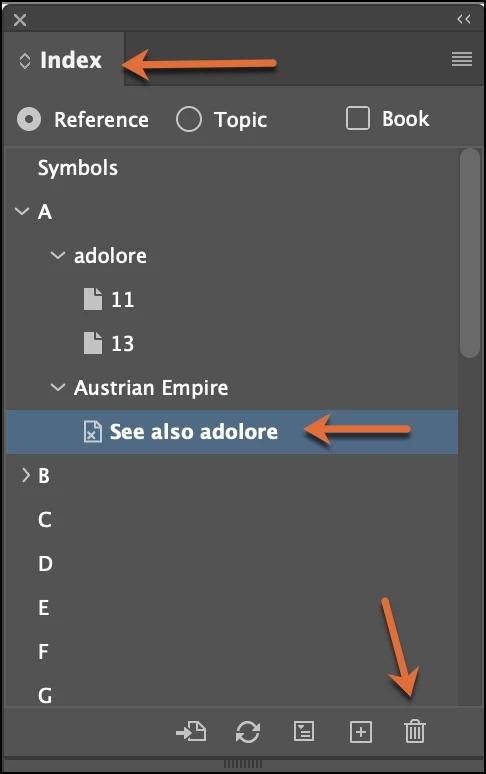
    This isn't quick—and I don't know a way to delete them all at once—but you can open the Index panel, twirl open the reference (i.e., Besly) and drag the see also to the trash. Update the index. 


    ~Barb 

    1 reply

    Barb Binder
    Community Expert
    Barb BinderCommunity ExpertCorrect answer
    Community Expert
    May 23, 2021

    Hi @Graham5ECC:


    This isn't quick—and I don't know a way to delete them all at once—but you can open the Index panel, twirl open the reference (i.e., Besly) and drag the see also to the trash. Update the index. 


    ~Barb 

    ~Barb at Rocky Mountain Training
    Participant
    September 14, 2024

    Unfortunately all this solution does is cause my version of  InDesign to crash. On reopening the offending entry remains! 

    Robert at ID-Tasker
    Legend
    September 14, 2024

    @Graham5ECC


    Maybe your document is corrupted?


    Can you try IDMLing - export as IDML, open, save with a new name - do not overwrite your original file. 


    Otherwise - can you share your document - can be on priv - please click my nickname.