
Inspiring
December 13, 2024
Question

Detect Color Settings vs. PDF Export Setting in a Script

  • December 13, 2024
  • 3 replies
  • 549 views

For the first time we recently received a color settings file from a client along with PDF export settings.


When using a preset that doesn't match the current color settings file the export dialog displays this in the summary:
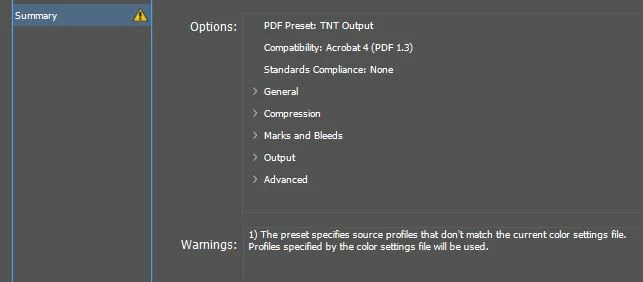
 

Is there a way to detect this mismatch with a script?

This topic has been closed for replies.

3 replies

KenWKAuthor
Inspiring
December 18, 2024

Sorry, should have explained further.


Since CS3 we've been using a script to output PDFs. The script's dialog allows the user to choose from a list of our various PDF job options that are stored on a network drive where it's ensured everyone is using the most recent / same settings. The dialog also  readily shows the description within the job options and has various options to automatically set consistent file names and folders for output.


Up until now we've been using the generic color setting "North America General Purpose 2" with no trouble. For the first time we've received a .csf file, which I thought (correct me if I'm wrong!) isn't file specific and can't be assigned to a file, but has to be activated at the application level.


Basically, I want the script to replicate the check that is happening on the dialog pictured in the original post so the user can adjust the color settings or, maybe, choose to have the script do so.


Thanks for answering and sorry again for the lack of detail.

Robert at ID-Tasker
Legend
December 18, 2024
Robert at ID-Tasker
Legend
December 14, 2024

@KenWK


You want to list profiles assigned to linked objects?


Community Expert
December 14, 2024

Can you not assign the colour profile to the InDesign file? 

Similar to this


https://community.adobe.com/t5/indesign-discussions/how-to-use-custom-color-profiles/m-p/13040098