

ViaMaria
Participant
April 24, 2018
Answered

Devanagari in InDesign

  • April 24, 2018
  • 1 reply
  • 3858 views

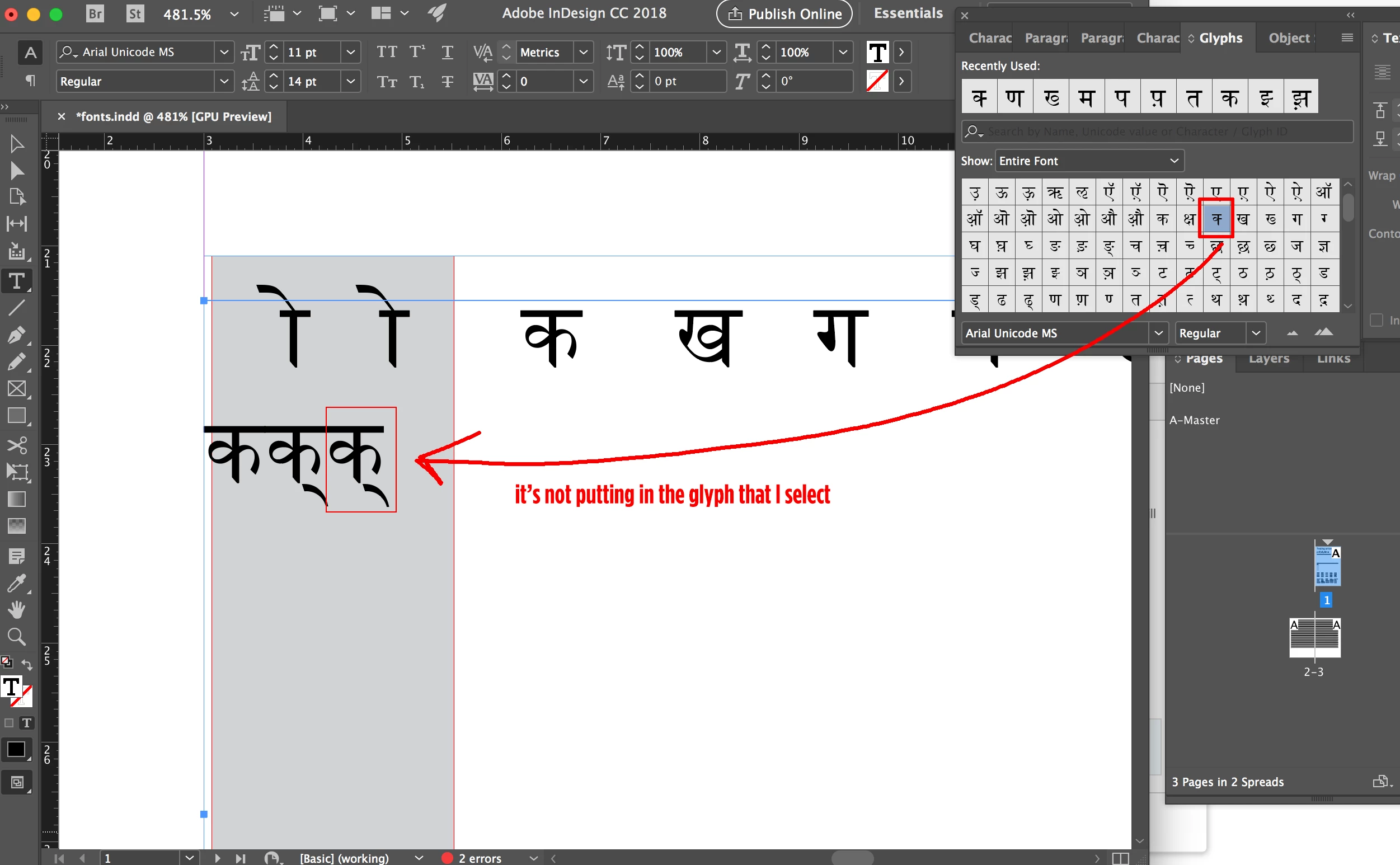
I am trying to do conjuncts in Devanagari using the Devanagari keyboard, using the Arial Unicode font. The problem is that when I use the glyphs to insert the first half of a conjunct, it doesn't put in the glyph I select (1/2 the character). Instead it puts in the full character with a hul after it. I need this to work - any suggestions?
This topic has been closed for replies.
Correct answer nkgillett

I had a similar problem when trying to work with Gujarati text recently. It was the first time I'd worked in that language and didn't realise at first that you needed Adobe World-Ready Paragraph Composer switched on in the Preferences. That sorted out the problem.

1 reply

nkgillettCorrect answer
Inspiring
April 24, 2018

I had a similar problem when trying to work with Gujarati text recently. It was the first time I'd worked in that language and didn't realise at first that you needed Adobe World-Ready Paragraph Composer switched on in the Preferences. That sorted out the problem.

ViaMaria
ViaMariaAuthor
Participant
April 24, 2018

You are my Adobe hero! That completely fixed it! Whew! THANK YOU!!

Embellish everything.