
January 16, 2026
Answered

Dictionary changes language randomly within a document

  • January 16, 2026
  • 3 replies
  • 181 views

I am using Windows 11 Enterprise v24h2 on a 13th Gen intel core with 128MB graphics card and 32 GB RAM running InDesign v21.0. 

I have a document that suddenly starting swiching to the French dictionary, but only within 3 sections/objects. I have checked all the paragraph, character and object styles and all are set to USA English. The preferences are set to USA English. But when I run a Spell Check, it defaults to the French dictionary. 

I have tried restarting the program and resetting the workspace. Neither worked. I tried restarting the computer and that did not work. Even when I change the dictionary within the Spell Check modal it still reverts to French. So far this is only happening in this one document and I need to go to press today!
Correct answer rob day

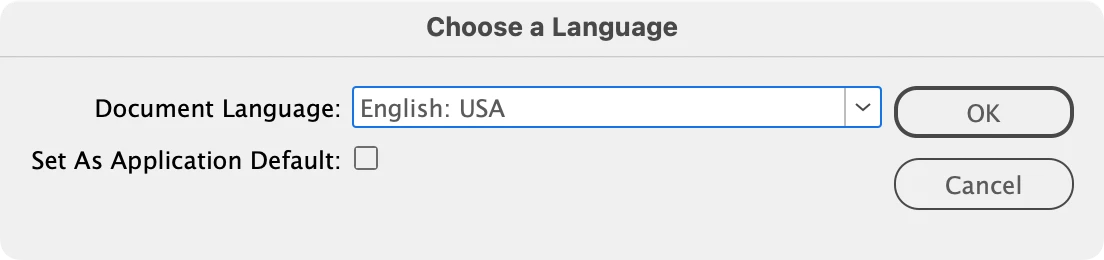
Hi @41315633 , As others have noted Language is a character (not document or paragraph) property, so in some cases it can be challenging the set all of a document’s texts to the same language. This script can help with stubborn language problems:


https://www.dropbox.com/scl/fo/c4b5xq33qe4yeoocbn79d/AA1gsiiG5x2SNfgKW63jK1g?rlkey=ua8ydp888t8y1oktvp2pmhygy&dl=0


The dialog:


Screen Shot 9.png

3 replies

Joel Cherney
Community Expert
Community Expert
January 16, 2026

Are you sure that there are no style overrides?


It's great that you have identified it as marked with paragraph and character styles that are marked as English, but that doesn't mean it's all marked as English. In this example, I marked some of the words as French in MS Word, imported the text, and applied the paragraph style, but didn't clear all overrides. 


high.gif

Even when I change the dictionary within the Spell Check modal it still reverts to French.


Changing the spell check language won't change the assigned language, and it really looks like many of those words were assigned the French language property, which is a character-level property. Assigning a paragraph style won't remove those character-level properties, either. 


If that text is flagged as English in the Character panel, then there's something very wrong with your document. But I suspect that you just have some version control issues in Some Word Processing App Or OTher thatyou can resolve by clearing paragraph formatting overrides. 

Barb Binder
Community Expert
Community Expert
January 16, 2026

The language can be set for the paragraph style, but character styles or formatting can override it. 


Try selecting the text in one of the text frames and then click the ¶* button at the bottom of the Paragraph Styles panel. Does that clear it?


~Barb


2026-01-16_13-50-47 (1).gif

~Barb at Rocky Mountain Training
Anubhav M
Community Manager
Community Manager
January 16, 2026

Hello @41315633,

That does seem strange. Could you try copying all layers/objects from the problematic document to a new one to see if the problem persists?

Looking forward to hearing from you.

Anubhav

January 20, 2026

That was an interesting exercise. I was able to copy the Free Family Saturdays article into a new document and voila, French showed up in the Characters panel. I was able to change it to English USA, and copy and paste it back into the offending document. That seemed to take care of it. The weird part is in the original document, the dictionary in the Character panel was set to English USA. I was able to paste the article back into the document and the dictionary stayed English USA. I have no idea where the French came from. This file was built from scratch and I didn't copy and paste anything into it—even the text came from a notepad document and not Word.

rob day
Community Expert
rob dayCommunity ExpertCorrect answer
Community Expert
January 20, 2026

Hi @41315633 , As others have noted Language is a character (not document or paragraph) property, so in some cases it can be challenging the set all of a document’s texts to the same language. This script can help with stubborn language problems:


https://www.dropbox.com/scl/fo/c4b5xq33qe4yeoocbn79d/AA1gsiiG5x2SNfgKW63jK1g?rlkey=ua8ydp888t8y1oktvp2pmhygy&dl=0


The dialog:


Screen Shot 9.png