
Kimberly24772103jb8b
Participant
September 19, 2022
Question

Dictionary issues after last update

  • September 19, 2022
  • 1 reply
  • 220 views

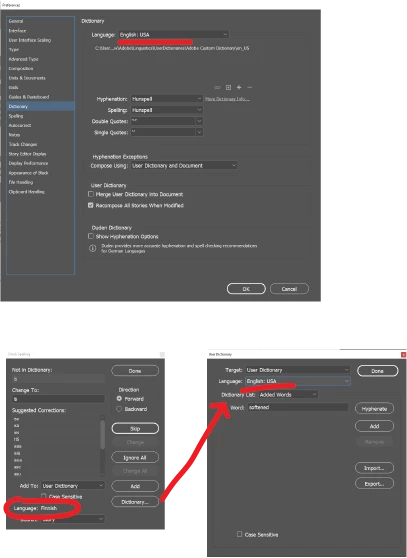
I created a document before the last In-Design update. After the update, I noticed that the dictionary changed to Finish. However, the preferences have it set to English US. I have done everything to change it back to English and even deleted the file and started fresh. It defaults back to Finish every time I try to change it back to English. It's only affecting this document and it's happened every time I create it fresh. I am linking to two images (used in other documents without this effect) and typing in the exact same text (not cut and pasted). 

This is extremely frustrating and disruptive to my process. Can someone suggest a possible fix?
This topic has been closed for replies.

1 reply

Rishabh_Tiwari
Legend
September 19, 2022

Hi @Kimberly24772103jb8b,


Sorry to hear about the trouble. Have you tried changing the preferences with no documents open? If not, please try that. You can also refer to this discussion https://community.adobe.com/t5/indesign-discussions/change-user-dictionary-in-a-document-after-it-s-created/m-p/11712267#M409033 and try the suggestions shared there.


Let us know if this helps or if you need any further assistance.


Regards

Rishabh

Kimberly24772103jb8b
Participant
September 19, 2022

Thank you, it worked. But why would it just change itself to Finish? Not Dutch, German, or Hindi, Finish. I would have never gone in and changed it and it defaulted to finish by itself even after I deleted the original document and created a new one.