Participant
July 6, 2026
Question

Die Nummerierung der Miniatur im Fenster „Seiten“ soll analog zur Seitenzahl sein. Beispiel: ein Artikel meines Magazins beginnt bei Seite 24. Im Fenster „Seite“ beginnen die Miniaturen aber immer mit 1. Frage: wie kann ich das ändern?
  • July 6, 2026
  • 3 replies
  • 24 views


    3 replies

    Dave Creamer of IDEAS
    Community Expert
    Community Expert
    July 6, 2026

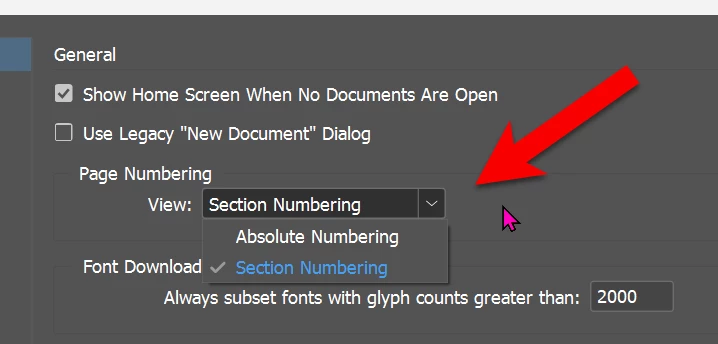
    As ​@Abhishek Rao mentioned, check your General Preferences. Here is the setting:


    David Creamer: Community Expert (ACI and ACE 1995-2023)
    Participant
    July 7, 2026

    Thank you, that's it!

    Abhishek Rao
    Community Manager
    Community Manager
    July 6, 2026

    Hi ​@julia_0604,


    Thanks for reaching out. Could you please confirm what Page Numbering > View is currently set to under Preferences > General?

    If it’s set to Absolute Numbering, please change it to Section Numbering, then go back to the Pages panel and check whether the page thumbnails now display the section page numbers.


    Please let us know how it goes.

    Abhishek

    Participant
    July 7, 2026

    That’s it. Thank you so much!

    Mike Witherell
    Community Expert
    Community Expert
    July 6, 2026

    Guten tag,

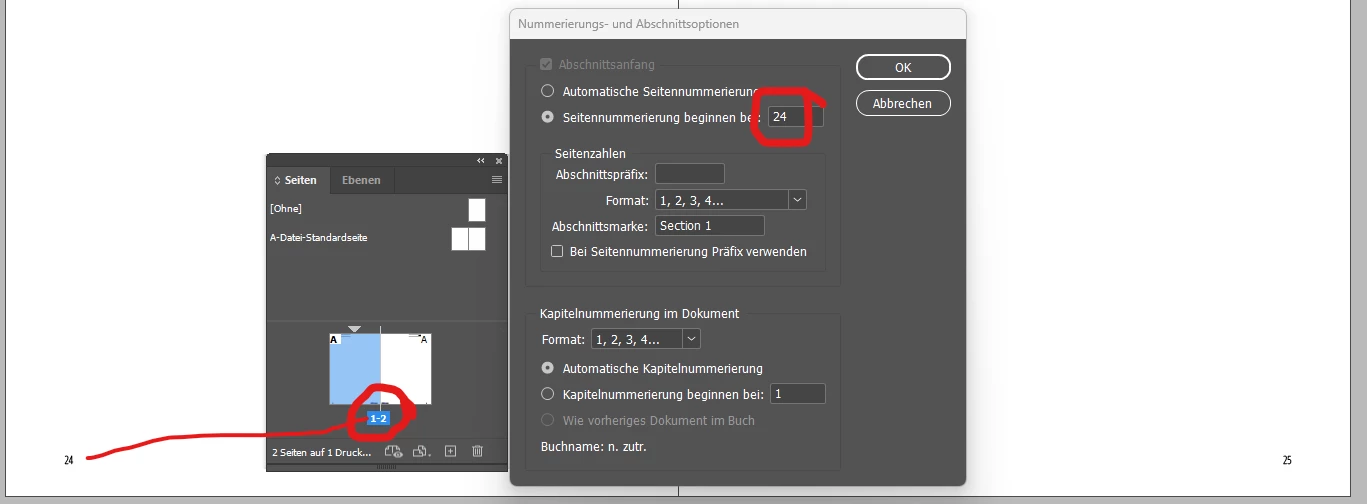
    While selected to that page, click the Pages panel menu button. Choose Numbering and Section Options. What do you see in that resulting dialog box?

    Mike Witherell
    Participant
    July 7, 2026

    That’s it