e ch n
Inspiring
March 16, 2025
Answered

Diferencia de fuentes entre InDesign y en Ilustrador.

  • March 16, 2025
  • 4 replies
  • 1420 views

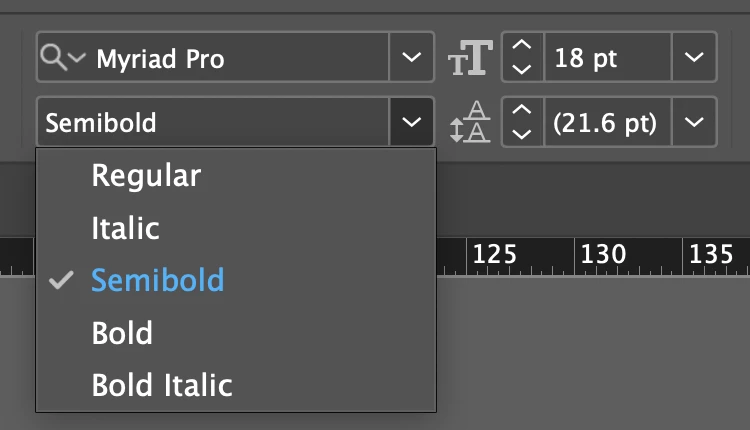
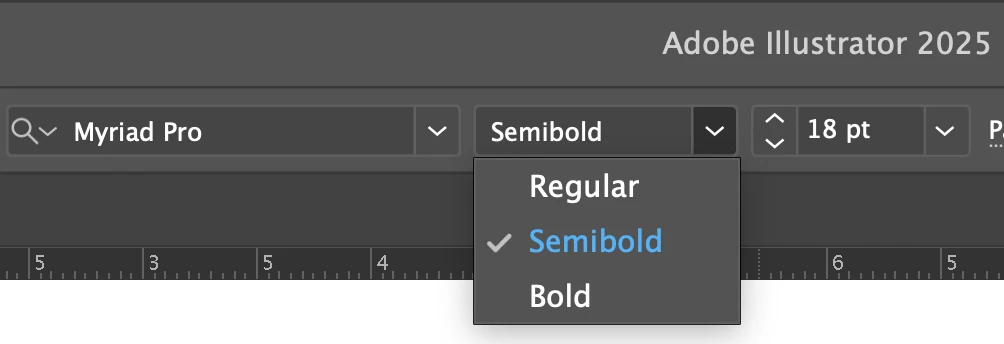
Hice un boceto en Ilustrador, y al realizar el archvio para ID, la "supuesta" misma familia tipográfica me aparece con algunos estilos "iguales" y otros no aparecen, por lo que no puedo igualar el archivo de impresión al del boceto...


¿Por qué puede estar sucediendo esto?
 

Correct answer Dirk Becker

Select that Semibold in the Find/Replace Fonts list - as I wrote above.

You should see its file path in the bottom font info display of the dialog.

As @Mike Witherell wrote, these files can exist in different locations of the file system, and still contribute to the same font family. While it is generally preferrable to have all related files of a font family in one place, that required Myriad Pro is a special case.


The red rectangle is a different font family "Myriad Variable Concept" which can demonstrate "variable font" technology, but in real life misses essential characters.

4 replies

Abhishek Rao
Community Manager
Community Manager
March 20, 2025

Hi @8496505 n,  


Thanks for trying the suggestions and sharing your findings!

I'm checking this behavior with the product team to get more insights and will update you once I hear back. Appreciate your patience!  


Abhishek

e ch n
e ch nAuthor
Inspiring
March 21, 2025

Gracias @Abhishek Rao 


Continuaré atento, al pendiente y paciente. 

Legend
March 17, 2025

Create some document and apply the font in question.

Open the font usage dialog (search / replace fonts)

Select the used font.

Use the "more info" button.

See the installed location of the font.

See that for example Myriad Pro Italic is a "required" font of the InDesign Installation.

Do not delete required fonts!


e ch n
e ch nAuthor
Inspiring
March 18, 2025

@Dirk Becker @Robert at ID-Tasker @Mike Witherell 


Bueno, ahora me está costando un poco de trabajo encontrar el hilo a todo esto, pero paso por paso...


  1. En la captura de pantalla se aprecia la ruta -que entiendo es local- donde está almacenada la fuente Myriad Pro y algunas de sus variantes
  2. En los rectángulos azules se muestan las coincidencias, y en rojo, las que al menos por nombre, no coinciden con la ventana de "Find/Replace Font"
  3. ¿Las del rectángulo rojo, por qué no coinciden, qué hay respecto de ellas?
  4. Haría falta ubicar la Myriad Pro Semibold, que sí se puede usar y sí aparece en la ventana de "Find/Replace Font"


Dirk BeckerCorrect answer
Legend
March 18, 2025

Select that Semibold in the Find/Replace Fonts list - as I wrote above.

You should see its file path in the bottom font info display of the dialog.

As @Mike Witherell wrote, these files can exist in different locations of the file system, and still contribute to the same font family. While it is generally preferrable to have all related files of a font family in one place, that required Myriad Pro is a special case.


The red rectangle is a different font family "Myriad Variable Concept" which can demonstrate "variable font" technology, but in real life misses essential characters.

Robert at ID-Tasker
Legend
March 16, 2025

@e ch n


In case of InDesign - the order where InDesign is looking for fonts is:


- Document fonts folder - next to the INDD file, 

- Adobe Fonts, 

- System Fonts. 


Fonts activated by Font Managers - depends on how they are configured. 


e ch n
e ch nAuthor
Inspiring
March 17, 2025

Gracias, Robert.


Arriba mi respuesta detallada.

Mike Witherell
Community Expert
Community Expert
March 16, 2025

Hello echn,


Fonts might come from:

Adobe Fonts

A "Document fonts" folder under the InDesign file

The Fonts folder within the individual application

A font management software

Having more than one of these at the same time can easily confuse InDesign or Illustrator.

So, what you might try, is hunting down all the places this font might be installed. Remove all except one place. Restart your computer. Maybe the problem will clear up.

Mike Witherell
e ch n
e ch nAuthor
Inspiring
March 17, 2025

Gracias @Mike Witherell @Robert at ID-Tasker 


Bueno, verifiqué todos los lugares, pero salvo la propia fuente que muestra cada programa -AI y ID- no enconté las fuentes en los otros lugares, lo que me haría pensar que los programas las obtienen de Adobe Fonts, y si tal fuera el caso, ¿por qué serían distintas, implicaría que dentro de Adobe Fonts hubiera familias diferentes con el mismo nombre, lo cual no parece lógico.


  1. Adobe Fonts muestra la familia, pero con únicamente dos variantes, ni son las 3 de AI ni las 5 de ID
  2. No tengo fuentes personales instaladas en el sistema operativo
  3. Font Book no tiene esa familia
  4. La carpeta de fuentes el programa aparece vacía
  5. No hay fuentes en la carpeta donde se almacena el archivo


Adjunto capturas de pantalla de los lugares donde busqué y no encontré la familia "Myriad Pro" y sus 5 variantes como se muestran en ID, a diferencia de AI que muestra sólo 3.

Me pregunto:


  1. ¿Dentro de cada programa, hay alguna forma de saber la ruta desde dónde obtienen la fuente?
  2. ¿Hay forma de decirle al programa desde dónde obtenga la fuente, a fin de que ignore otras alternativas?

    Gracias.


Robert at ID-Tasker
Legend
March 17, 2025

@e ch n


File / Psckage / Fonts - if you click on a font - there will be a file path: