
Disable Alert Prompt From Link Export Script?
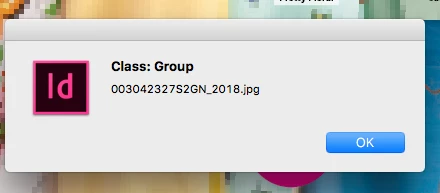
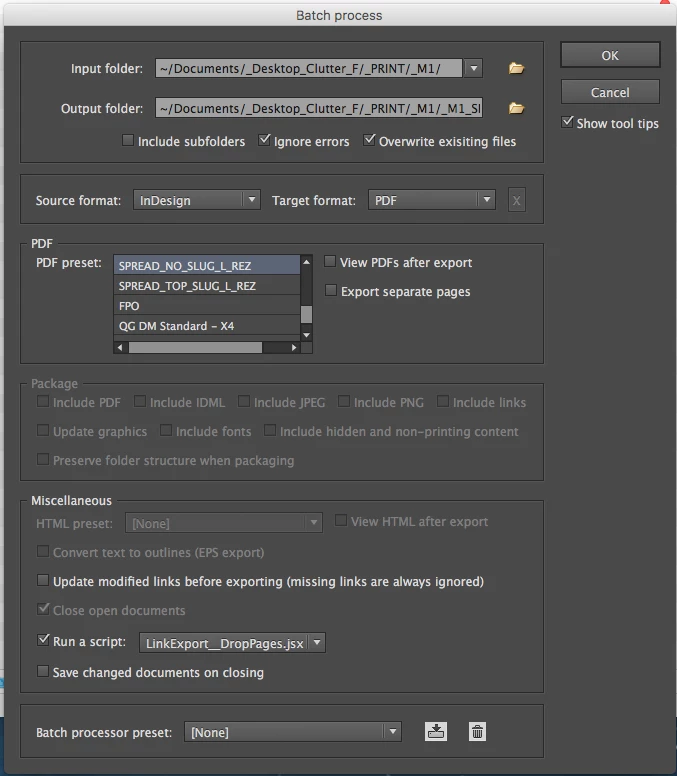
When attempting to batch convert indds to PDFs, using Peter Kharel’s script (which has the ability to attach another script to it), in conjunction with a script pieced together in order to generate an image list (Martin Fsicher’s script) as well as drop all pages after the second page, alerts are encountered during the batching that the user is forced to click through in order for the process to continue.
I tried playing around with commenting out certain sections of the code in an attempt to neutralize whatever part of the code was causing the prompts, but nothing worked.
I think the prompts are for grouped frames containing images.
Any way I can run the below script without getting any alert prompts whatsoever — in order to enable the script to run through without having to monitor the entire process?
Any help is very much appreciated. Cheers.
1. Alerts encountered when running the cobbled together LinkExport_DropPages script.
2. Peter Kharel’s batch convert script
// LinkExport-Pro_1a.jsx
//DESCRIPTION: Exports some information about placed images in the active Document into a textfile in the same folder as the document.
// The values are tab-separated, so that the content of the file can be copied to Excel via Clipboard.
// The exported textfile has the ending ".txt".
// Script by Martin Fischer (www.hilfdirselbst.ch)
//
var myDoc = app.documents[0];
if (myDoc.saved == false)
{
alert("Error.\rYou must first save your document.");
exit();
}
var myDocName = myDoc.name.split(".indd")[0];
var myTXT_File = myDocName + '.txt';
var myPath = myDoc.filePath + "/";
var myCreator = "R*ch";
var myType = "TEXT";
var theFiles = myDoc.links;
var myData = "link\tpath\tpage\twidth\theight\t% vertical\t% horizontal\teff. PPI\r";
var f = new File( myPath + myTXT_File );
f.open( 'w', myType, myCreator );
f.writeln( myData );
for (myCounter = 0; myCounter<theFiles.length;myCounter ++ ) {
var myBounds = theFiles[myCounter].parent.geometricBounds;
var myWidth = Math.round(myBounds[3]-myBounds[1]);
var myHeight = Math.round(myBounds[2]-myBounds[0]);
var myScaleVert = Math.round(theFiles[myCounter].parent.absoluteVerticalScale);
var myScaleHori = Math.round(theFiles[myCounter].parent.absoluteHorizontalScale);
var myImagePath = theFiles[myCounter].filePath;
// WARNING if vertical scale is different to horizontal scale
if (myScaleVert != myScaleHori)
{
var myWarning = "% vertical is not equal % horizontal";
}
else
{
var myWarning = "";
}
try
{
myPPI = (theFiles[myCounter].parent.effectivePpi);
}
catch (e)
{
myPPI = 0;
}
var myClass = theFiles[myCounter].parent.parent.parent.constructor.name;
// image placed on page
if (myClass == "Page")
{
myPage = theFiles[myCounter].parent.parent.parent.name;
}
// image embedded
else if (myClass == "Character")
{
try
{
myPage = theFiles[myCounter].parent.parent.parent.parentTextFrames[0].parent.name;
}
catch(e)
{
myPage = "versteckt im Überlauf";
}
}
else {
try
{
// image placed outside the pages
myPage = "Spread of " + theFiles[myCounter].parent.parent.parent.pages[0].name;
}
catch(e)
{
// don't know the page where the image is placed
alert ("Class: " + myClass + "\r" + theFiles[myCounter].name);
}
}
myData = theFiles[myCounter].name + "\t" + myImagePath + "\t" + myPage + "\t" + myWidth + "\t" + myHeight + "\t" + myScaleVert + "\t" + myScaleHori + "\t" + myPPI + "\r";
f.writeln(myData);
}
f.close();
//Drop Pages script added
/*
Strategy:
To export only the first 2 pages, remove all others, export and do not save when closing the document.
WARNING:
Do not save the InDesign documents when run with
Peter Kahrel's Batch Processor Script!
ALWAYS DO:
[ ] Save documents on closing
DO NOT:
Save documents on closing
*/
// Removes all pages on the processed document, but pages [0] and [1]:
if(app.documents[0].pages.length > 2)
{
app.documents[0].pages.itemByRange(2,-1).remove();
};
 AdChoices