
Christopher Pickering
Known Participant
March 21, 2020
Answered

Discretionary line breaks are ignored in Grep searches?

  • March 21, 2020
  • 1 reply
  • 758 views

Hi,


I have some text with discretionary line breaks in it. When I do a grep search, it ignores the breaks as characters. 

For example, text is "a<discretionary_line_break>b"

Grep is "ab"
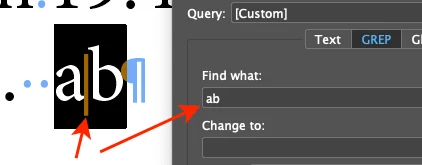


The text containing the break will be found, but I don't want to find it... only exact "ab" matches.


Do you have any ideas of how to find matches that do not have the break char? (~k)


Thanks!

Christopher

This topic has been closed for replies.
Correct answer David Popham

Hi Christopher,


That's interesting how InDesign ignores the discretionary line break, but not helpful in your case.


However, you can find "a + discretionary line break + b", so that does allow a workaround of that consists of three Find/Change operations instead of one, where you temporarily alter those instances, then change them back after completing your intended search.


First Find/Change operation

Find: a~kb
Change: <a|b> (Note: you can use whatever pattern you like here, as long as it's something that doesn't naturally occur in your content. This is only a suggestion.)


Second Find/Change operation

Perform your regular "ab" search


Third Find/Change operation

Find: <a\|b>
Change: a~kb

1 reply

David Popham
David PophamCorrect answer
Participating Frequently
March 21, 2020

Hi Christopher,


That's interesting how InDesign ignores the discretionary line break, but not helpful in your case.


However, you can find "a + discretionary line break + b", so that does allow a workaround of that consists of three Find/Change operations instead of one, where you temporarily alter those instances, then change them back after completing your intended search.


First Find/Change operation

Find: a~kb
Change: <a|b> (Note: you can use whatever pattern you like here, as long as it's something that doesn't naturally occur in your content. This is only a suggestion.)


Second Find/Change operation

Perform your regular "ab" search


Third Find/Change operation

Find: <a\|b>
Change: a~kb

Christopher Pickering
Known Participant
March 21, 2020

Thanks for the suggestion!