Participant
January 9, 2018
Question

Distorted Images in InDesign CC 2018 Windows

  • January 9, 2018
  • 2 replies
  • 654 views

Hi all,

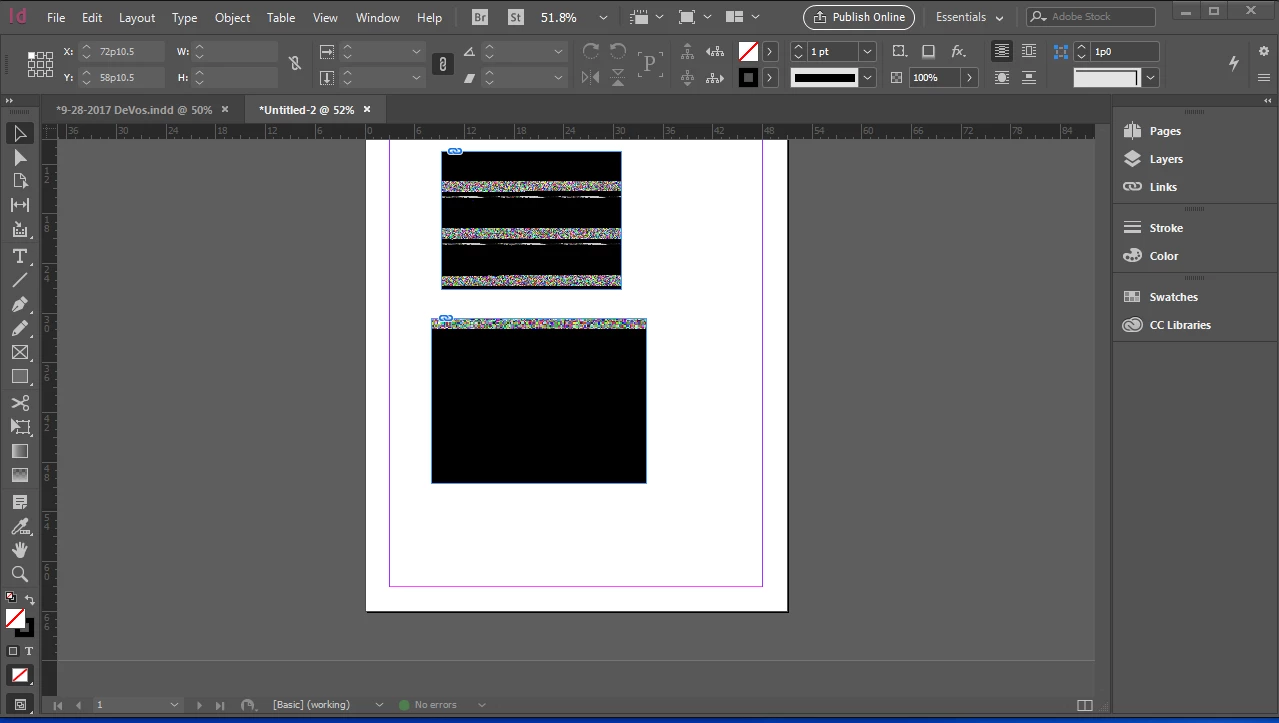
I've been using InDesign to make posters for work (very basic stuff). After not using InDesign for a couple of weeks, when I tried to place a photo in a document today it appeared extremely distorted. (See the screenshot below.) Both of these are totally normal photos that open fine in photoshop, and if I open a document I've already made, the images there are normal.

I'm running Windows 7 on my Dell laptop, and am fully updated to InDesign CC 2018. From what I've read, similar problems have occurred in Mac High Sierra, but that seems to be a result of GPU acceleration, which in not yet included in InDesign for Windows. I'm a complete amateur at this, and I'm at my wits end. Does anyone have clues into what's going on?

Thanks,

Olivia
This topic has been closed for replies.

2 replies

Jeff Witchel, ACI
Community Expert
Community Expert
January 10, 2018

Does this happen with just some images? Or all images? If you have an image that you have successfully Placed in the past, try it in your new document, to see if it still places correctly.

Have you tried opening the images in Photoshop?

BobLevine
Community Expert
Community Expert
January 9, 2018

What if you create a different document?

Participant
January 9, 2018

Unfortunately, creating a new document doesn't make a difference. Neither does changing the display performance settings or uninstalling and reinstalling.

BobLevine
Community Expert
Community Expert
January 9, 2018

Might be time to try trashing your preferences.

https://forums.adobe.com/thread/526990