

sureshkumarc20579032
Known Participant
December 22, 2017
Answered

Document contains an invalid frame - Error

  • December 22, 2017
  • 3 replies
  • 6745 views

Dear Team,

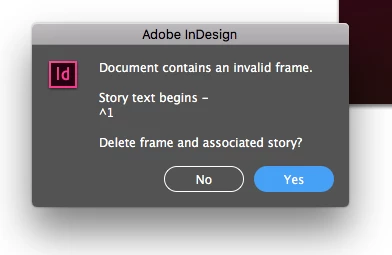
We are working in InDesign CC 2017 on Mac OS-X, While deleting some box item in pages InDesign unexpectedly closes. We are trying to open the file, but InDesign shows "Document contains an invalid frame" alert message. We are not able to recover after selecting Yes/No option.

Could you please suggest any option to recover the InDesign file.
Regards,

Suresh

    Correct answer SanyamTalwar

    There are multiple factors both internal and external to InDesign application that can lead to document corruption. However, I can take a look and see if the file can be repaired. Please email your InDesign file to corrupt_indesign_docs@adobe.com and I will take a look at the document.

    If the file is larger than 10 Mb, you can zip (and password protect) the file and upload to Creative Cloud account (or Dropbox) and send us the document link.

    3 replies

    typegirl
    Known Participant
    July 25, 2018

    Just a note for anyone looking for this problem in the future. I exported to IDML and the problem [seems to have] disappeared.

    Participant
    June 16, 2022

    I have the same issue, exported to IDML and the problem disappeared. Thanks

    SanyamTalwar
    SanyamTalwarCorrect answer
    Participating Frequently
    January 2, 2018

    There are multiple factors both internal and external to InDesign application that can lead to document corruption. However, I can take a look and see if the file can be repaired. Please email your InDesign file to corrupt_indesign_docs@adobe.com and I will take a look at the document.

    If the file is larger than 10 Mb, you can zip (and password protect) the file and upload to Creative Cloud account (or Dropbox) and send us the document link.

    Bill Silbert
    Community Expert
    Community Expert
    December 22, 2017

    In looking over some previous reports about this it seems like this may be the result of a program bug that had been reported. You may want to check out this thread: Document contains an invalid frame?. You should also try exporting your file as an IDML and then reopening it through your version of the program. Sometimes this method will clean up some corruption. From what I have read it may be that the file is damaged and unrecoverable but you can try checking out this link also: Recover documents and undo mistakes in InDesign. Since apparently this bug was reported for CC 2017 it would probably be a good idea to upgrade to CC 2018. If you do please be warned that the option "Import previous settings and preferences" in the Advanced Options that appear during the install should be UNCHECKED so that any problems from CC 2017 are not imported into CC 2018.

    Participant
    May 9, 2025

    It's 2025 and this problem is still happening. 

    Robert at ID-Tasker
    Legend
    May 9, 2025
    quote

    It's 2025 and this problem is still happening. 


    By @Lachlan353479754aog


    Maybe your file got corrupted - because you were working on it for too long - without doing Save As with a new name from time to time?