

Daniel Flavin
Inspiring
January 9, 2012
Question

Document Fonts not displaying in PDF

  • January 9, 2012
  • 4 replies
  • 49651 views

Making the leap into CS5.5 I thought it would be great to take advantage of the Document Fonts folder usage.

(I'd love to have the free time (ok, the ambition) to purge the system fonts folder.)

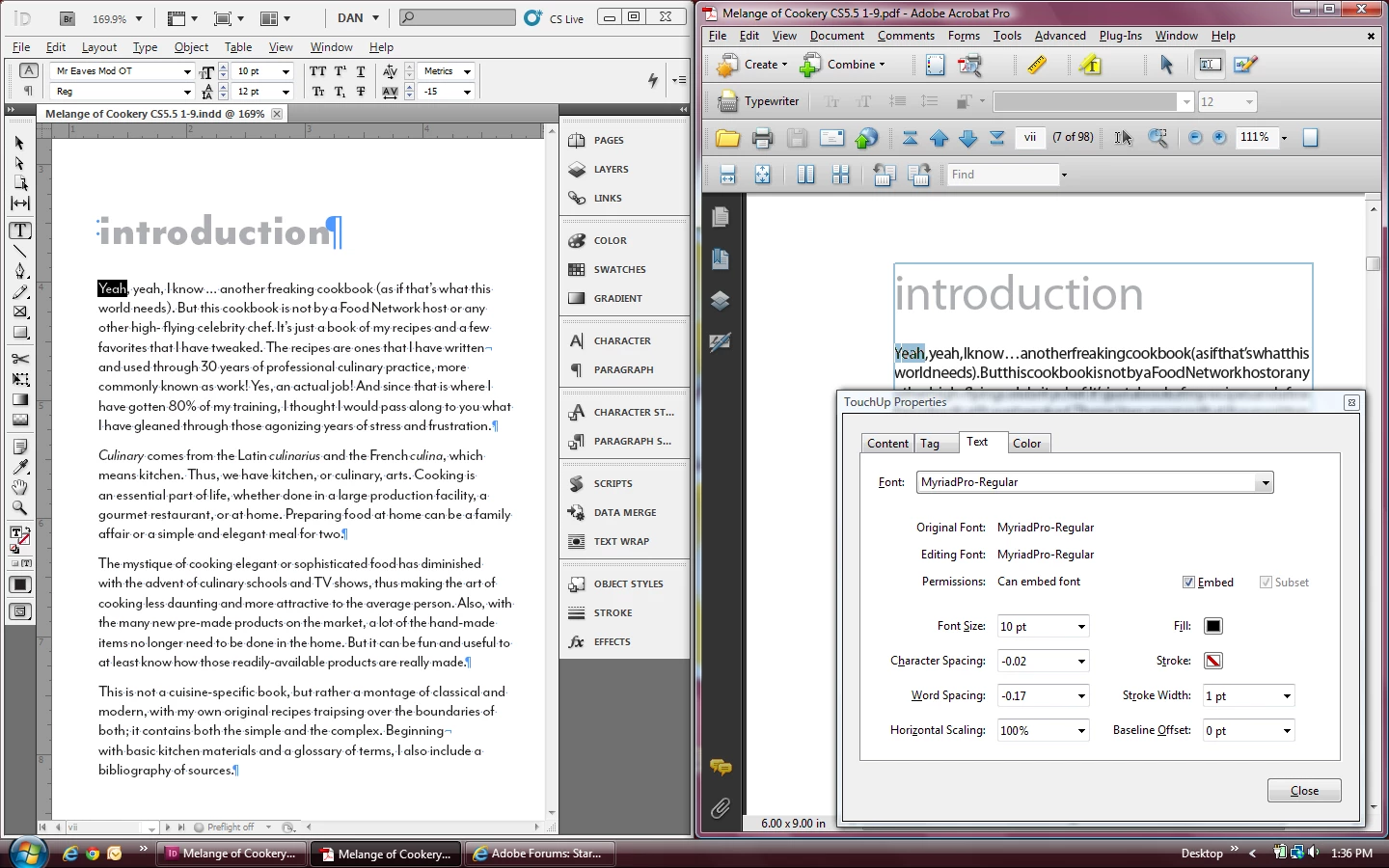
Paths to several fonts are in the document folder across a local network, exported for print, press quality, fonts confirmed embedded (subset) in Acrobat.

Acrobat is displaying all the type in Minion Pro, with the body, head, etc. fonts embedded.

Is this a doc fonts bug or an Acrobat preference setting?
    This topic has been closed for replies.

    4 replies

    Peter Spier
    Community Expert
    Community Expert
    January 11, 2012

    Exports fine here, too.

    Daniel, did you try trashing your prefs?

    Peter Spier
    Community Expert
    Community Expert
    January 11, 2012

    I wonder if it's as simple as Daniel needing to trash his prefs?

    If somene sends me the file I'll try it here on Win7, though.

    Peter Spier
    Community Expert
    Community Expert
    January 9, 2012

    I THINK I may know what the problem is here. The font is T1, not OpenType, I think (myfonts.com doesn't show an Opentype version available) and Document Installed Fonts doesn't work properly with T1 fonts.

    BobLevine
    Community Expert
    Community Expert
    January 9, 2012

    Why should that matter if the right font was used in the InDesign document?

    (I’m replying by email so I hope I haven’t missed anything)

    Bob

    Peter Spier
    Community Expert
    Community Expert
    January 9, 2012

    Bob, you have to start reviewing the threads.

    The problem here is that the font supposedly is installed and in use in ID (not showing as missing) and after Export the PDF properies show it as an embedded subset, but the actual font in the PDF, when you use the touch-up tool to confirm, is Myriad Pro, not the subset Mr Eaves.

    I bet you have a better memory than I, though, about exactly what the problem is with DIF and T1 fonts.

    Peter Spier
    Community Expert
    Community Expert
    January 9, 2012

    The document fonts feature ONLY does one thing, install the fonts in the document fonts folder for use while editing the current document. It has nothing to do with what gets displayed by Acrobat once the PDF is exported.

    You checkd the document properties in Acrobat and confirmed that Mrs Eaves is embedded? If so, this is either that you have use local fonts selected in the Acrobat prefs (which I thought would still use embedded fonts if the font was missing onthe system, but I could be wrong), or it's an Acrobat bug of some sort, I would say.

    John Hawkinson
    Inspiring
    January 9, 2012

    Well, or it's an InDesign bug that for some reason it is not embedding the font in the PDF that it should be.

    Perhaps related to a font that is marked as not licensed for embedding?

    I would try another PDF viewer, and perhaps go try to dig into the details, both in Document Properties in Acrobat, and also the various preflights that can do analysis of this stuff.

    Peter Spier
    Community Expert
    Community Expert
    January 9, 2012

    John Hawkinson wrote:

    Well, or it's an InDesign bug that for some reason it is not embedding the font in the PDF that it should be.

    Perhaps related to a font that is marked as not licensed for embedding?

    I would try another PDF viewer, and perhaps go try to dig into the details, both in Document Properties in Acrobat, and also the various preflights that can do analysis of this stuff.

    If the font is marked as restricted, it's not a bug if ID honors the restriction, and if ID is not embedding it, but Acrobat is reporting it as embedded in the fonts list under document properties, I'd say that's an Acrobat bug.

    There WAS a font packaging bug on Mac, but Daniel is on Windows, and as far as I know nothing similar has been reported up to now for embedding. I stand by my firts response -- if the font shows as embedded in the list in Acrobat, the problem is in Acrobat, not ID, and there is unlikely to be any connection to the Document Fonts feature.

    If the font is embeddable and fails to embed, that's a different animal.