juan_miguela24038520
Participant
April 9, 2015
Answered

document.search() is not a function

  • April 9, 2015
  • 3 replies
  • 2062 views

We recently upgraded from InDesign CS2 to InDesign CS6.

We have scripts that we ran on Windows InDesign CS2 that we are trying to get to run on a Mac InDesign CS6.

We are getting the following error when executing one of the scripts.
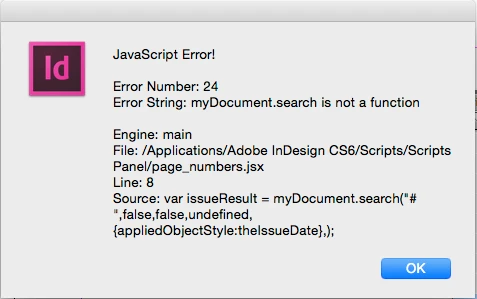
I looked in the Object Model Viewer and did not find a method search() for Document.
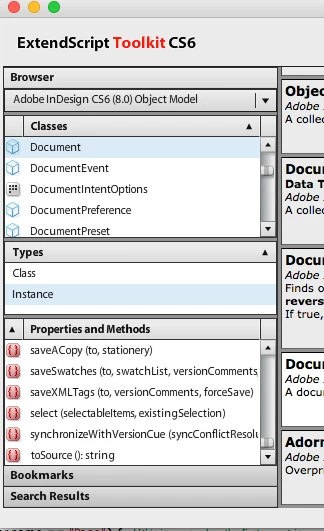
Since it looks like this worked before in CS2, I am wondering if anyone knows if this method was deprecated in CS6 and if there is another method that does the same work?

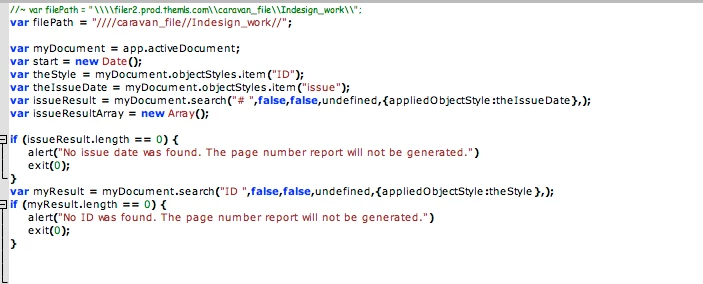
This is the code that gets executed.
Any help in the right direction is appreciated.

This topic has been closed for replies.
Correct answer Stefan Rakete

Hi Juan,

the search has been replaced by findText(), findGrep() and findObject().

It looks like you need the findObject() function on the document:

mySearchFunction = function () {


    var curDoc = app.activeDocument;


    var searchElements = [];

    //app.resetGrep();

    var findObjectStyle = curDoc.objectStyles.itemByName("myObjectStyleName");

    app.findObjectPreferences.appliedObjectStyles = findObjectStyle;


    searchElements = curDoc.findObject();

    //app.resetGrep();


    return searchElements;


}

Thanks Stefan

www.indesignscript.de

3 replies

Jongware
Community Expert
Community Expert
April 10, 2015

Create a new folder in your User Scripts folder and name it "Version 2.0 Scripts". This is specifically described in the various JavaScript Guides. Quoting from the CS5.5 one (which happened to be the top Google hit):

InDesign CS5 can run scripts using earlier versions of the InDesign scripting object model. [...]

InDesign CS5 correctly interprets a script written for an earlier version of the scripting

object model. To do this, run the script from a folder in the Scripts panel folder named Version 5.0

Scripts (for InDesign CS3 scripts) or Version 2.0 Scripts (for InDesign CS2 scripts), or explicitly set

the application's script preferences to the old object model within the script (as shown below). Put the

previous version scripts in the folder, and run them from the Scripts panel.

Stefan Rakete
Stefan RaketeCorrect answer
Inspiring
April 10, 2015

Hi Juan,

the search has been replaced by findText(), findGrep() and findObject().

It looks like you need the findObject() function on the document:

mySearchFunction = function () {


    var curDoc = app.activeDocument;


    var searchElements = [];

    //app.resetGrep();

    var findObjectStyle = curDoc.objectStyles.itemByName("myObjectStyleName");

    app.findObjectPreferences.appliedObjectStyles = findObjectStyle;


    searchElements = curDoc.findObject();

    //app.resetGrep();


    return searchElements;


}

Thanks Stefan

www.indesignscript.de

juan_miguela24038520
Participant
April 10, 2015

@Stefan Thanks that worked like a charm.

@Jongware Thanks. Your solution also worked, but we're going to try and update the scripts to work with the current version of cs6.

Loic.Aigon
Legend
April 10, 2015

Hi,

I think you want to use doc.findText() or doc.findGrep()

Loic

http://www.ozalto.com