

Blue Roses
Participant
April 13, 2022
Question

Document Setup Won't Change and Unable to Adjust Margins/Columns

  • April 13, 2022
  • 2 replies
  • 251 views

I currently have two documents setup with these proportion. However, neither document adjusts when I alter the present values and the second document's gutters are just plain wrong (They don't match the first document). The ability to adjust the columns is not even present. 
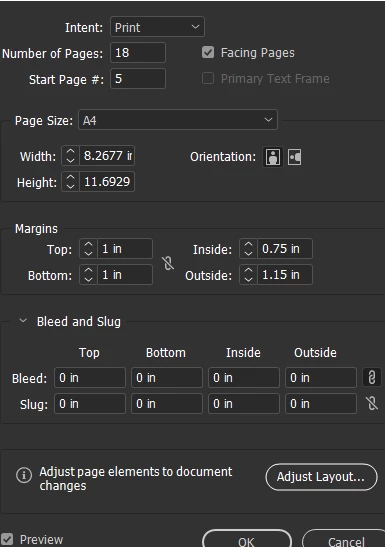
It doesn't appear as though changes in the document setup page alter the document and there is no ability to adjust the pages from the page menu. 

This topic has been closed for replies.

2 replies

Legend
April 13, 2022

Once a file is set up, changes to margins and columns on individual document pages or Parent (Master) pages can be made through the Layout > Margins and Columns menu.

Blue Roses
Participant
April 13, 2022

Thanks a ton! I'm... much dumber than I thought about this stuff.

Community Expert
April 13, 2022

Drag your master page from the Pages Panel onto the Page in the Pages panel to apply the Master page to that page (all done in the Pages Panel)


For adjusting Columns go to Layout>Margins & Columns.