markh59319623
Inspiring
May 17, 2023
Answered

Document size set to 6x9 but exporting to PDF creates 5.5x8.5 and KDP no like for 6x9

  • May 17, 2023
  • 3 replies
  • 4471 views

Hi,

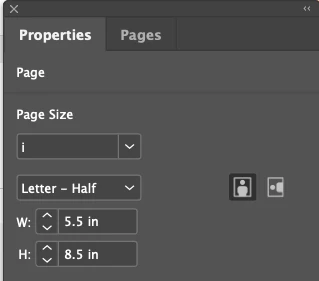
I am trying to figure out how to get my INDD file exported to 6x9 trim size for load to KDP. It will all be printed in B&W and there are no fancy bleeds... just straight text on the page. But every time I export it, it creates a 5.5x8.5. What am I missing? Here is document setup. I did make sure there is no check in "Crop Marks" still... why is this being so difficult?

This topic has been closed for replies.
Correct answer markh59319623

Ding ding ding ding:

I guess I need to somehow apply that page size to all of the page templates I have. UGH... and THEN reflow the entire book. How exciting. But thanks... first answer to send me on a path that should help me resolve.

3 replies

rob day
Community Expert
Community Expert
May 17, 2023

Hi @markh59319623 , Did you double check the page sizes? A document has a default Document Setup Width and Height, but the pages themselves can be any size. Here I’ve use the Page tool and  Transform panel to customize the page size to 5.5"x8.5":


Also, how are you checking the PDF’s page sizes? With AcrobatPro’s Preflight? Can you share the PDF?

markh59319623
markh59319623AuthorCorrect answer
Inspiring
May 17, 2023

Ding ding ding ding:

I guess I need to somehow apply that page size to all of the page templates I have. UGH... and THEN reflow the entire book. How exciting. But thanks... first answer to send me on a path that should help me resolve.

rob day
Community Expert
Community Expert
May 17, 2023

Acrobat’s Document properties uses the first page for the Description Page Size—Preflight will list all the page sizes


You can select all of the pages in the Pages panel, and with the Pages tool and the Transform panel, set them all to the same dimension:


Here the transform is from the center


Barb Binder
Community Expert
Community Expert
May 17, 2023

Hi Mark:


How are you determining that the PDF has a different paper size? Are you printing it and measuring it? Acrobat will scale a document by default when you print it. You need to disable that if you wanted to print out the correct size. (Click Actual Size and not Fit.)


There are two ways to determine the paper size in Acrobat:

  • File > Properties > Description > Paper Size 
  • Hover over the lower left corner of the file when open.


~Barb


~Barb at Rocky Mountain Training
markh59319623
Inspiring
May 17, 2023

Command D will pull up PDF properties in Acrobat. It says it is 5x5 x 8.5 and so did KDP.

James Gifford—NitroPress
Legend
May 17, 2023

Since your page setup appears to be correct (although there are other menus that would affect this), the problem almost certainly lies in your PDF export. Be sure you are using Ctrl-E, or File | Export to PDF, not 'print to PDF.' And there, make sure your export page size is 6x9. I would bet you are "printing" to half-letter pages, and the output is scaling down, which is what you're asking it to do. Export directly.


Your margins seem a little small, by the way. For 214 pages, the inside margin should be closer to an inch than three-eighths of an inch; the inner text is going to be hard to read. I'd use 1 inch inside, 1/2 inch outside, and probably 1/2 inch top and bottom as well, especially if you are using running page headers or footers. Books with very tight margins, especially on the spine side, are crowded visually and can be annoying to read. 🙂

markh59319623
Inspiring
May 17, 2023

Thank you for your quick reply. I will deal with margins later, but this book has larger font with something like 1.2 line spacing for older readers. If I mess with margins (make them bigger), it will obviously change the page count and will require quite a bit of layout changes due to the way I have some page spreads and images set in.


But here is my "Export" process... It does not allow File > Export to PDF. It just says File > Export...


James Gifford—NitroPress
Legend
May 17, 2023

Under File |Export, you should be able to choose "PDF (Print)" or something like that. I don't have a copy of ID handy at the moment, but it should be simple to verify that the export size is 6x9, or "document page size," or such.


The inferior alternative is to "Print" the document and choose PDF as the destination, which does a poor job of creating a PDF and introduces print-like features such as printer paper sizes (like 8.5x5.5), and then imposes the page size on that. Don't use anything in the Print menu for this.