
Document will not print correctly as either INDD or PDF
Hello, and thank you for reading this. HELP! LOL.
I am designing a newsletter for the public library where I work, and I am having nothing but trouble trying to get it to print so that we can pass it around for proofreading.
Whenever I try to print this document, some of the pages distort to the point that they are unrecognizable. I don't mean that they are simply pixelated, I mean that they are stretched all out of proportion/shape, some/most of the graphics are not there at all, and the text is completely missing (see photo).
This is a 16-page newsletter, but it does not do this to every page. Out of 16, 6 pages printed distorted like this and the rest were just fine. The pages that print with no troubles are just as graphic-heavy and content-heavy as the pages that do distort. It does this whether I print out of Indesign or if I export it to PDF and print it out of Acrobat.
The file exports to PDF without any issues that I can see. Every graphic is in place and every word is on the page. It looks beautiful. LOL.
Additionally, I was unable to use Acrobat to save the document as a JPG so I could just print it as a flat image. It would save 3 or 4 of the 16 pages as a JPG, but the rest of the pages would never show up in my file as JPGs. I tried this three times and it saved a different group of pages each time, but never all of them.
So, then I tried exporting each page of the newsletter individually as a separate PDF, and it WOULD NOT save any of these pages as JPGs. It would go through the motions but the JPG file would never appear. No warning messages or anything. What gives?
I suspect this might have something to do with the flattening of the pages, but I don't know. We have a fairly old color laser Xerox machine and maybe it just gets confused by all the information? I don't have another printer on which to test this theory, but I was able to use a snipping tool to capture the image from my screen and print it as a JPG, so I know that it WILL print as a flat image but not as an INDD or a PDF.
I have used a work around for this newsletter, but I do three of them a year as well as countless other INDD projects and I would like to solve this problem (or at least understand what is happening, LOL). Has anyone else had this issue? How did you solve it? What was causing it?
Thank you!
This is what happens: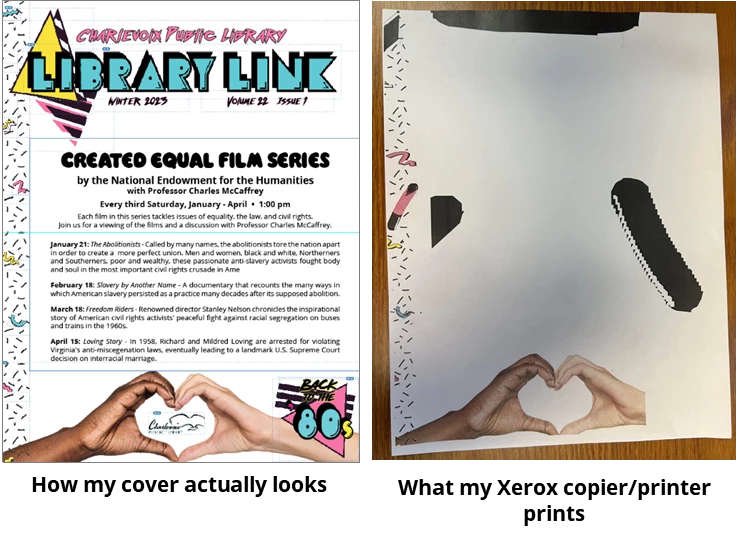


 AdChoices