


Inspiring
May 21, 2026 2:31 PM UTC
Question

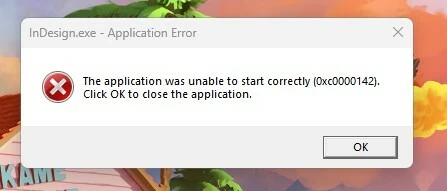
Does anyone have a permanent solution to error 0xc0000142?

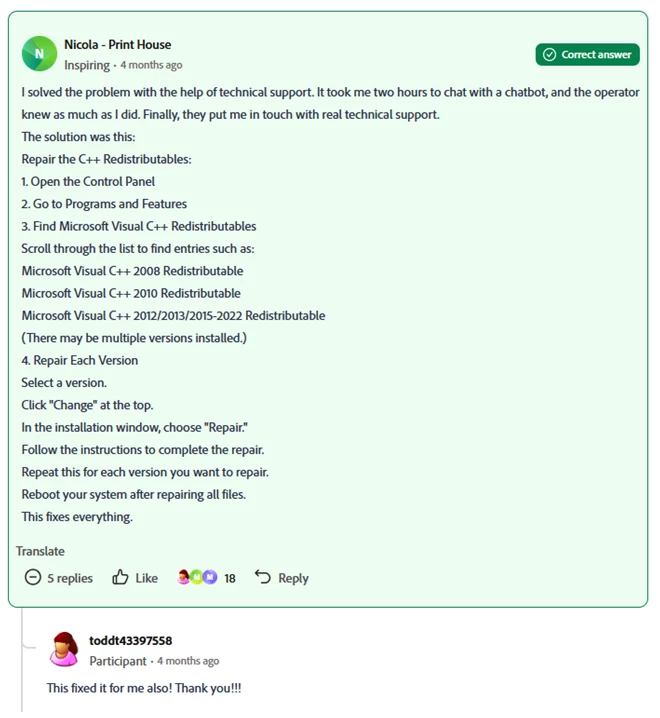
I have experienced this error (0xc0000142) when attempting to open InDesign and illustrator several times over the course of a few months now. There is a fix that I found through the Adobe forums that involves repairing the Microsoft Visual C++ Redistributable program files and it works temporarily, but after a few weeks the problem reappears. I have tried installing several versions of both programs to see if it is just affecting a specific version, but it does not appear to make a difference.

Any help toward a permanent fix is appreciated, as I require authorization from my company’s tech support department in order to perform the fix every time this problem occurs and it is interfering with my job. Thank you
 

below is the fix I have had to do if anyone is interested. again it works but only temporarily for me:
 

    5 replies

    Mike Witherell
    Community Expert
    Community Expert
    Jul 22, 2026 12:42 PM UTC

    Hi pmac,

    Can you also find out what version of Windows update your machine is running? I had that problem come and go about 1-2 years ago. I wonder if the version of Windows you are running is a factor?

    Translate
    Mike Witherell
    pmac88
    Participant
    Jul 22, 2026 11:52 AM UTC

    Has there been any updates on this issue ​@Abhishek Rao ? My team runs into the same issue whenever there are windows updates (with Indesign and Illustrator, for some reason Photoshop still works). Our IT department is also required to do C++ repairs (it requires escalated access), this causes delays in our workflow if one if them isn’t around to remote into our machines. We’ve been dealing with this for the last year or so, happened twice this week already. 

    Translate
    Abhishek Rao
    Community Manager
    Community Manager
    May 21, 2026 3:27 PM UTC

    Hi @jasminet88,


    Sorry to hear that you're experiencing this issue repeatedly. This issue has already been logged as a bug, and the InDesign product team is actively working with Microsoft to investigate and resolve it.

    To help with the investigation, could you please collect and share the diagnostic logs requested in the following post from the affected machine?

    https://adobe.ly/4e0W11p

    You can share the logs via Google Drive, Dropbox, OneDrive, etc. If the information is confidential, feel free to send it to me via DM instead.

    Thanks for your patience and support.


    Best,
    Abhishek

    Translate
    Inspiring
    Jul 27, 2026 3:26 PM UTC

    hello, 

    I have spoken with my company's IT department but unfortunately I do not have authorization from my company to provide that information.

    Translate
    Abhishek Rao
    Community Manager
    Community Manager
    Aug 4, 2026 1:36 PM UTC

    Hi ​@jasminet88,


    Thanks for checking with your IT team. I completely understand if you're unable to share the requested diagnostic logs due to your company's security policies.

    This issue is still under investigation, and we're working with Microsoft toward a permanent resolution. I'll continue to keep this thread updated as soon as I have any progress to share.

    In the meantime, please continue using the workaround outlined here whenever the issue occurs:
    https://community.adobe.com/questions-671/indesign-v21-not-starting-after-update-win-11-897997?postid=7505433#post7505433


    Thank you again for your patience and understanding.

    Abhishek

    Translate