ashleyc86467363
Participating Frequently
January 12, 2017
Answered

Does InDesign have an 'Outline View' (like in Keynote or Powerpoint)?

  • January 12, 2017
  • 4 replies
  • 7248 views

Hello,

I've been searching for ages and can't find anything.  If you are familiar with keynote, you will find in the views a view called Outline, where you can just type a list of all the titles and subtitles of the pages that you want to create in your presentation, and pages are automatically created and populated with the titles.

If there isn't, does anyone know a work-around?

Thanks in advance,

Ash.

    This topic has been closed for replies.
    Correct answer jane-e

    As you know (I think) I make very complicated FXL animation ePubs and web-presentations

    I did not know, and am filing that information away for when I need you!


    Put me down as another one who uses InDesign for "PowerPoint" types of presentations. I haven't really used PowerPoint in over 15 years, and although I used to know it well, I can no longer find my way around in it. InDesign and Acrobat do a great job as a team.

    Ashly,

    A couple of things to make this work. (I assume you are already making these.)

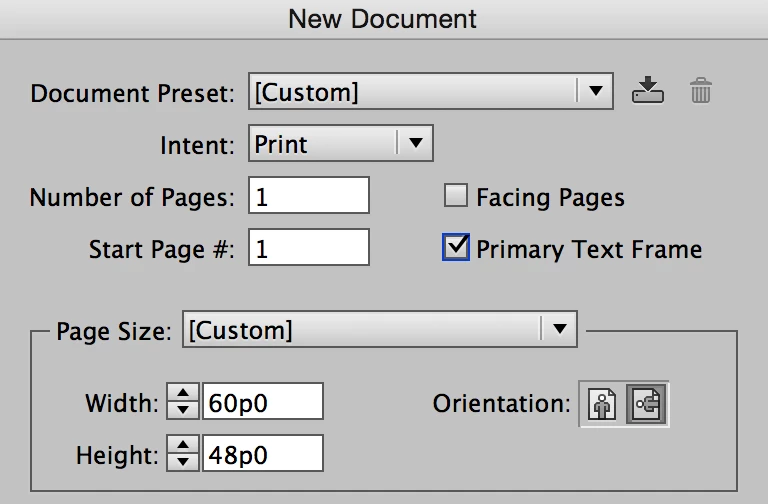
    1. Turn on Primary Text Frame

    2. Use a style for your titles.

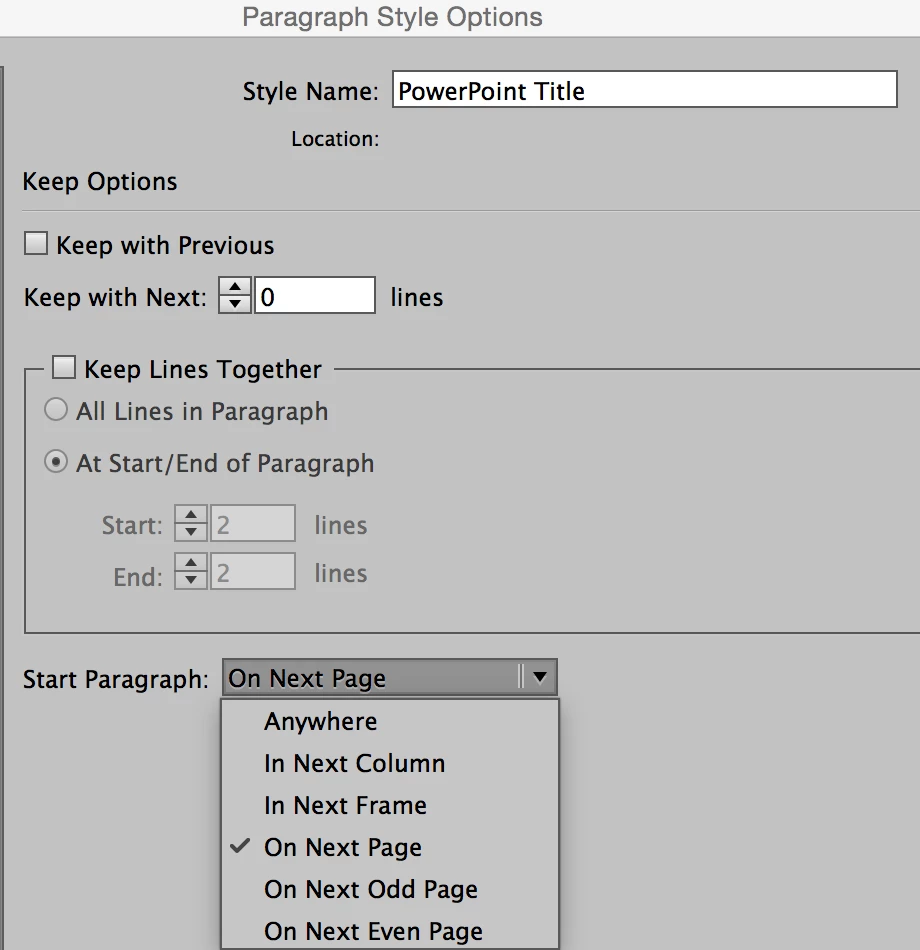
    3. In the Keep Options for the style, make it start on a new page

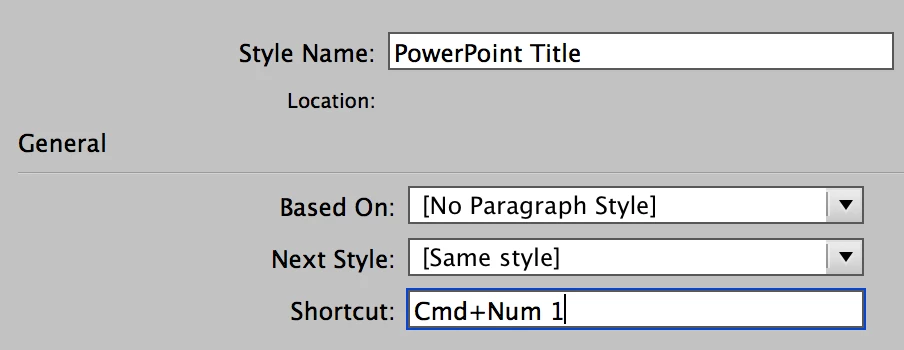
    4. In General Options, choose Next Style: Same Style

    Note: turn this off after you type your headings!

    5. If you want titles and subtitles, then in for the Next option, just use the other. Everything else is the same.

    4 replies

    ashleyc86467363
    Participating Frequently
    January 16, 2017

    Thanks everyone! 

    So many useful comments and tips.  Jane-e's suggestion has brought me fairly close to the kind of thing I was looking for.

    Ash.

    Barb Binder
    Community Expert
    Community Expert
    January 12, 2017

    Hey Frans van der Geest (ACP)​: I use InDesign to create what everyone thinks are Powerpoint slides all the time. I build in simple interactivity, save it as an interactive PDF and open it in full screen mode in Acrobat or Reader. The reason I choose InDesign over Powerpoint is simple—I know InDesign well, and would struggle to do anything sophisticated in Powerpoint.

    That said, ashleyc86467363​, there is not an Outline view in InDesign. But you could type your headings into Word, place them in InDesign, set up the heading style with a page break and then auto-flow the content and get the same result. Then you could come back in and add the content under the heads. InDesign has master pages, which are similar to master slides to set up repeating elements.

    I'd suggest that you select the program you feel most comfortable in, or use this as an opportunity to learn InDesign.

    ~Barb at Rocky Mountain Training
    Frans v.d. Geest
    Community Expert
    Community Expert
    January 12, 2017

    Sure, if you know InDesign by heart by all means use all the bits to make presentations as well. My view was that InDesign was used by the OP only for the use of making a presentation however (I read that more or less in the kind of question) and in such a case InDesign is far too complicated to a starter that wants to make a presentation, that was what I was making as a point ;-)

    (As you know (I think) I make very complicated FXL animation ePubs and web-presentations, I push it to the limit sometimes (and am a kind of specialist trainer in this), but for someone startingin InDesign these things are way more complicated compared to Powerpoint etc.)

    Barb Binder
    Community Expert
    Community Expert
    January 12, 2017

    As you know (I think) I make very complicated FXL animation ePubs and web-presentations

    I did not know, and am filing that information away for when I need you!

    ~Barb at Rocky Mountain Training
    Participating Frequently
    January 12, 2017

    You could view your document text (somewhat) hierarchically by viewing it in Story Editor - if you have applied styles to your text it should display in a sort of outline form without images or font treatments.

    Frans v.d. Geest
    Community Expert
    Community Expert
    January 12, 2017

    InDesign is not a replacement for things like Powerpoint although you can create interactive documents, you are using the wrong program if you want to make presentations imo, InDesign is a professional tool for creating print and digital high quality documents...