Participating Frequently
January 5, 2021
Answered

Drawing svg code javascript (no import)

  • January 5, 2021
  • 5 replies
  • 2197 views

Hi, I'm writing a script to create a simple document with text and a rather simple vector logo placed on it.

For the logo I don't want to choose the same file in a dialog every time I run the script so I wondered if there was a way to create an object directly using the svg code from the logo file.

Therefore, the logo in my document would not be a linked file but vector indesign items.

This topic has been closed for replies.
Correct answer rob day

Unless there is a mean to get the pathpoints of an already existing graphic (that I could copy-paste for example).


There is.


This code would return the entirePath property of the selected path:

var p=app.activeDocument.selection[0].paths[0].entirePath;  
$.writeln("Properties:" + p.toSource())  
 
//returns [[[0.44771525333333, 1], [1, 1], [1.55228474666667, 1]], [[2, 0.77614237333333], [2, 0.5], [2, 0.22385762666667]], [[1.55228474666667, 0], [1, 0], [0.44771525333333, 0]], [[0, 0.22385762666667], [0, 0.5], [0, 0.77614237333333]]]
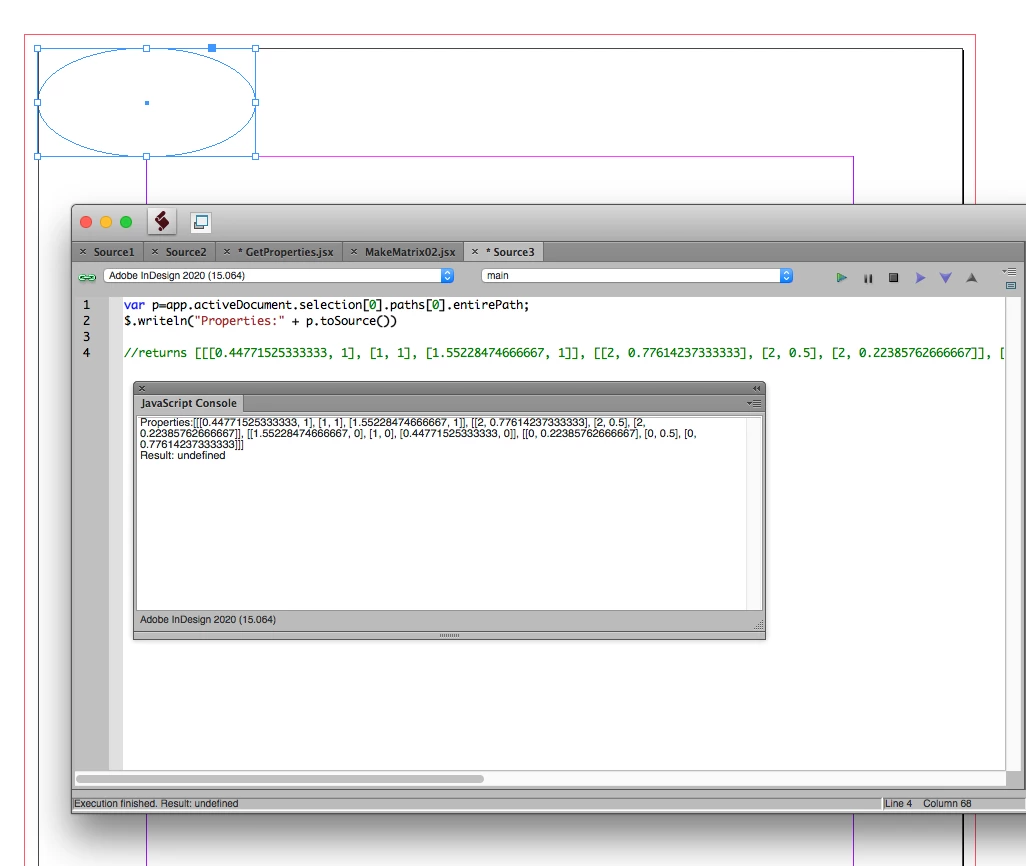


Then to create the same path in a new script it would something like this function (rulers set to inches):


//gets a selection’s path
//var p=app.activeDocument.selection[0].paths[0].entirePath;  
//$.writeln("Properties:" + p.toSource())  


//the entire path property
var pathArray = [[[0.44771525333333, 1], [1, 1], [1.55228474666667, 1]], [[2, 0.77614237333333], [2, 0.5], [2, 0.22385762666667]], [[1.55228474666667, 0], [1, 0], [0.44771525333333, 0]], [[0, 0.22385762666667], [0, 0.5], [0, 0.77614237333333]]]
//the target page
var pg = app.activeDocument.pages[0]

var poly = makePath(pg, pathArray);
poly.fillColor = "Black"

/**
* Make a path with the provide entire path array 
* @9397041 the target page 
* @9397041 the entire path array 
* @Return the polygon
* 
*/
function makePath(pg, ep){
    //add a new polygon to page
    var thePath= pg.polygons.add();
    //set the entire path
    thePath.paths[0].entirePath = ep;
    return thePath
}

 

5 replies

Inspiring
January 6, 2021

Looks like you've got the SVG solution you were looking for, but I just want to point out that you can store a library on a server and give everyone on your team access to it. Yet it's still only one thing to change if/when change becomes necessary. In fact, we keep our executable script code on a server for that same reason; the client PCs run them via shortcuts.

Participating Frequently
January 6, 2021

For this particular script, it won't change (or if it does everything else will so it will become useless anyway).


That's an other topic but I've tried several times to put our scripts on a server and run them via shortcuts, but the shortcuts get replaced by the actual files at each CC's update. Got tired of replacing them with shortcuts every time...

I would love to have a simple mean to share scripts, documents presets, default color settings and other stuff in the team...

Inspiring
January 6, 2021

Not sure what's happening there. We have absolutely no JavaScript code on desktop PCs. Or libraries or templates. We have a shortcut in the startup folder that initiates our scripting system at startup, including a  ScriptUI panel with buttons and dropdowns linked to other scripts, all on the server.


If it's really not possible to use a shortcut in CC, I think I'd try using a stub scriptthat simply executes doScript() on script files on the server. 

Jens Trost
Inspiring
January 6, 2021

Hi @laurentc39824241,
you could save your logo as .svg, copy the svg-code into a variable in your script and then create the logo on the fly as svg file again.

Participating Frequently
January 6, 2021

Nice ! That's exactly what I want to do ! Do you have any hint on how to do that ?

BarlaeDC
Community Expert
Community Expert
January 6, 2021

Hi,


Should be able to use this, just change the var content line to be the SVG code, and the filename to FILE.svg.


https://community.adobe.com/t5/after-effects/create-a-txt-file-in-extendscript/td-p/9645024?page=1


Malcolm

rob day
Community Expert
Community Expert
January 6, 2021

There isn‘t an option for scripting svg code, but you can script polygons and their paths. It should be possible store the logo’s pathPoints in arrays and construct new polygons


https://www.indesignjs.de/extendscriptAPI/indesign-latest/#PathPoint.html#d1e267038


https://www.indesignjs.de/extendscriptAPI/indesign-latest/#Path.html#d1e266307


https://www.indesignjs.de/extendscriptAPI/indesign-latest/#Polygon.html


Participating Frequently
January 6, 2021

Unfortunately even if the logo is not complicated, it has some curves that make me think it would be tedious to do that way. Unless there is a mean to get the pathpoints of an already existing graphic (that I could copy-paste for example).

rob day
Community Expert
rob dayCommunity ExpertCorrect answer
Community Expert
January 6, 2021

Unless there is a mean to get the pathpoints of an already existing graphic (that I could copy-paste for example).


There is.


This code would return the entirePath property of the selected path:

var p=app.activeDocument.selection[0].paths[0].entirePath;  
$.writeln("Properties:" + p.toSource())  
 
//returns [[[0.44771525333333, 1], [1, 1], [1.55228474666667, 1]], [[2, 0.77614237333333], [2, 0.5], [2, 0.22385762666667]], [[1.55228474666667, 0], [1, 0], [0.44771525333333, 0]], [[0, 0.22385762666667], [0, 0.5], [0, 0.77614237333333]]]


Then to create the same path in a new script it would something like this function (rulers set to inches):


//gets a selection’s path
//var p=app.activeDocument.selection[0].paths[0].entirePath;  
//$.writeln("Properties:" + p.toSource())  


//the entire path property
var pathArray = [[[0.44771525333333, 1], [1, 1], [1.55228474666667, 1]], [[2, 0.77614237333333], [2, 0.5], [2, 0.22385762666667]], [[1.55228474666667, 0], [1, 0], [0.44771525333333, 0]], [[0, 0.22385762666667], [0, 0.5], [0, 0.77614237333333]]]
//the target page
var pg = app.activeDocument.pages[0]

var poly = makePath(pg, pathArray);
poly.fillColor = "Black"

/**
* Make a path with the provide entire path array 
* @9397041 the target page 
* @9397041 the entire path array 
* @Return the polygon
* 
*/
function makePath(pg, ep){
    //add a new polygon to page
    var thePath= pg.polygons.add();
    //set the entire path
    thePath.paths[0].entirePath = ep;
    return thePath
}


Legend
January 5, 2021

Hello,

Re: " I don't want to choose the same file in a dialog every time I run the script"

You can do what robert said and store your logo in a specific location then have the script place that file without using a dialog to select.


Example:


doc = app.documents[0]; 

var myFolder = doc.filePath;

myLogo = app.activeDocument.place(File(myFolder.fsName + "/" + "Logo.eps"));


Regards,

Mike

Participating Frequently
January 6, 2021

Thanks for your answers.

The thing is, if I want to share the script in my team, I will need to share the logo as well, and it will need to have the exact same file path. 

It would be way more simple if I could draw it directly in the script.

Inspiring
January 5, 2021

Doon't know about SVG. I've always stored logos & such in a library, then use a script to place the library asset. This means non-scripters can tweak the asset as long as they save it under the same name.