Richard38213849xt3l
Inspiring
June 24, 2024
Answered

Drop Cap Alignment Issue

  • June 24, 2024
  • 1 reply
  • 895 views

I have seen answers to the question that I have, but they seem to not be my proble,.  My problem is a drop cap that does not display on the first line but below that. I have it set in paragraph styles to be three lines tall but it covers four lines and the first line of text is higher than the Drop Cap.  The solutions offered on this site are to make sure that the point type of the Drop cap is the same as the text in the rest of the paragraph (check) and also to make sure that the Character style in the Drop Cap setting for the paragraph style is set to "empty." Mine is set to "[None]" which I presume is the same as "empty." If not, I do not know how to change "[None]" to "empty."  Does anyone have any suggestions?  Thanks!!


Rick Reiman
This topic has been closed for replies.
Correct answer Richard38213849xt3l

Sorry, this question went past me as I don't have any special expertise with drop caps in print and didn't realize the question was about EPUB export.


That it's a reflowable EPUB answers the first question. Second, though, is "What epub reader are you using to proof it?" EPUB readers are not all the same (far from it) and what one viewer shows might not be anything like what the next one does. I suggest Calibre as a good, fairly stndards-compliant reader for proofing. Does your DC appear correctly in it?


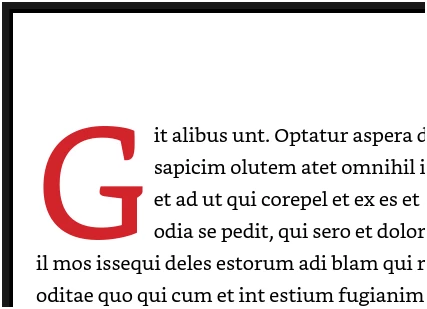
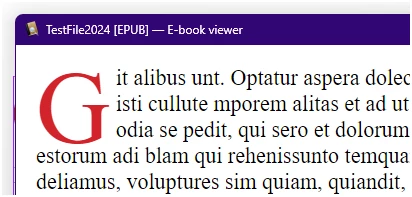
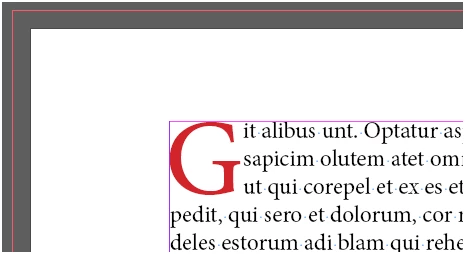
Drop caps should be easy to define in InDesign and export. Here's one from a test file, with nothing fancy except the def in the paragraph style and an associated character style making it red (InDesign, Kindle Previewer, Calibre, in order) —


You can also tweak drop caps using CSS style code on export. But ID does it well and with many options... as long as the reader supports the layout properly.


I checked it out with Adobe Digital Editions and it worked perfectly!  The problem was the Mac desktop ereader, "Books."   Thanks again-- I was at my with end.

Rick

1 reply

Richard38213849xt3l
Inspiring
June 24, 2024

I would like to add one more explanation of my problem.  The problem I describe occurs when I export the epub to an ereader app.  The Drop Cap looks fine in InDesign but it does not export as an epub properly.  The Drop cap character is positioned beside but lower than the first line and although it is not very large, there are 4 lines indented even though I set it to be three lines indented. The Drop cap hovers between the first and the fourth line, inexplicably.

Richard38213849xt3l
Inspiring
June 24, 2024

...It is a reflowable epub that I am attempting to create, if that helps.

Richard38213849xt3l
Inspiring
June 24, 2024

Will anyone answer my question, please?  Thanks,


Rick